

Focus Flow: Stock Your Time
Yusuke Kimura Productivity iPhoneiPadiPod touchApple Watch
Focus Flow: Stock Your Time is a free Productivity app for iPhone and iPad by Yusuke Kimura. Requires iOS 26.0. Updated September 2, 2026.
- Price
- Free
- on the App Store
- Size
- 24 MB
- Age 4+
- Updated
- Sep 2
- 2026 · v1.4
Screenshots


About Focus Flow: Stock Your Time
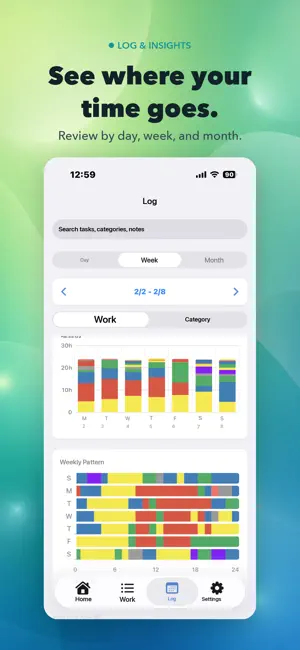
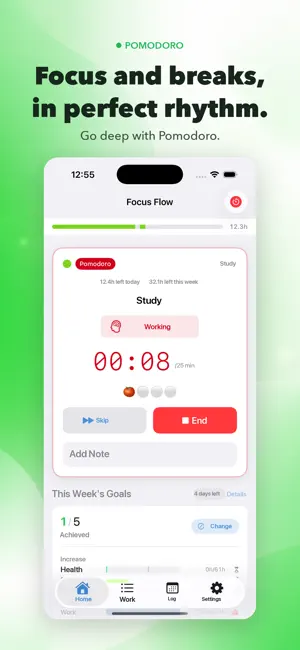
Focus Flow is a time tracking app that lets you start working with a single tap from your pre-registered activities. --- ■ **Start Tracking with One Tap** Your activities are displayed on the home screen—just tap to instantly start tracking. No complicated setup or extra steps required. ■ **Live Activity & Dynamic Island** See your elapsed time in real time on the Dynamic Island and Lock Screen while you work. Check your progress anytime without reopening the app. ■ **Pomodoro Timer** Automatically manage your focus and break cycles. Customize work duration, break time, and number of sessions. Reliable notifications powered by AlarmKit help you stay on track. ■ **“What’s Next?” Flow** Get suggestions for your next activity when a session ends. Switch tasks smoothly and prevent missed records. ■ **Goal Setting & Streak Tracking** Set daily and weekly time goals and monitor your progress in real time. Track your streaks to stay motivated. ■ **Detailed Logs & Charts** Visualize your productivity with daily, weekly, and monthly timelines and charts. Use heatmaps to uncover long-term patterns. ■ **Widget Support** Place widgets on your Home Screen, Lock Screen, and Control Center. Quickly check your current session, today’s summary, and goal progress at a glance. ■ **Apple Watch Support** Start, stop, and monitor sessions directly from your wrist. Dedicated complications display key information right on your watch face. ■ **Siri & Shortcuts Integration** Use voice commands like “Start working” or “End session” with Siri, or automate actions via the Shortcuts app—completely hands-free. ■ **Calendar Integration** Automatically sync your session logs with the iOS Calendar. Manage your planned schedule and actual results in one place. ■ **Backup & Restore** Export and import your data to keep your valuable records safe. ■ **Theme Customization** Supports Dark Mode and multiple accent colors. Personalize the look and feel to match your style. Make your time visible, improve your focus, and boost your productivity. Try Focus Flow as your daily partner in achieving more. Privacy Policy: https://focus-flow-chi-blue.vercel.app/privacy Terms of Use (EULA): https://www.apple.com/legal/internet-services/itunes/dev/stdeula/ Terms of Service: https://focus-flow-chi-blue.vercel.app/terms
What’s new
Version 1.4 · Updated September 2, 2026
Introducing Daily Plans for today and tomorrow: pick activities from your categories, lay them out on a 24-hour timeline, and compare plan vs. actual right on the Home screen. The new Today's Plan widget shows your plan and your actual time side by side on the same 24-hour axis, so you can check your progress without opening the app. We also improved pause/resume reliability, added charts and Apple Watch delivery for goal notifications, and strengthened cleanup of duplicate data from iCloud sync.
App privacy
The developer, Yusuke Kimura, reported these privacy practices to Apple.
Data Not Linked to You
The following data, which may be collected but is not linked to your identity, may be used for the following purposes:
- Usage Data: Product Interaction, Other Usage Data
- Diagnostics: Crash Data, Other Diagnostic Data
Used for: Analytics, App Functionality
Alternatives to Focus Flow: Stock Your Time
Looking for apps like Focus Flow: Stock Your Time? Here are 6 similar apps on the App Store.
-
 マルナゲ勤怠
-
 Kiseki - Work Time Tracker
-
 FocusFlow: screen time
-
 Focus Flow : Deep Focus Timer
-
 Melt: Focus & Pomodoro Timer
-
 SkillQuest - Skill Tracker
| App | Rating | Price | Last updated | Compare |
|---|---|---|---|---|
| Focus Flow: Stock Your Time | – | Free | September 2, 2026 | |
| マルナゲ勤怠 | – | Free | Mar 9, 2026 | Compare |
| Kiseki - Work Time Tracker | – | Free | Sep 26, 2026 | Compare |
| FocusFlow: screen time | – | Free | Jan 6, 2026 | Compare |
| Focus Flow : Deep Focus Timer | – | Free | May 20, 2026 | Compare |
| Melt: Focus & Pomodoro Timer | – | Free | May 21, 2026 | Compare |
| SkillQuest - Skill Tracker | – | Free | Sep 22, 2026 | Compare |