

FocusFlow: screen time
Giress Kenne tsasse Productivity iPhoneiPadiPod touch
FocusFlow: screen time is a free Productivity app for iPhone and iPad by Giress Kenne tsasse. Requires iOS 16.0. Updated January 6, 2026.
- Price
- Free
- on the App Store
- Size
- 45 MB
- Age 4+
- Updated
- Jan 6
- 2026 · v1.0.1
Screenshots
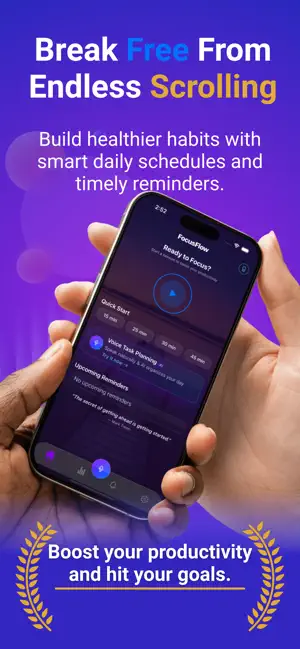
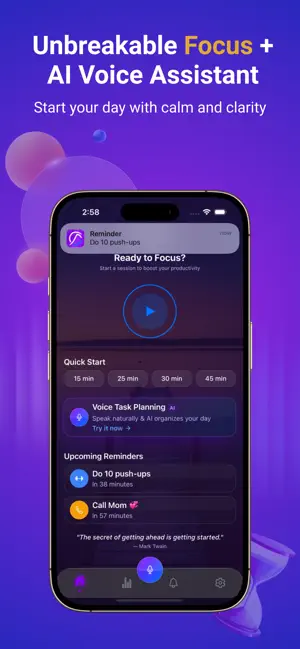


About FocusFlow: screen time
Focus without lifting a finger. The voice-powered app blocker and time blocking tool that turns Screen Time into your productivity system. FocusFlow Pro is a hands-free app blocker built on Apple’s Screen Time. Start a focus session, block distracting apps, and now plan tasks by voice, then get reminder notifications so nothing slips. SAY IT. DONE. Use natural voice commands like: * “Block Instagram for 30 minutes” * “Block social apps for 2 hours” NEW: VOICE TASK PLANNER + TASK REMINDERS Create tasks instantly with your voice: * “Add ‘send invoice’ to my tasks” * “Remind me about it at 4pm” * “Remind me every weekday at 9” Every task can trigger reminder notifications, so your plan stays real, even when you’re busy. ACTUALLY HARD TO BYPASS Powered by Apple Screen Time: * Blocking stays active even if the app is closed * Sessions end automatically when the timer finishes * Designed to reduce quick “just one minute” slip-ups TIME BLOCKING & FOCUS SESSIONS FOR REAL LIFE * Quick focus sessions for study or work * Repeatable routines (your go-to session setups) * Simple flow: pick apps, set time, start PRIVACY-FIRST * Voice processing on-device when possible * No voice recordings stored * Optional cloud sync (only if you choose to sign in) * No ads. No selling your data. PERMISSIONS * Screen Time: to enforce app blocking * Microphone: for voice commands (optional) * Notifications: for session + task reminders Perfect for students who need study focus, professionals managing deep work sessions, or anyone building better task routines. Requires iOS 16+ Questions? [email protected] Terms: https://www.focusflow.cc/terms Privacy: https://www.focusflow.cc/privacy Feedback: https://www.focusflow.cc/feedback
What’s new
Version 1.0.1 · Updated January 6, 2026
Voice Schedule Planner (New) * Create your daily schedule using only your voice, just tap the mic and speak naturally. * Example: “Remind me tomorrow to go to the hospital from 9 to 11, and pray at 5pm.” * FocusFlow automatically converts what you say into organized reminders and scheduled tasks. Smarter Reminder Notifications * Get notified right on time, or choose alerts 15 / 20 / 30 minutes before (or any custom “remind me X minutes before”). * Never miss an important task, your schedule stays with you throughout the day.
App privacy
The developer, Giress Kenne tsasse, reported these privacy practices to Apple.
Data Linked to You
The following data, which may be collected and linked to your identity, may be used for the following purposes:
- Purchases: Purchase History
- Financial Info: Payment Info
- Contact Info: Email Address
- Identifiers: User ID
- User Content: Audio Data
Used for: App Functionality, Other Purposes
Alternatives to FocusFlow: screen time
Looking for apps like FocusFlow: screen time? Here are 6 similar apps on the App Store. The highest rated is DeepFocus: Session Tracker (5.0/5), and all 6 are free to download.
-
 DeepFocus: Session Tracker
5.0
-
 Focal: Optimizing attention
5.0
-
 Ascend: Daily
5.0
-
 TimeCounts
-
 10,000 Hours - Mastery Tracker
4.5
-
 OneTime: Daily Time Tracker
| App | Rating | Price | Last updated | Compare |
|---|---|---|---|---|
| FocusFlow: screen time | – | Free | January 6, 2026 | |
| DeepFocus: Session Tracker | 5.0 / 5 (1) | Free | Jul 2, 2026 | Compare |
| Focal: Optimizing attention | 5.0 / 5 (1) | Free | Jan 13, 2026 | Compare |
| Ascend: Daily | 5.0 / 5 (3) | Free | Apr 21, 2026 | Compare |
| TimeCounts | – | Free | Jun 19, 2026 | Compare |
| 10,000 Hours - Mastery Tracker | 4.5 / 5 (2) | Free | Oct 12, 2026 | Compare |
| OneTime: Daily Time Tracker | – | Free | Oct 19, 2026 | Compare |