

Pentip: Notes, Sketch & PDF
Khalil Khalil Productivity iPhoneiPadiPod touchMac
Pentip: Notes, Sketch & PDF is a free Productivity app for iPhone and iPad by Khalil Khalil. Rated 1.0/5 from 1 ratings. Requires iOS 18.2.
- Rating
- 1.0
- 1 ratings
- Price
- Free
- on the App Store
- Size
- 48 MB
- Age 4+
- Updated
- Oct 12
- 2026 · v5.0
Screenshots

About Pentip: Notes, Sketch & PDF
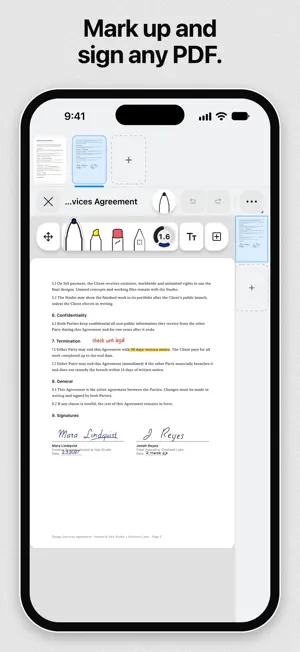
Pentip is a notebook for people who take a lot of notes, and who write some of them by hand and type the rest. FIND WHAT YOU WROTE BY HAND Search your notes and Pentip reads your handwriting. It also searches typed text, floating text frames, the text inside any PDF you imported, and the values you filled into PDF form fields. Search your whole library, or find every match inside the document you have open and jump straight to it. Handwriting is recognised in all ten languages Pentip speaks, Arabic and Turkish included. Searching costs nothing extra. TYPE AND HANDWRITE ON THE SAME PAGE Type straight onto the page. Your text flows from one page to the next, the way it does in a word processor, instead of sitting in a small box you have to drag around. Then pick up your Apple Pencil and draw on that same page. There is no drawing mode to switch into: the Pencil draws, the keyboard types where the cursor is, and your finger scrolls. YOUR DRAWINGS MOVE WITH YOUR TEXT Every pen stroke remembers the line of text it was drawn beside. So if you come back weeks later and add a paragraph, the arrow you drew still points at the same sentence, even once that sentence has moved onto the next page. READ IN THE DARK WITHOUT CHANGING YOUR WORK Turn on Smart Dark and a light document is drawn dark while you read and write it. It is a viewing mode, so what you export is exactly what you made. TOOLS THAT FEEL RIGHT Pen, brush, highlighter and a precise eraser, all with Apple Pencil pressure and tilt. Hold at the end of a stroke and it snaps into a clean shape. Straighten lines with the ruler or turn it into a protractor to measure an angle. Squeeze an Apple Pencil Pro and a small palette of colours and sizes opens at the tip of the pen. WORK ON YOUR HANDOUTS Import a lecture PDF and mark it up like paper, or scan pages straight in with the camera. Tap a form field and type into it, in any script, right to left included. Select the text in the PDF itself to copy, look up or translate it. And if your lecturer sends a corrected version, swap it in and every note you made stays where it was. BUILT FOR BIG DOCUMENTS Notebooks of any length, page templates, five layers, and sections that hold several canvases in a single file. Star the ones you live in and they gather on a Favorites page. TEN LANGUAGES, INCLUDING RIGHT TO LEFT Arabic, Dutch, English, French, German, Italian, Polish, Russian, Spanish and Turkish. Text direction is set for each paragraph, so an Arabic note sits correctly next to an English source. Export to PDF or as an image, and sync across your devices with iCloud. Pentip runs on iPhone and Mac too. Terms of Service: https://www.apple.com/legal/internet-services/itunes/dev/stdeula/ Privacy Policy: https://pentip.app/privacy/
What’s new
Version 5.0 · Updated October 12, 2026
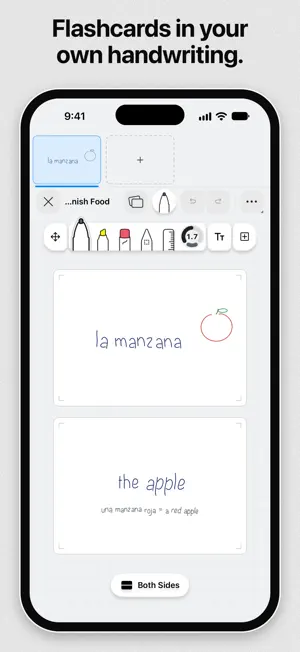
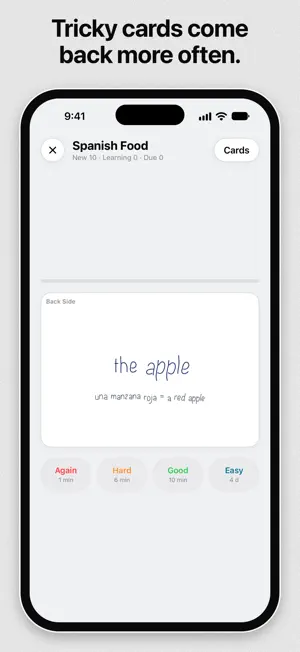
Pentip 5 brings two new kinds of documents, tables in your typed text, and a tool bar you can put wherever you like. FLASHCARDS • A new kind of document for studying. Write on both sides of each card and flip it over to check yourself, and the ones you find hard come back sooner • Test yourself in order or shuffled, then see your score, your best streak and the cards to practise again • In the library, every deck shows its first card on the cover WHITEBOARD • A board that grows as you draw. Write and place pictures anywhere, then zoom out to see the whole thing • A mini map shows the whole board and takes you anywhere on it, and the library shows each board's drawing TABLES IN YOUR TEXT • Add tables to typed text, with borders on the sides you choose, merged cells, and rows that carry on to the next page • Work with them like a spreadsheet. Select cells, rows and columns, drag and resize them, copy and paste, and type into them from a keyboard 27 NEW PAPER TEMPLATES • Lined, grid, music, maths, planner, storyboard and more, sorted into groups so the right one is quick to find A NEW TOOL BAR • It floats over your page and docks on any edge, or tucks into a corner when you want more room • Tools are grouped into View, Draw, Text and Add • One dial per tool sets its size and colour. Hold and slide to fine-tune it • Typing and drawing now undo in the order you did them, and holding Undo or Redo steps through quickly FORMATTING AND LAYOUT • Formatting options now float in a small bar beside your text or shape and show up only when you ask for them. Bigger choices open right where you are • Moved and resized objects snap to each other, to the page edges and to the page centre, with guides that show how things line up. You can switch Snapping off • A new colour picker offers swatches, a grid and a spectrum, and text frames can now have a background colour. Both look right in Smart Dark • Shapes take exact numbers for line width, corner radius and line style WRITING AND DRAWING • Your line stays right under the tip of Apple Pencil, even when you draw fast • While Apple Pencil hovers over the screen, one finger no longer moves the page. Two fingers still scroll and zoom • View mode lets you read and scroll without leaving a stray mark • Zoom out to see many pages at once, or fit a whole section on screen • Links in PDFs now show where they lead before the jump, and a Back to page bar takes you straight back • Pen, eraser and text sizes now look the same on iPad, iPhone and Mac • Layers and the section's paper template are now in the More menu • Ask Siri to create or open documents, add text or flashcards, and search your notes. The same actions work in your own automations • Proofread or rewrite typed text with the built-in writing tools on devices that support them FIXES • Edits made offline are no longer lost when your devices sync. If two devices changed the same section, Pentip keeps both versions • Ink drawn below the last page no longer disappears when you open the document again • Undo no longer erases ink on other pages, and undone steps stay undone after you reopen a document • Drawing no longer stutters every few seconds in documents stored in iCloud • Some PDF files could close Pentip right after it started. That no longer happens • Handwriting next to typed text stays where you put it • Tapping a link in a PDF no longer opens the line above it • Copied PDF text now matches the text you selected • Smart Dark thumbnails no longer flash light while you edit • A selection you move or resize is saved straight away Plus fixes for PDF pages that stayed blank after tapping a link, uneven template lines on small screens, text frames in Smart Dark, menus opening behind the keyboard, double indents on checklists, tiny marks at the start and end of strokes, and circles in PDF templates showing up as dots.
App privacy
The developer, Khalil Khalil, reported these privacy practices to Apple.
Data Not Collected
The developer does not collect any data from this app.
Alternatives to Pentip: Notes, Sketch & PDF
Looking for apps like Pentip: Notes, Sketch & PDF? Here are 6 similar apps on the App Store. The highest rated is Simplify Notes: PDF Notebook (5.0/5), and all 6 are free to download.
-
 AINotes: Note Taking & PDF
4.8
AINotes: Note Taking & PDF
4.8
-
 Simplify Notes: PDF Notebook
5.0
Simplify Notes: PDF Notebook
5.0
-
 ScribblePad: Notes & PDF
5.0
ScribblePad: Notes & PDF
5.0
-
 OpenNotes: Notes & PDF Markup
4.5
OpenNotes: Notes & PDF Markup
4.5
-
 BLISS Note: Notes PDF Planner
-
 UnivNote: Lag-Free Note Taking
| App | Rating | Price | Last updated | Compare |
|---|---|---|---|---|
| Pentip: Notes, Sketch & PDF | 1.0 / 5 (1 rating) | Free | October 12, 2026 | |
| AINotes: Note Taking & PDF | 4.8 / 5 (6) | Free | Oct 23, 2026 | Compare |
| Simplify Notes: PDF Notebook | 5.0 / 5 (2) | Free | Oct 21, 2026 | Compare |
| ScribblePad: Notes & PDF | 5.0 / 5 (3) | Free | Sep 7, 2026 | Compare |
| OpenNotes: Notes & PDF Markup | 4.5 / 5 (30) | Free | Oct 15, 2026 | Compare |
| BLISS Note: Notes PDF Planner | – | Free | Oct 22, 2026 | Compare |
| UnivNote: Lag-Free Note Taking | – | Free | Oct 23, 2026 | Compare |