

MemoWink Album
TakeKApp Utilities iPhoneiPadiPod touch
MemoWink Album is a free Utilities app for iPhone and iPad by TakeKApp. Requires iOS 15.0. Updated October 6, 2026.
- Price
- Free
- on the App Store
- Size
- 101 MB
- Age 4+
- Updated
- Oct 6
- 2026 · v1.2.2
Screenshots



About MemoWink Album
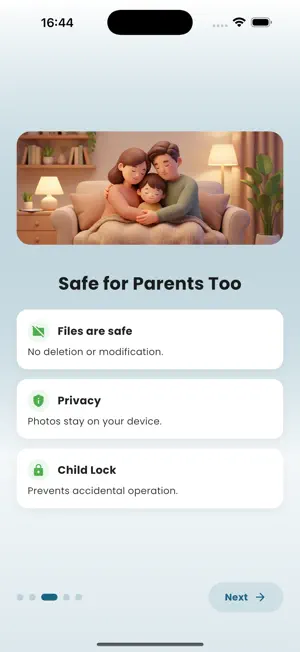
Browse albums as thumbnails and jump straight to any photo or video. While viewing, draw with a rainbow pen or add playful stamps, with sound and vibration for every action. Magic happens with every touch. A photo app safe for kids. Look back on your photos and increase family bonding time. Are you facing these parenting challenges? - Taking lots of photos and videos but rarely looking at them - Kids accidentally tapping the wrong screen when you show them photos - Kids getting bored quickly when just looking at photos MemoWink Album is a viewer-only photo gallery designed so kids can safely enjoy your memories. Photos and videos are shown one by one in full screen, with playful tap effects, sound, and vibration to make viewing feel like a game. To prevent accidental actions, swiping is disabled. Navigate with on-screen buttons or double-tap at the screen edge. Settings are protected by a parental gate (press and hold for 3 seconds), so kids won’t change things by mistake. Recommended for - Family time looking back at photos together - Short waiting moments or outings - Parents who want to hand a phone to kids safely - Anyone who wants a playful way to revisit memories Tap Effects (examples) - Sparkle, Ripple, Heart, Star Burst - Confetti, Flower, Paint Splash, Lightning - Firework, Colored Pencil, Rainbow Trace Settings You Can Control (Premium) - Auto-play interval - Date display (relative/absolute) - Pinch zoom and auto-rotate-to-fit - Enable/disable effects and choose types - Sound, vibration, and volume controls - Random play - Screenshot prevention and screenshot filtering Key Features - Full-screen, one-by-one photo/video viewing - Manual / Auto-play modes - Tap effects, sound, and vibration - Random play, date display (relative/absolute) - Pinch zoom, auto-rotate-to-fit - Screenshot prevention and screenshot filtering - Offline, on-device only; no deletions or edits Free lets you view Recents (up to 30 items) and Favorites. Premium (one-time purchase) unlocks all albums and advanced settings, including auto-play speed and effects controls. It's a one-time purchase, so you can rest assured. MemoWink Album combines kid-safe design with a joyful way to enjoy family memories. Let's make looking back on family memories fun with MemoWink Album!
What’s new
Version 1.2.2 · Updated October 6, 2026
- Fixed an issue where playback did not start from the selected photo when Random Play was turned off. - Improved overall stability and performance.
App privacy
The developer, TakeKApp, reported these privacy practices to Apple.
Data Not Linked to You
The following data, which may be collected but is not linked to your identity, may be used for the following purposes:
- Location: Coarse Location
- Usage Data: Product Interaction
- Diagnostics: Crash Data
- Purchases: Purchase History
Used for: Analytics, App Functionality
Alternatives to MemoWink Album
Looking for apps like MemoWink Album? Here are 6 similar apps on the App Store.
-
 Forgotten Items Checker
-
 ツクマデ - 到着時間計算&帰宅連絡
-
 つむれこ
つむれこ
-
 Curio Camera: Photo Questions
-
 watashi no QR
-
 Akaru: Alarm Clock & Calendar
| App | Rating | Price | Last updated | Compare |
|---|---|---|---|---|
| MemoWink Album | – | Free | October 6, 2026 | |
| Forgotten Items Checker | – | Free | Jul 14, 2026 | Compare |
| ツクマデ - 到着時間計算&帰宅連絡 | – | Free | Sep 1, 2026 | Compare |
| つむれこ | – | Free | Oct 22, 2026 | Compare |
| Curio Camera: Photo Questions | – | Free | Sep 2, 2026 | Compare |
| watashi no QR | – | Free | Oct 14, 2026 | Compare |
| Akaru: Alarm Clock & Calendar | – | Free | Oct 11, 2026 | Compare |
Compare MemoWink Album with the top alternatives: ratings, updates, ASO score and keyword gaps →