

Meeting Intelligence
Edgepoint Solutions LLC Productivity iPhoneiPadiPod touchMac
Meeting Intelligence is a free Productivity app for iPhone and iPad by Edgepoint Solutions LLC. Rated 5.0/5 from 4 ratings. Requires iOS 17.0.
- Rating
- 5.0
- 4 ratings
- Price
- Free
- on the App Store
- Size
- 5 MB
- Age 4+
- Updated
- Sep 24
- 2026 · v4.2
Screenshots
About Meeting Intelligence
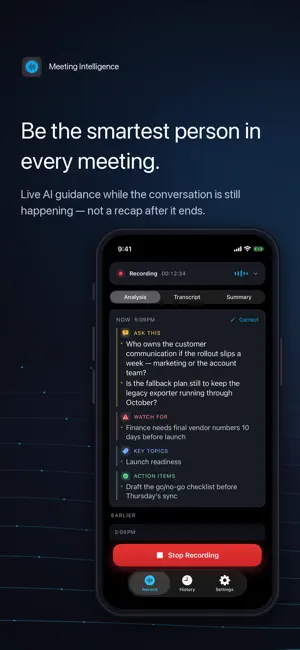
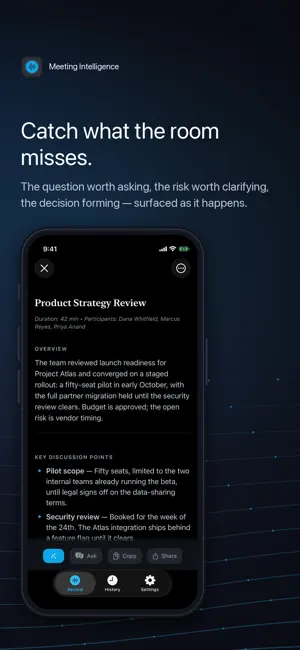
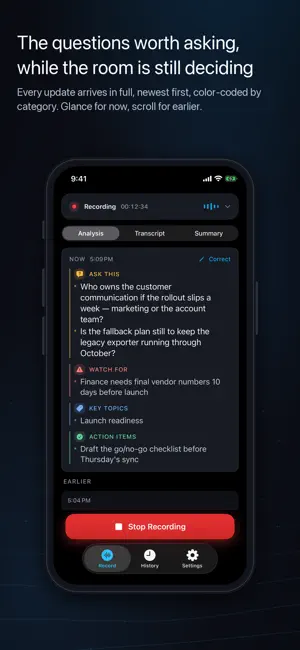
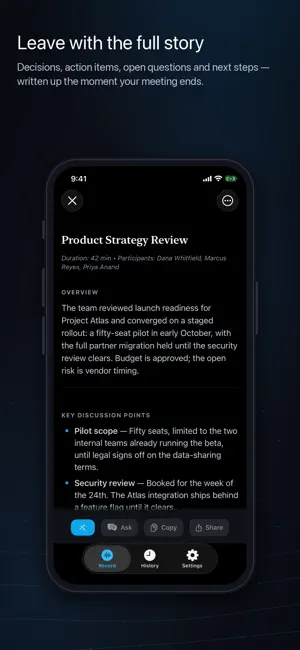
Live AI Meeting Assistant Meeting Intelligence is the advisor that shows up before your meeting, guides you through it, and remembers everything after. Real-time transcription and live AI guidance while you talk — plus a meeting history you can talk to. Catch what everyone else misses — then ask anything you've ever discussed. YOUR NEXT MEETING, READY TO RECORD Connect your calendar and your next meeting is waiting on the home screen — prepped from your past meetings: what happened last time, which decisions are still open, and the questions worth walking in with. One tap starts recording with the meeting's attendees and agenda already loaded. A reminder taps you as each meeting begins — one tap to record. Your calendar events stay on your device; a meeting's attendees, title, and notes are shared for analysis only when you choose to record that meeting. EVERY DEVICE, IN SYNC Record on your iPhone, review on your Mac, ask on your iPad. Meetings, Meeting Memory, and profiles stay identical across your devices through your private iCloud — never our servers, and we can't read it. Pro, on by default, off in one switch. ASK MY MEETINGS — ONE MEETING, OR ALL OF THEM Open a meeting and ask about just that one: "What did we decide?" "What did I commit to?" Or ask across everything you've recorded — "Who owns the security review?" — like a colleague who sat in every meeting and forgot nothing. Then keep going: "why?", "when was that decided?" Follow-ups understand the thread, and answers carry tappable sources that jump to the meeting. SEARCH THAT UNDERSTANDS Find meetings by meaning, not just keywords — search "hiring plans" and surface the meeting about headcount. The index stays on your device. YOUR WORDS, RECOGNIZED Your participants' names, your corrections, and your Meeting Memory terms guide transcription — so names, projects, and jargon are far more likely to come out right from the first word. Fix a misheard name or term mid-meeting, in your own words, and the rest of the meeting gets it right too. REAL-TIME MEETING INTELLIGENCE As your meeting unfolds, Meeting Intelligence surfaces the questions worth asking, the risks worth clarifying, and the decisions hiding inside the conversation. It connects an earlier point to what's happening now and reacts the instant a decision or risk comes up — so you speak up while it still matters. New here? Watch a 45-second sample meeting before you record anything. MEETING MEMORY Meeting Intelligence gets more useful the longer you use it. Pro users build a private memory layer from prior summaries, corrections, project names, and recurring topics — so future meetings get sharper questions and summaries, surfacing only when relevant. DECISION INTELLIGENCE Identifies the decisions your team made and the ones still open — with owner, confidence, and context, so nothing critical slips through. NEVER LOSE A MEETING Meeting Intelligence journals your meeting as it happens — if anything interrupts a recording, the app offers to restore your transcript the moment you're back. If transcription stalls, a health indicator tells you instantly, with a one-tap restart. EXECUTIVE SUMMARIES, SHARED BEAUTIFULLY When your meeting ends, the summary takes the stage — a clean document with discussion points, decisions, action items, open questions, and next steps. Send it looking the part everywhere: a PDF named after your meeting for email and files, clean text for chat apps, rich formatting for notes. Refine summaries, fix names, or rename a meeting with a tap. PRIVATE BY ARCHITECTURE No bot joins your call. Your audio never touches our servers. Your meetings sync between your devices through your own private iCloud — never through ours. Your first meeting is on us — full Pro, no trial and no card. After that, keep Pro with a 7-day free trial. Transcript mode is free forever. Terms of Use: https://edgepointsolutions.co/terms Privacy Policy: https://edgepointsolutions.co/privacy
What’s new
Version 4.2 · Updated September 24, 2026
Meeting Intelligence, everywhere you already are. This one's big. Start a meeting with your voice, follow it from your Lock Screen, and jump to any meeting from Search. And a calmer live view keeps the one question worth asking front and center. NEW IN THIS UPDATE - START WITH YOUR VOICE. Say "Hey Siri, start recording in Meeting Intelligence" and your meeting begins. Say "Hey Siri, stop recording in Meeting Intelligence" and your summary is on its way. Your very first recording starts on screen, so you set things up once. - ONE PRESS OF THE ACTION BUTTON. On iPhones with an Action Button, open Settings › Action Button, choose Shortcut, and pick Meeting Intelligence › Start/Stop Recording. Press and hold to start; press and hold again to stop. Start Recording and Stop Recording are in the Shortcuts app too, ready for your own automations. - YOUR MEETING ON THE LOCK SCREEN. Every recording now lives on your Lock Screen and in the Dynamic Island: the running timer, the latest question worth asking, and a Stop button. Glance down, speak up. Stop from the Lock Screen and the card clears as soon as your summary is ready. - YOUR NEXT MEETING ON YOUR HOME SCREEN. The new Next Meeting widget shows what's up next on your calendar, with a Record button right on it. Small and medium sizes, once your calendar is connected. - FIND ANY MEETING FROM SEARCH. Swipe down on your Home Screen, type part of a meeting's title, and jump straight into it. Only meeting titles and dates are indexed, on each of your devices. Never transcripts or summaries, and nothing is sent to us. Turn it off in the app's Settings, under Data & Privacy; Delete All My Data removes them. - A CALMER LIVE VIEW. While you talk, the question to ask and the risk to watch for stay front and center. Topics and action items fold into a single line, like "Also captured: 2 topics · 1 action item." Tap it to open them. Everything still lands in your summary. - REFINE, SMOOTHER ON iPHONE. Apply now sits at the top of the Refine sheet, in reach even with the keyboard up. Tap beside the text box to put the keyboard away, and a stray swipe can no longer throw out a correction you've typed. - MORE ROOM FOR YOUR SUMMARY. The privacy receipt now closes out the summary instead of staying pinned beneath it, so more of your screen is your summary. The "Ask this meeting anything" row steps aside once you've asked your first question; the Ask button stays put. - STRAIGHT TALK ABOUT INTERRUPTIONS. When a call or Siri interrupts a recording, the banner says "Recording paused by another app," then "Recording resumed" once capture is back. IN CASE YOU MISSED IT - THE RECEIPT COVERS BOTH HOPS. Under every summary: what this device sent for analysis, and where the audio went to be transcribed. - EVERY DEVICE, IN SYNC. Meetings, Meeting Memory, and profiles stay identical on iPhone, iPad, and Mac through your private iCloud, never our servers. Your first meeting is on us. After that, try Pro free for 7 days: live AI analysis, Meeting Memory, Decision Intelligence, Ask My Meetings, and every device in sync, in your real meetings. Cancel anytime before it ends and you won't be charged. Transcript mode stays free forever.
App privacy
The developer, Edgepoint Solutions LLC, reported these privacy practices to Apple.
Data Not Linked to You
The following data, which may be collected but is not linked to your identity, may be used for the following purposes:
- Usage Data: Product Interaction, Advertising Data
Used for: Analytics, App Functionality
Alternatives to Meeting Intelligence
Looking for apps like Meeting Intelligence? Here are 6 similar apps on the App Store. The highest rated is OLVA:Live AI Meeting Assistant (5.0/5), and all 6 are free to download.
-
 TellMeMo: AI Meeting Assistant
-
 OLVA:Live AI Meeting Assistant
5.0
OLVA:Live AI Meeting Assistant
5.0
-
 Modus: AI Meeting Assistant
5.0
Modus: AI Meeting Assistant
5.0
-
 Nodus - Zettelkasten
-
 Efficient Meeting Tools
5.0
Efficient Meeting Tools
5.0
-
 manyface.io
| App | Rating | Price | Last updated | Compare |
|---|---|---|---|---|
| Meeting Intelligence | 5.0 / 5 (4 ratings) | Free | September 24, 2026 | |
| TellMeMo: AI Meeting Assistant | – | Free | Mar 18, 2026 | Compare |
| OLVA:Live AI Meeting Assistant | 5.0 / 5 (2) | Free | Sep 25, 2026 | Compare |
| Modus: AI Meeting Assistant | 5.0 / 5 (1) | Free | Jun 4, 2026 | Compare |
| Nodus - Zettelkasten | – | Free | May 22, 2026 | Compare |
| Efficient Meeting Tools | 5.0 / 5 (1) | Free | Jan 13, 2026 | Compare |
| manyface.io | – | Free | Nov 2, 2024 | Compare |