

Screen Time Control: Pip
DANIEL PETRISOR ATITIENEI Productivity iPhoneiPadiPod touch
Screen Time Control: Pip is a free Productivity app for iPhone and iPad by DANIEL PETRISOR ATITIENEI. Rated 5.0/5 from 2 ratings. Requires iOS 18.0.
- Rating
- 5.0
- 2 ratings
- Price
- Free
- on the App Store
- Size
- 28 MB
- Age 4+
- Updated
- Oct 23
- 2026 · v1.1.2
Screenshots

About Screen Time Control: Pip
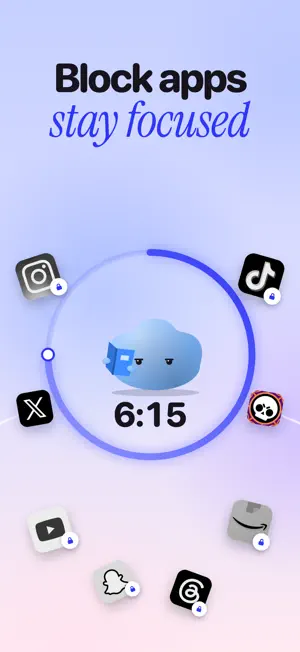
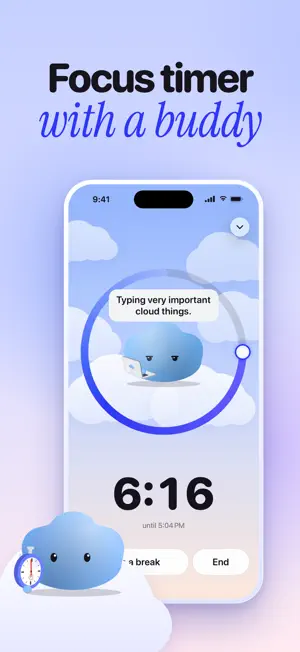
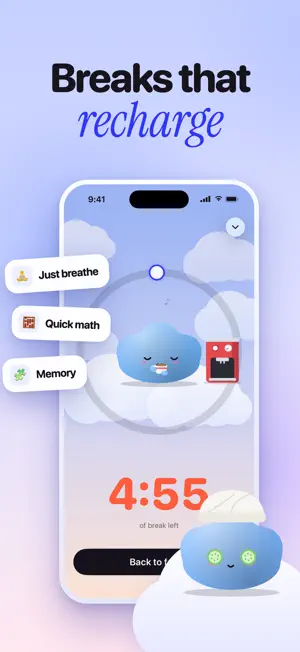
Pip is a little cloud who helps you put your phone down. Pick the apps that pull at you and start a focus session. Pip locks them until you're done and quietly gets on with its day. Finish, and you both get something for it. BLOCK DISTRACTING APPS • Lock social media, games and any app you choose while you focus • Built on Apple's Screen Time, so blocks hold even if you close the app • Need a break? Earn it with a few slow breaths or a quick memory game LIMIT YOUR SCREEN TIME • Set a daily screen time goal and see how close you are • Track pickups and screen time trends across days and weeks • Gentle morning and evening nudges, never nagging A FOCUS PET THAT GROWS WITH YOU • Every focused minute earns coins • Dress Pip up with hats, glasses and more from the shop • Keep your streak alive to unlock rewards, and mend it if a day slips MADE FOR REAL LIFE • A focus timer for study, deep work, sleep and time with people • Nightstand mode and a Live Activity keep the timer in view • A hold-to-commit pledge that makes your goal feel official PRIVATE BY DESIGN Your Screen Time data is processed by Apple on your iPhone. Pip never sees which apps you open and never uploads your usage. A subscription unlocks focus sessions and the full experience. Payment is charged to your Apple ID and renews automatically unless cancelled at least 24 hours before the end of the current period. Manage or cancel it any time in your App Store account settings. Terms of Use (EULA): https://www.apple.com/legal/internet-services/itunes/dev/stdeula/ Privacy Policy: https://www.freeprivacypolicy.com/live/e3c354c7-9a8f-4202-8159-6549f1a5ce00
What’s new
Version 1.1.2 · Updated October 23, 2026
New widgets, fresh fits in the shop, and a few little fixes to keep things running smoothly. Pip’s looking sharp
App privacy
The developer, DANIEL PETRISOR ATITIENEI, reported these privacy practices to Apple.
Data Not Collected
The developer does not collect any data from this app.
Alternatives to Screen Time Control: Pip
Looking for apps like Screen Time Control: Pip? Here are 6 similar apps on the App Store. The highest rated is FocusWell: Screen Time Control (5.0/5), and all 6 are free to download.
-
 TEMPER: Discipline Tracker
4.3
-
 FocusWell: Screen Time Control
5.0
-
 MyFocus - Screen Time Control
4.8
-
 Seren - Screen Time Control
-
 Scrollr - App Blocker
-
 Clarity: App Blocker & Focus
| App | Rating | Price | Last updated | Compare |
|---|---|---|---|---|
| Screen Time Control: Pip | 5.0 / 5 (2 ratings) | Free | October 23, 2026 | |
| TEMPER: Discipline Tracker | 4.3 / 5 (9) | Free | Jun 13, 2026 | Compare |
| FocusWell: Screen Time Control | 5.0 / 5 (3) | Free | Oct 26, 2026 | Compare |
| MyFocus - Screen Time Control | 4.8 / 5 (6) | Free | Dec 16, 2024 | Compare |
| Seren - Screen Time Control | – | Free | May 22, 2026 | Compare |
| Scrollr - App Blocker | – | Free | Oct 27, 2026 | Compare |
| Clarity: App Blocker & Focus | – | Free | Jul 10, 2026 | Compare |