

TouchNav Pro
杨 周 Utilities iPhoneiPadiPod touch
TouchNav Pro is a free Utilities app for iPhone and iPad by 杨 周. Requires iOS 13.0. Updated August 14, 2026.
- Price
- Free
- on the App Store
- Size
- 23 MB
- Age 9+
- Updated
- Aug 14
- 2026 · v1.0.6
Screenshots

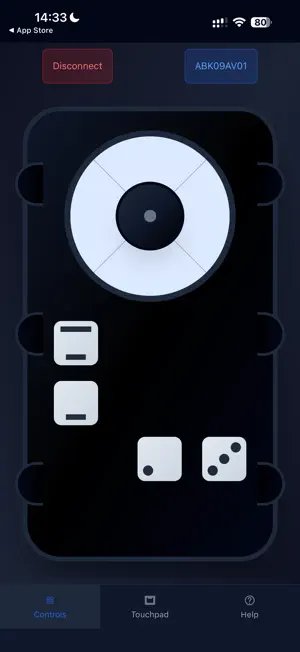
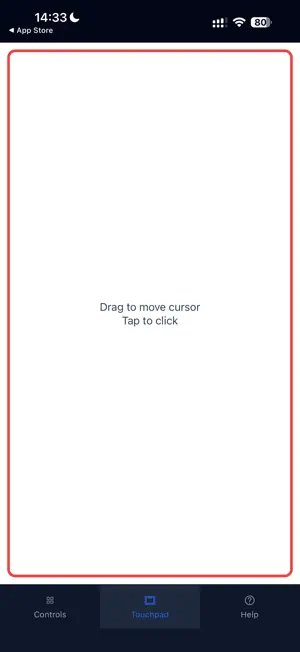
About TouchNav Pro
Step 1: Open the app and ensure Bluetooth is enabled.If Bluetooth is not enabled, an instruction will appear to turn it on. Step 2: Search for nearby Bluetooth devices.Available devices will be displayed for connection. Step 3: Click to open the control page. Page 1: Control functions using on-screen buttons. Page 2: Use the touchscreen to simulate a mouse. Page 3: View instructions on how to use the app.
What’s new
Version 1.0.6 · Updated August 14, 2026
1.Adjust the transmission issue of some buttons 2.Adjust the interface framework to adapt to different mobile devices 3.Adjust the sending issue of the Touchpad
App privacy
The developer, 杨 周, reported these privacy practices to Apple.
Data Not Linked to You
The following data, which may be collected but is not linked to your identity, may be used for the following purposes:
- Location: Precise Location, Coarse Location
Used for: App Functionality
Alternatives to TouchNav Pro
Looking for apps like TouchNav Pro? Here are 6 similar apps on the App Store. The highest rated is Musician's Log (5.0/5), and 5 of the 6 are free to download.
-
 WeBe Bluetooth Mouse for Mac
-
 Dev Pass
-
 SmartRide Tools
-
 BHand
BHand
-
 Musician's Log
5.0
Musician's Log
5.0
-
 Accessibility Keyboard
| App | Rating | Price | Last updated | Compare |
|---|---|---|---|---|
| TouchNav Pro | – | Free | August 14, 2026 | |
| WeBe Bluetooth Mouse for Mac | – | 1.99 USD | Mar 2, 2026 | Compare |
| Dev Pass | – | Free | Oct 8, 2024 | Compare |
| SmartRide Tools | – | Free | May 16, 2026 | Compare |
| BHand | – | Free | Aug 26, 2026 | Compare |
| Musician's Log | 5.0 / 5 (2) | Free | Mar 21, 2025 | Compare |
| Accessibility Keyboard | – | Free | Aug 17, 2026 | Compare |
Compare TouchNav Pro with the top alternatives: ratings, updates, ASO score and keyword gaps →