

Merge PDF: PDF Combiner & join
Nikunj Kavathiya Utilities iPhoneiPadiPod touch
Merge PDF: PDF Combiner & join is a free Utilities app for iPhone and iPad by Nikunj Kavathiya. Requires iOS 17.0. Updated August 11, 2026.
- Price
- Free
- on the App Store
- Size
- 5 MB
- Age 4+
- Updated
- Aug 11
- 2026 · v1.4
Screenshots


About Merge PDF: PDF Combiner & join
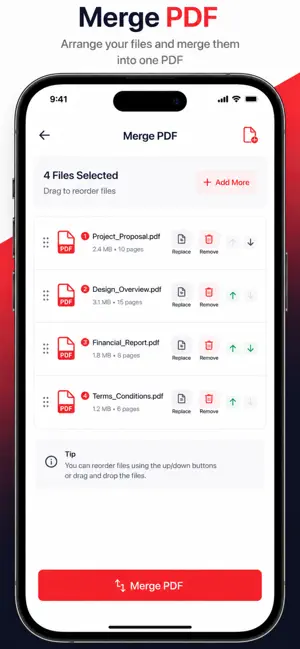
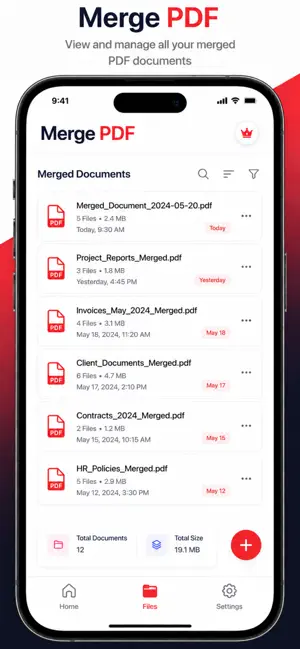
Merge PDF Files Easily on iPhone & iPad PDF Merge is a powerful and easy-to-use tool to combine multiple PDF files into one single document. Perfect for students, professionals, and businesses who need to manage documents quickly. Merge PDF files in seconds with a clean and simple interface designed for iOS. # Key Features - Merge multiple PDF files into one - Combine PDF documents in high quality - Reorder files before merging - Fast and offline processing - No file upload – your data stays private - Save, share, or export merged PDFs - Works on iPhone & iPad - Lightweight and easy to use # Why Use PDF Merge Pro? - Save time by combining PDFs in one tap - Keep documents organized and professional - Secure and private – files stay on your device - Perfect for work, school, and business use # Ideal For • Students merging assignments and notes • Office workers combining reports and invoices • Legal documents and contracts • Business presentations and documents • Government and official PDF files # How to Merge PDFs 1. Select multiple PDF files 2. Arrange the order 3. Tap the merge button 4. Save or share the combined PDF # Secure & Private Your privacy matters. All PDF processing happens on your device. No files are uploaded to servers. PDF merge, merge PDF, combine PDFs, PDF joiner, PDF combiner, merge documents, PDF tools, join PDF files, PDF editor, document manager Merge multiple PDF files into one easily. PDF Merge Pro lets you combine, reorder, and share PDFs securely on your iPhone and iPad. Fast, offline, and privacy-friendly PDF tool for work and study. Privacy : https://www.freeprivacypolicy.com/live/4b10aab4-4f25-479a-8fa1-618d10d0ccc6
What’s new
Version 1.4 · Updated August 11, 2026
* New Document Scanner Scan documents directly using your camera. Capture multiple pages in a single scan. Automatically create high-quality PDF files from scanned pages. * Merge Scanned Pages with Existing PDFs Combine newly scanned documents with any PDF file. Easily reorder pages before merging. Create a single PDF from multiple sources in just a few taps. * Performance Improvements Faster PDF processing and merging. Improved stability and bug fixes. Enhanced user experience and smoother workflow.
App privacy
The developer, Nikunj Kavathiya, reported these privacy practices to Apple.
Data Used to Track You
The following data may be used to track you across apps and websites owned by other companies:
- Identifiers: Device ID
Data Not Linked to You
The following data, which may be collected but is not linked to your identity, may be used for the following purposes:
- Identifiers: Device ID
Used for: Third-Party Advertising
Alternatives to Merge PDF: PDF Combiner & join
Looking for apps like Merge PDF: PDF Combiner & join? Here are 6 similar apps on the App Store. The highest rated is Merge PDF: Combine PDF & Split (1.0/5), and all 6 are free to download.
-
 PDF Merge - Combine,PDF Expert
-
 Merge PDF: Combine PDF & Split
1.0
-
 PDF Merger - Combine & Join
-
 PDF Merger - Combine, Join PDF
-
 Merge PDF – Combine Files
-
 PDF & HTML Merger
| App | Rating | Price | Last updated | Compare |
|---|---|---|---|---|
| Merge PDF: PDF Combiner & join | – | Free | August 11, 2026 | |
| PDF Merge - Combine,PDF Expert | – | Free | Aug 7, 2025 | Compare |
| Merge PDF: Combine PDF & Split | 1.0 / 5 (1) | Free | May 19, 2026 | Compare |
| PDF Merger - Combine & Join | – | Free | Apr 29, 2026 | Compare |
| PDF Merger - Combine, Join PDF | – | Free | Sep 5, 2026 | Compare |
| Merge PDF – Combine Files | – | Free | Jun 16, 2026 | Compare |
| PDF & HTML Merger | – | Free | Apr 10, 2026 | Compare |