

Merge PDF: Combine PDF & Split
Andrii Kulchytskyi Utilities iPhoneiPadiPod touch
Merge PDF: Combine PDF & Split is a free Utilities app for iPhone and iPad by Andrii Kulchytskyi. Rated 1.0/5 from 1 ratings. Requires iOS 15.1.
- Rating
- 1.0
- 1 ratings
- Price
- Free
- on the App Store
- Size
- 45 MB
- Age 4+
- Updated
- May 19
- 2026 · v1.0.1
Screenshots



About Merge PDF: Combine PDF & Split
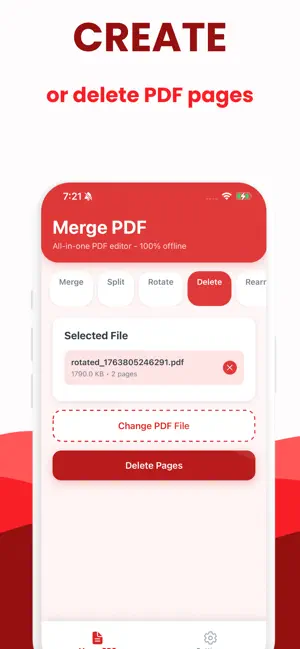
Merge PDF is the fastest way to combine, split, rotate and organize PDF files directly on your iPhone or iPad. Every operation happens on your device, with no internet connection required and no files ever uploaded to a server. Whether you are a student assembling research documents, a professional preparing client reports, or anyone who works with PDF files daily, Merge PDF gives you a complete set of tools in one clean, easy-to-use app. MERGE PDF FILES Select any number of PDF files from your device and combine them into a single document in seconds. Drag them into the exact order you want before merging. The original files are never modified. SPLIT PDF FILES Divide any PDF into separate documents by choosing exact page numbers where the split should happen. Or split a file into any number of equal parts automatically. Useful for breaking large reports, contracts or manuals into smaller sections. ROTATE PAGES Rotate individual pages or an entire PDF by 90, 180 or 270 degrees. Fix scanned documents that came in sideways or upside down without re-scanning a single page. DELETE PAGES Remove any page or set of pages from a PDF instantly. Clean up scanned documents, strip cover pages, or cut out sections you do not need before sharing a file. REARRANGE PAGES Reorder the pages of any PDF by moving them into any sequence you choose. Reorganize a document without printing, cutting or re-scanning anything. ADD PAGES Insert a blank page at any position in an existing PDF. Or take pages from another PDF file and insert them at a specific location. Perfect for adding cover pages, separators or supplementary content. VIEW PDF FILES Open and read any PDF file directly inside the app with the built-in viewer. No need to switch to another application just to check the result of your edits. SHARE AND SAVE When your PDF is ready, save it to your device or share it instantly using the system share sheet. Send it to any app, AirDrop it, attach it to an email, or upload it wherever you need it. 100 PERCENT OFFLINE Merge PDF requires no internet connection at any point. All processing runs locally on your device using on-device technology. Your documents are never sent to any server, never analyzed by any third party, and never stored anywhere outside your own device. What you edit stays yours. NO ACCOUNT REQUIRED There is no sign-up, no login and no subscription needed to use the core tools. Open the app and get to work immediately. DESIGNED FOR IPHONE AND IPAD The app is optimized for both iPhone and iPad with a clean, modern interface built for speed and ease of use. Every tool is accessible from a single screen with no complicated menus. Merge PDF is the private, offline-first PDF editor that respects your documents and your time. Terms of use: https://docs.google.com/document/d/1z78VOjx1cbjUipYch3jbUjGxxk69YOxQxZoRj2eBopA/edit?usp=sharing Privacy Policy: https://www.termsfeed.com/live/75bc94a7-5737-4d49-a7c3-c141e626878a
What’s new
Version 1.0.1 · Updated May 19, 2026
1.0.1 - fixed bugs
App privacy
The developer, Andrii Kulchytskyi, reported these privacy practices to Apple.
Data Not Collected
The developer does not collect any data from this app.
Alternatives to Merge PDF: Combine PDF & Split
Looking for apps like Merge PDF: Combine PDF & Split? Here are 6 similar apps on the App Store.
-
 PDF Merger - Combine & Join
-
 Merge PDF: PDF Combiner & join
-
 PDF Merge - Combine,PDF Expert
-
 PDF Combi/Splitter
-
 PDF Merger - Combine, Join PDF
-
 Word to PDF Converter DOCX
| App | Rating | Price | Last updated | Compare |
|---|---|---|---|---|
| Merge PDF: Combine PDF & Split | 1.0 / 5 (1 rating) | Free | May 19, 2026 | |
| PDF Merger - Combine & Join | – | Free | Apr 29, 2026 | Compare |
| Merge PDF: PDF Combiner & join | – | Free | Aug 11, 2026 | Compare |
| PDF Merge - Combine,PDF Expert | – | Free | Aug 7, 2025 | Compare |
| PDF Combi/Splitter | – | Free | Nov 25, 2025 | Compare |
| PDF Merger - Combine, Join PDF | – | Free | Sep 5, 2026 | Compare |
| Word to PDF Converter DOCX | – | Free | Jan 8, 2026 | Compare |