

Text Snippet Keyboard - SnipIt
enugo k.k. Utilities iPhoneiPadiPod touch
Text Snippet Keyboard - SnipIt is a free Utilities app for iPhone and iPad by enugo k.k. Rated 5.0/5 from 2 ratings. Requires iOS 17.0.
- Rating
- 5.0
- 2 ratings
- Price
- Free
- on the App Store
- Size
- 11 MB
- Age 4+
- Updated
- Oct 20
- 2026 · v2.0.0
Screenshots



About Text Snippet Keyboard - SnipIt
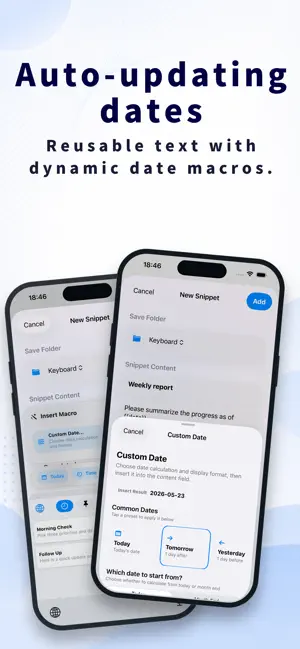
Your go-to prompts and everyday replies. Stop typing them over and over. SnipIt is a prompt and text template manager that lets you insert saved text with one tap from your iPhone or iPad keyboard. Instructions for ChatGPT, Claude, and Gemini, email replies, work messages. Spend less time finding and copying text from a notes app. Bring up what you need right in the app you're using. Start by saving your 10 most-used entries for free. ■ Your everyday text, right from the keyboard Switch to the SnipIt keyboard and tap a saved entry. Insert long prompts and text templates in AI apps, email, notes, browsers, and more. • AI instructions you use repeatedly • Replies to inquiries and thank-you emails • Introductions, signatures, and work messages • Social media post templates and hashtags Fewer steps for the text you type every day. ■ Organize and edit comfortably on iPad's larger screen Organize templates with folders, your entry list, and text in view. The layout adapts to the window width, making it easy to use alongside other apps. Keep an email or document open and copy text from SnipIt beside it. You can also drag and drop text between compatible apps and use external keyboard shortcuts. ■ Replace only what changes Create templates with variables and input fields for names, topics, tone, target readers, and more. Automatic date insertion and selectable options are supported too. “Rewrite this text for the specified audience.” “Translate the following into the specified language.” Save the structure of your usual instructions and change only what you need. No need to rebuild a long prompt each time. ■ Find your text, even as your collection grows Organize entries in folders for work, writing, translation, study, social media, and more. Quickly reach the text you need through search, pinned entries, and usage history. ■ Share your everyday text across iPhone, iPad, and Mac Premium's iCloud sync lets you share prompts and text templates across devices. Polish your text on iPad or Mac, then bring it up on your iPhone on the go. Keep using your favorite templates as you switch devices. If you also use the Mac version, the Universal plan gives you Premium features on Mac, iPhone, and iPad. ■ Privacy-conscious text input The SnipIt keyboard has no features that collect the text you type or send it outside your device. iCloud sync uses your own iCloud account. App lock with Face ID, Touch ID, or a passcode is also supported. ■ Start free, then make a one-time purchase if you need more Save up to 10 entries for free. Premium unlocks unlimited saved entries and iCloud sync. Premium is a one-time purchase. There is no monthly fee. Choose the iPhone and iPad plan or the Universal plan, which also covers Mac. Start by saving that text you typed again today in SnipIt. Next time, just bring it up from your keyboard. Note: To use the keyboard, add it in your device settings. Custom keyboards aren't available in some apps or text fields. Note: iCloud sync is a Premium feature. Using SnipIt on Mac requires the separate SnipIt Mac app.
What’s new
Version 2.0.0 · Updated October 20, 2026
SnipIt 2.0.0 now supports iPad. Enjoy your everyday prompts and text templates on a larger screen. • A dedicated iPad layout Organize and edit text with folders, your entry list, and text in view. The layout adapts to the window width. • Use it alongside other apps Open SnipIt beside your email, notes, or browser and quickly copy the text you need. You can also drag and drop text between compatible apps. • Insert directly from the keyboard on iPad too Bring up saved prompts and reply templates right where you need them. • Smooth operation with an external keyboard Added shortcuts for creating entries, searching, copying, and saving. Quick access on iPhone, thoughtful editing on iPad. Make everyday typing easier, in the way that works for you.
App privacy
The developer, enugo k.k., reported these privacy practices to Apple.
Data Not Collected
The developer does not collect any data from this app.
Alternatives to Text Snippet Keyboard - SnipIt
Looking for apps like Text Snippet Keyboard - SnipIt? Here are 6 similar apps on the App Store. The highest rated is CopyAndPaste Manager (5.0/5), and all 6 are free to download.
-
 Easy Copy and Paste
-
 定型文キーボード Pochitto(ぽちっと)
-
 Clipboard Keyboard -Copy Paste
4.0
Clipboard Keyboard -Copy Paste
4.0
-
 CopyAndPaste Manager
5.0
CopyAndPaste Manager
5.0
-
 Sniplt -AI Prompt Manager
-
 Negi - フルアクセス断固拒否の日本語キーボードアプリ
5.0
Negi - フルアクセス断固拒否の日本語キーボードアプリ
5.0
| App | Rating | Price | Last updated | Compare |
|---|---|---|---|---|
| Text Snippet Keyboard - SnipIt | 5.0 / 5 (2 ratings) | Free | October 20, 2026 | |
| Easy Copy and Paste | – | Free | Sep 15, 2026 | Compare |
| 定型文キーボード Pochitto(ぽちっと) | – | Free | Aug 30, 2026 | Compare |
| Clipboard Keyboard -Copy Paste | 4.0 / 5 (6) | Free | Oct 17, 2026 | Compare |
| CopyAndPaste Manager | 5.0 / 5 (1) | Free | Mar 20, 2025 | Compare |
| Sniplt -AI Prompt Manager | – | Free | Oct 5, 2026 | Compare |
| Negi - フルアクセス断固拒否の日本語キーボードアプリ | 5.0 / 5 (1) | Free | Oct 19, 2026 | Compare |