

Easy Copy Paste & Memo List
Kenichi Ando Utilities iPhoneiPadiPod touch
Easy Copy Paste & Memo List is a free Utilities app for iPhone and iPad by Kenichi Ando. Requires iOS 15.0. Updated October 23, 2026.
- Price
- Free
- on the App Store
- Size
- 28 MB
- Age 4+
- Updated
- Oct 23
- 2026 · v2.2.0
Screenshots

About Easy Copy Paste & Memo List
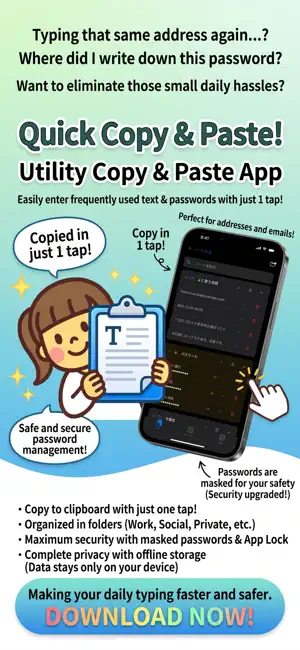
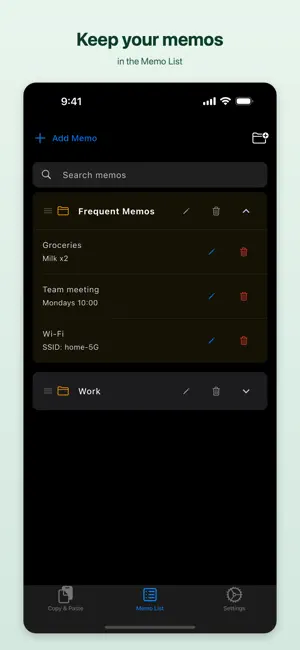
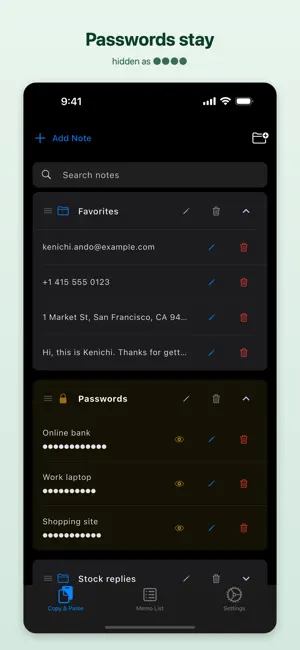
"Do I really have to type that address again?" "Where did I write down that password?" Easy Copy Paste & Memo List takes those small daily chores away. Save the text you use most often, and one tap puts it on the clipboard. All that is left is to paste. MAIN FEATURES Memo List (new in 2.2.0, free) - Keep memos with a title and body, sorted into folders. - Shopping lists, meeting notes, Wi-Fi details - things you want to read again. - Search titles and text at once. - Copy an open memo with one tap. - Switch between Copy & Paste, Memo List and Settings with the tabs at the bottom. One-tap copying - Tap a saved entry and it is copied. That is the whole interaction. - Email addresses, phone numbers, postal addresses, greetings, emoticons, hashtags - anything you type more than once. - Paste it into any other app, exactly as you saved it. Folders to keep things tidy - Create folders such as Work, Social, or Passwords. - Reorder entries by dragging them. - Search across folder names and note text at once. - Swipe an entry to the left to move it to another folder, so you can reorganise later as your list grows. Protected folders (Premium) - Turn on protection and the contents are shown as ●●●●. - The list shows only the names you chose, such as "Online bank" or "Work laptop". The contents never appear on screen. - You can still tap a hidden entry to copy it, so it is safe to use in front of other people. - To check the contents, tap the eye icon and confirm it is you. - Protected entries are left out of search results. Clipboard auto-clear (Premium) - Text copied from a protected folder is removed from the clipboard after a set time. - Choose anything from 20 seconds to 3 minutes. - Nothing sensitive is left sitting on the clipboard after you have pasted it. App lock (Premium) - Lock the whole app with Face ID or Touch ID. - You are not asked to authenticate every time you switch apps - only when you come back after a while. Backup and moving to a new device - Export everything you have saved as a CSV file. - Useful when you change devices, or when you would rather edit the list on a computer. - Save the exported file by email, to the Files app, or however you prefer. And also - Optionally add the clipboard contents automatically when the app opens. - Light and dark mode, following your device. - Works on iPhone and iPad. - Available in English, Japanese, French, German, Italian, Spanish, Portuguese, Chinese (Simplified and Traditional) and Korean. PREMIUM A single purchase. No monthly fee, no automatic renewal - buy it once and it stays yours. It unlocks: - Protected folders with hidden contents - Automatic clipboard clearing after copying - App lock with Face ID and Touch ID - Complete removal of ads After changing devices or reinstalling, use "Restore purchase" in Settings to get it back. WHO IT IS FOR - Anyone who types the same text over and over - Anyone tired of retyping email addresses and postal addresses - Anyone who handles passwords where others can see the screen - Anyone using a phone at work or on a shared computer - Anyone who wants hashtags and stock replies within reach - Anyone who keeps a collection of emoticons and emoji - Anyone moving their data to a new device PRIVACY The notes you save stay on your device. This app never sends them to any server. The developer cannot see what you have saved. The masking in protected folders is there to stop people reading your screen over your shoulder. The free version shows ads through Google AdMob. Serving those ads may use your device identifier. You choose whether to allow tracking in the dialog shown the first time you open the app. Buying Premium removes the ads. Privacy policy: https://tenmais.jp/privacy.php CONTACT Requests and bug reports are welcome: https://tenmais.jp/contact/ Make your daily typing faster, and safer.
What’s new
Version 2.2.0 · Updated October 23, 2026
Version 2.2.0 The app is now called Easy Copy Paste & Memo List, and it has a new Memo List. Memo List - Keep memos with a title and body, sorted into folders. - Switch between Copy & Paste, Memo List and Settings with the tabs at the bottom. - The Memo List is free to use. Also - Settings are now grouped into General, Copy & Paste and Memo List. - When you add a note, its folder opens so you can see it right away. - A new app icon. All your saved notes are still here, exactly as before.
App privacy
The developer, Kenichi Ando, reported these privacy practices to Apple.
Data Used to Track You
The following data may be used to track you across apps and websites owned by other companies:
- Location: Coarse Location
- Identifiers: Device ID
- Usage Data: Advertising Data
Data Linked to You
The following data, which may be collected and linked to your identity, may be used for the following purposes:
- Location: Coarse Location
- Identifiers: Device ID
- Usage Data: Advertising Data
Used for: Analytics
Data Not Linked to You
The following data, which may be collected but is not linked to your identity, may be used for the following purposes:
- Location: Coarse Location
- Identifiers: Device ID
- Usage Data: Advertising Data
Used for: Third-Party Advertising
Alternatives to Easy Copy Paste & Memo List
Looking for apps like Easy Copy Paste & Memo List? Here are 6 similar apps on the App Store.
-
 コピペのポッケ - クリップボード履歴
-
 Copy gentleman
-
 Rearrange Copy Paste
-
 フリマ定型文:取引コメントをかんたん管理&即コピー
-
 らくタグ
-
 ClipStack - Save & Reuse Text
| App | Rating | Price | Last updated | Compare |
|---|---|---|---|---|
| Easy Copy Paste & Memo List | – | Free | October 23, 2026 | |
| コピペのポッケ - クリップボード履歴 | – | Free | Sep 17, 2026 | Compare |
| Copy gentleman | – | Free | Feb 11, 2026 | Compare |
| Rearrange Copy Paste | – | Free | Feb 27, 2025 | Compare |
| フリマ定型文:取引コメントをかんたん管理&即コピー | – | Free | Jun 14, 2026 | Compare |
| らくタグ | – | Free | Oct 9, 2026 | Compare |
| ClipStack - Save & Reuse Text | – | Free | Jun 5, 2025 | Compare |