

Vault Flow - Money Tracker
Jashandeep Singh Finance iPhoneiPadiPod touch
Vault Flow - Money Tracker is a free Finance app for iPhone and iPad by Jashandeep Singh. Requires iOS 26.2. Updated October 12, 2026.
- Price
- Free
- on the App Store
- Size
- 7 MB
- Age 4+
- Updated
- Oct 12
- 2026 · v4.0.0
Screenshots


About Vault Flow - Money Tracker
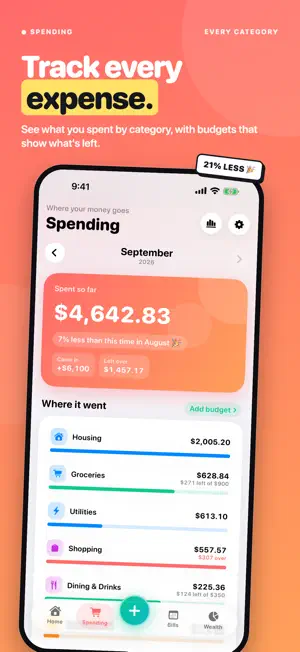
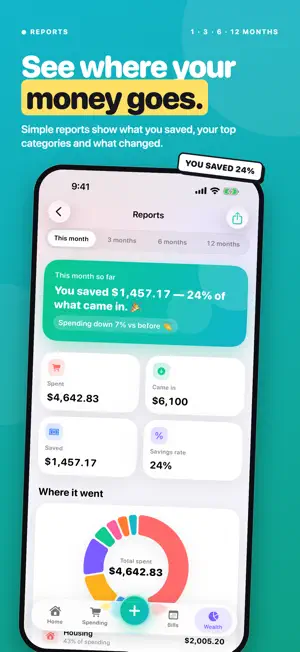
VaultFlow shows your complete financial picture — cash, investments, property, and debt — in one calm, private app. See your net worth at a glance, watch it grow, and always know what's coming up. YOUR NET WORTH, AT A GLANCE • One big, clear number, plus a chart you can scrub from one month to all time • Milestones and streaks that make progress feel real • Home Screen widgets for net worth, daily spending, upcoming bills, and your portfolio SIMPLE, EVERYDAY MONEY • Chequing, Savings, and Credit Card — that's it, no clutter • Log spending and income in seconds; move money between accounts • Monthly budgets that show your pace, and recurring bills that never surprise you • A safe-to-spend number for the rest of the month INVESTMENTS WITH LIVE PRICES • Stocks, ETFs, and crypto, valued with live market prices in your currency • Allocation breakdown, today's movers, and gains versus what you paid • A tracker only — VaultFlow never buys, sells, or holds anything PROPERTY, MORTGAGE & DEBT • Track your home's value, equity, mortgage balance, and monthly costs • See every loan and card in one place, with what the interest is costing you • A debt-free planner (avalanche or snowball) that shows your payoff date and interest saved REPORTS & FORECAST • Spending by category, income trends, net worth history, and portfolio performance • A 12-month net worth forecast and month-end cash-flow projection • Financial goals with progress rings MADE FOR YOU • 28 currencies with live exchange rates and a built-in converter • Light and dark mode, Face ID lock, and a one-tap Privacy Mode that hides amounts • Ask Siri "What's my net worth?", or log an expense from Shortcuts and Spotlight PRIVATE BY DESIGN Your data lives on your device. VaultFlow runs no servers and never sees your finances. No account or bank login is required — start in about a minute with the guided setup. Sign in with Apple is optional and only used for iCloud backup across your own devices. VaultFlow is completely free. No subscriptions, no in-app purchases, no ads.
What’s new
Version 4.0.0 · Updated October 12, 2026
A brand-new VaultFlow — simpler, friendlier, and a lot more fun. A WHOLE NEW LOOK • Four simple places: Home, Spending, Bills and Wealth • A big + button in the middle to add anything in one tap • Bright colours, bigger numbers and plain words everywhere • A fresh new app icon BRING YOUR MONEY IN, FAST • Import your bank's statement file (CSV, OFX or QFX) — duplicates are skipped • Credit card statements are spotted automatically, and card payments aren't counted as spending • Use ChatGPT or Claude with our ready-made prompt to turn any data into an import • Or just describe your money in your own words — Apple Intelligence sets it up, right on your iPhone • Import again any time: things update instead of doubling up • Export everything as a spreadsheet EASIER EVERY DAY • Home shows the money you have, what you've spent this month, and what's due next • Tap "Mark paid" on a bill and it's done (with Undo); get reminded 1–3 days before • Spending shows where your money went, with budgets right on each category • Search your transactions by name, category or note • Wealth puts your accounts, investments, home, loans and goals on one page • Edit, sell or remove investments, loans and the things you own • Move money between accounts, with Undo REPORTS THAT MAKE SENSE • Did you save? Where did it go? What changed since last month? • See what your bills and subscriptions cost you each year MAKE IT YOURS • Pick your app colour, your name, and which cards show on Home • Set a monthly spending limit and your default card • Settings is the gear on every tab, and has search so everything is easy to find • Looks great on iPad too
App privacy
The developer, Jashandeep Singh, reported these privacy practices to Apple.
Data Not Linked to You
The following data, which may be collected but is not linked to your identity, may be used for the following purposes:
- Financial Info: Other Financial Info
Used for: App Functionality
Alternatives to Vault Flow - Money Tracker
Looking for apps like Vault Flow - Money Tracker? Here are 6 similar apps on the App Store. The highest rated is Thrift: Budget & Money Tracker (5.0/5), and all 6 are free to download.
-
 Thrift: Budget & Money Tracker
5.0
Thrift: Budget & Money Tracker
5.0
-
 Salary Lens
-
 DueDock
-
 Monevis
-
 Rilio - Smart Expense Tracker
-
 Wealth Forecaster Pro
| App | Rating | Price | Last updated | Compare |
|---|---|---|---|---|
| Vault Flow - Money Tracker | – | Free | October 12, 2026 | |
| Thrift: Budget & Money Tracker | 5.0 / 5 (2) | Free | Sep 19, 2026 | Compare |
| Salary Lens | – | Free | Jun 15, 2026 | Compare |
| DueDock | – | Free | May 13, 2026 | Compare |
| Monevis | – | Free | Oct 13, 2026 | Compare |
| Rilio - Smart Expense Tracker | – | Free | Jul 13, 2026 | Compare |
| Wealth Forecaster Pro | – | Free | Aug 2, 2026 | Compare |