

NextStop: Train & GPS Alarm
Scattered Labs Travel iPhoneiPadiPod touch
NextStop: Train & GPS Alarm is a free Travel app for iPhone and iPad by Scattered Labs. Requires iOS 17.0. Updated September 4, 2026.
- Price
- Free
- on the App Store
- Size
- 18 MB
- Age 4+
- Updated
- Sep 4
- 2026 · v1.2
Screenshots
About NextStop: Train & GPS Alarm
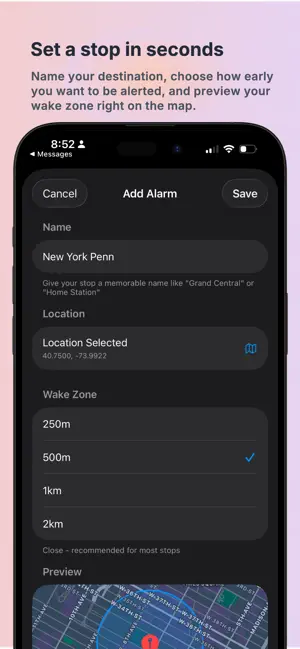
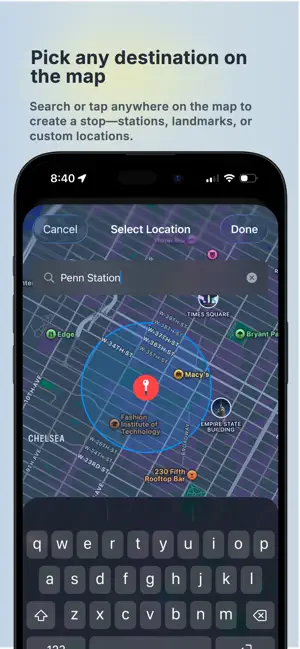
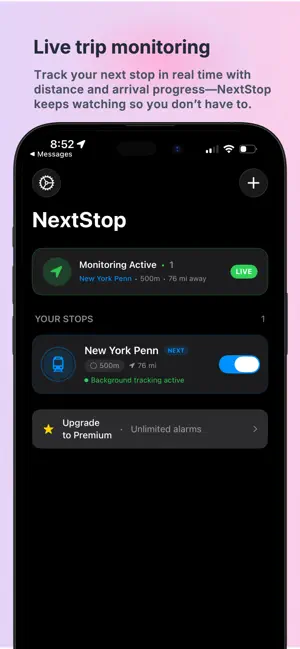
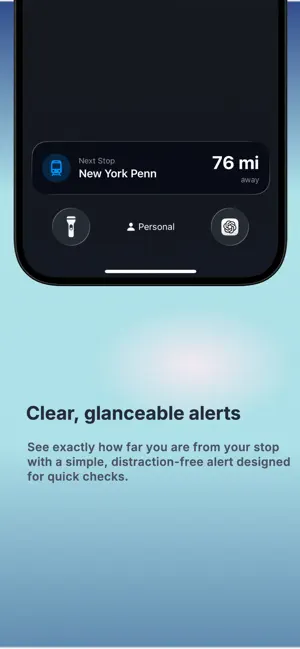
Fall asleep on the train? NextStop wakes you before your stop. Whether you’re commuting, traveling, or just zoning out on a long ride. Set your destination, choose how early you want the alert, and put your phone away. NextStop watches your location in the background and alarms as you get close — so you can nap, read, or switch off without missing where you're going. Set a destination, choose how early you want to be notified, and let NextStop quietly monitor your trip in the background. You’ll get a clear alert as you approach your stop, so you can relax and focus on the ride instead of watching the map. Why NextStop works so well • Live, real-time monitoring of your destination • Distance-based alerts — not unreliable time estimates • Works for trains, buses, subways, and general travel • Simple, glanceable alerts when you’re getting close • Runs in the background so you don’t have to keep the app open • Choose how early you want to be notified with adjustable wake zones • Pick any destination directly from the map Whether you’re heading to work, traveling in an unfamiliar city, or riding a late-night train home, NextStop gives you confidence that you won’t miss where you’re going. No clutter. No complicated setup. Just a reliable way to know when it’s time to get off. Terms of Use: https://www.apple.com/legal/internet-services/itunes/dev/stdeula/ Privacy Policy: https://www.scatteredlabsapps.com/privacy-policy
What’s new
Version 1.2 · Updated September 4, 2026
A new look, your own units, and a backup alarm you can trust. • NEW LOOK — A new icon and a warmer design inspired by railway signage. Green means clear, amber means get ready, and red only shows when it's time to get off. • KILOMETERS OR MILES — Distances now follow your region automatically, or choose your units in Settings. Wake zones, stop cards, and the Lock Screen all agree. • SMARTER BACKUP ALARM — If you lose signal underground, a time-based backup still wakes you. It now only arms once you're clearly moving toward your stop, so it won't go off while you're sitting at home. • SEE WHEN IT'S SET — The backup time shows on the stop's card and your Lock Screen, with a quiet heads-up the moment it's armed. Turn it off any time in Settings. • BETTER LIVE ACTIVITIES — One card per stop, always legible on the Lock Screen, and tapping it opens that stop. • SIMPLER SETUP — Pick the place first. Your stop takes its name automatically; rename it only if you want to. • TRY PREMIUM FREE FOR 7 DAYS — Set unlimited stops and ride a full week before you decide. Plus reliability fixes for background tracking. Never miss your stop.
App privacy
The developer, Scattered Labs, reported these privacy practices to Apple.
Data Not Linked to You
The following data, which may be collected but is not linked to your identity, may be used for the following purposes:
- Location: Coarse Location
- Identifiers: Device ID
- Usage Data: Product Interaction
- Diagnostics: Crash Data, Performance Data
Used for: Analytics, App Functionality
Alternatives to NextStop: Train & GPS Alarm
Looking for apps like NextStop: Train & GPS Alarm? Here are 6 similar apps on the App Store.
-
 PinBell
-
 Nice Tracker: Flight Status
-
 CluckAlarm: Train & Bus Alert
-
 AllBoards: Flight Tracker
-
 HalteWecker – Journey Alarm
-
 GPS Alarm: Location Alert
| App | Rating | Price | Last updated | Compare |
|---|---|---|---|---|
| NextStop: Train & GPS Alarm | – | Free | September 4, 2026 | |
| PinBell | – | Free | Jul 8, 2026 | Compare |
| Nice Tracker: Flight Status | – | Free | Feb 3, 2026 | Compare |
| CluckAlarm: Train & Bus Alert | – | Free | Oct 17, 2026 | Compare |
| AllBoards: Flight Tracker | – | Free | Sep 9, 2026 | Compare |
| HalteWecker – Journey Alarm | – | Free | Oct 14, 2026 | Compare |
| GPS Alarm: Location Alert | – | Free | Sep 9, 2026 | Compare |