

GPS Alarm: Location Alert
Matthew Wong Travel iPhoneiPadiPod touch
GPS Alarm: Location Alert is a free Travel app for iPhone and iPad by Matthew Wong. Requires iOS 17.0. Updated September 9, 2026.
- Price
- Free
- on the App Store
- Size
- 16 MB
- Age 4+
- Updated
- Sep 9
- 2026 · v1.0.11
Screenshots

About GPS Alarm: Location Alert
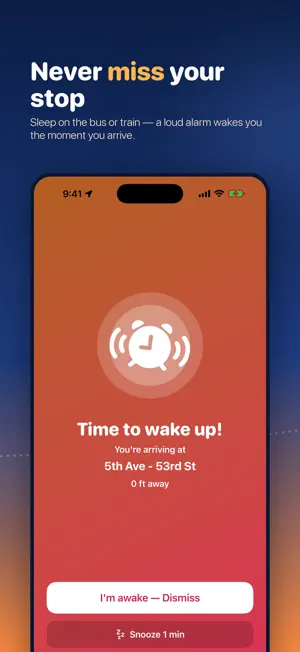
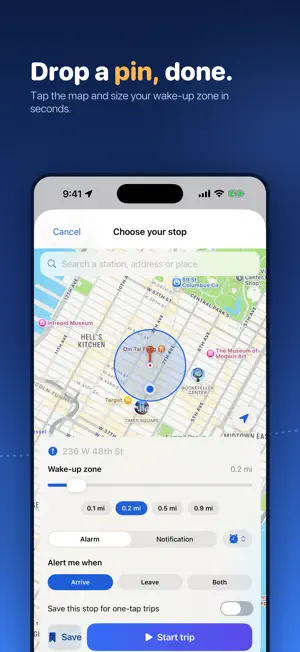
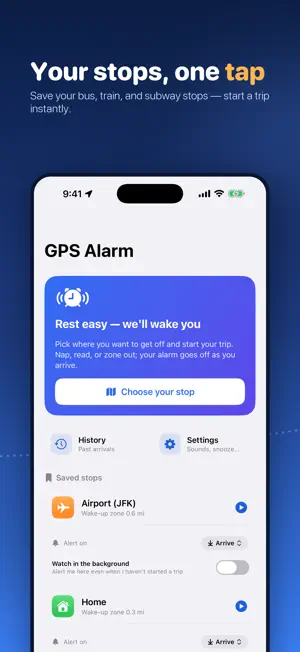
Sleep through your commute without watching every stop — GPS Alarm is a location alarm that wakes you when you're arriving, on the bus, train, subway, or coach. Set the place you want to get off on a map, choose a wake-up zone around it, and start your trip. The app keeps watch in the background and sounds a loud alarm — or a gentle notification, your choice — the moment you come within range. Then relax: nap, read, or just close your eyes. WHY YOU'LL LOVE IT • A wake-up alarm based on where you actually are, not a guessed arrival time • Works in the background, even with the screen locked • Loud looping alarm with vibration, or a gentle notification — your choice • Six built-in tones, and snooze if you need a few more minutes • In Alarm mode the sound plays even when your phone is set to silent FREE TO USE • The full single-destination arrival alarm is free — set a stop, start a trip, and we'll wake you when you arrive. No subscription required. • Save up to 2 stops for one-tap trips • Start a trip straight from the Home Screen widget, or start and end one with Siri • The free version is supported by ads. Ads never appear while a trip is running, and never on the alarm screen — nothing gets in the way of waking you up. GPS ALARM PRO Upgrade to Pro for: • No ads anywhere in the app • Leave & arrival alerts — be alerted when you arrive at a place, when you leave it, or both (per place). The free alarm is arrive-only. • Always-on monitoring of all your saved places — GPS Alarm can watch every saved place in the background and alert you whenever you arrive at or leave any of them, even when no trip is running. You turn this on per device in Settings; it needs the "Always" location permission and is off until you enable it. • A live countdown on your Lock Screen and Dynamic Island, so you can see how far you have to go at a glance • Unlimited saved stops • A full history of every arrival and departure, synced across your devices — with trip stats and CSV or GPX export Pro is an auto-renewable monthly or yearly subscription with a 7-day free trial. The price is shown in the app before you subscribe, and on this App Store page. Payment is charged to your Apple Account at confirmation of purchase. The subscription renews automatically unless cancelled at least 24 hours before the end of the current period; manage or cancel anytime in your App Store account settings. Any unused portion of the free trial is forfeited when you subscribe. Terms of Use (EULA): https://www.apple.com/legal/internet-services/itunes/dev/stdeula/ Privacy Policy: https://mwsupplylimited.github.io/timetowakeup/privacy.html SIMPLE TO USE • Search for a station or address, or just drop a pin on the map • Pick a wake-up zone — a larger zone wakes you earlier so you have time to get ready • Save the stops you travel to often for one-tap trips • A live screen shows how far you are from your destination PRIVACY • Your precise GPS location is processed only on your device — to detect when you arrive at or leave your stop, and, if you turn on always-on monitoring, to watch your saved places in the background. It is never uploaded to us, never sold, and never used to identify you. • Your saved stops and history back up to your own private iCloud • Our advertising partners receive an advertising identifier, app usage, purchase and performance data, and a country-level region derived from the ad request's IP address — never your GPS location, your saved stops, or your wake-up zones. Note: Continued use of GPS running in the background can dramatically decrease battery life. GPS Alarm uses continuous background location only while a trip is active. Always-on monitoring (an optional Pro feature) uses lower-power region and significant-location-change monitoring, and only when you have turned it on.
What’s new
Version 1.0.11 · Updated September 9, 2026
Reliability. • Fixed a rare case where the alarm could stay silent even though you had reached your stop. It was most likely on faster journeys with the app in your pocket. GPS Alarm now checks every location reading iPhone gives it, instead of only the most recent one.
App privacy
The developer, Matthew Wong, reported these privacy practices to Apple.
Data Used to Track You
The following data may be used to track you across apps and websites owned by other companies:
- Location: Coarse Location
- Identifiers: Device ID
Data Linked to You
The following data, which may be collected and linked to your identity, may be used for the following purposes:
- Identifiers: User ID, Device ID
- Usage Data: Advertising Data, Other Usage Data
- Other Data: Other Data Types
- Purchases: Purchase History
- Diagnostics: Performance Data
Used for: Third-Party Advertising, Analytics, App Functionality
Data Not Linked to You
The following data, which may be collected but is not linked to your identity, may be used for the following purposes:
- Location: Coarse Location
- Usage Data: Product Interaction
Used for: Third-Party Advertising, Analytics
Alternatives to GPS Alarm: Location Alert
Looking for apps like GPS Alarm: Location Alert? Here are 6 similar apps on the App Store. The highest rated is NapAlarm - GPS Wake Up (5.0/5), and all 6 are free to download.
-
 GPS Alarm - Location Reminder
-
 GeoAlarm · GPS Alarm
-
 NapAlarm - GPS Wake Up
5.0
NapAlarm - GPS Wake Up
5.0
-
 WakeMeUp: GPS Alarm
1.0
WakeMeUp: GPS Alarm
1.0
-
 Arrival - GPS Alarm
-
 WakeMeHere: GPS Location Alarm
5.0
WakeMeHere: GPS Location Alarm
5.0
| App | Rating | Price | Last updated | Compare |
|---|---|---|---|---|
| GPS Alarm: Location Alert | – | Free | September 9, 2026 | |
| GPS Alarm - Location Reminder | – | Free | Oct 5, 2026 | Compare |
| GeoAlarm · GPS Alarm | – | Free | May 16, 2026 | Compare |
| NapAlarm - GPS Wake Up | 5.0 / 5 (2) | Free | Apr 21, 2026 | Compare |
| WakeMeUp: GPS Alarm | 1.0 / 5 (1) | Free | Apr 28, 2026 | Compare |
| Arrival - GPS Alarm | – | Free | Jul 30, 2026 | Compare |
| WakeMeHere: GPS Location Alarm | 5.0 / 5 (1) | Free | Aug 29, 2026 | Compare |