

Strut - Steps Unlock
Cybernetica.io Productivity iPhoneiPadiPod touch
Strut - Steps Unlock is a free Productivity app for iPhone and iPad by Cybernetica.io. Rated 5.0/5 from 1 ratings. Requires iOS 18.0. Updated March 13, 2026.
- Rating
- 5.0
- 1 ratings
- Price
- Free
- on the App Store
- Size
- 10 MB
- Age 4+
- Updated
- Mar 13
- 2026 · v1.1.1
Screenshots


About Strut - Steps Unlock
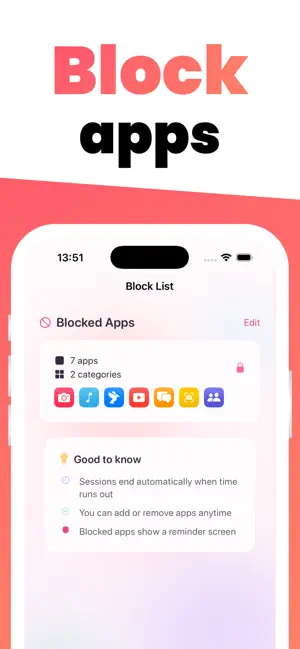
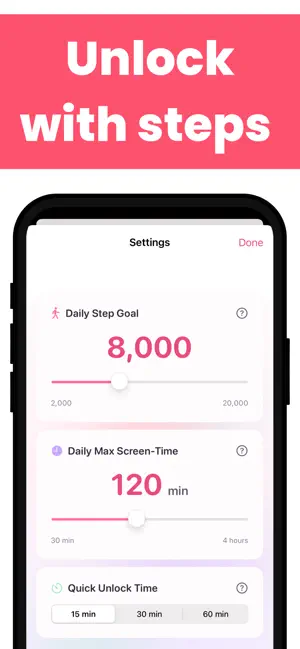
Walk more. Earn screen time. Take control of your habits. Strut turns your daily steps into screen time you can actually use. The more you move, the more minutes you earn — then spend them to temporarily unlock the apps you've chosen to restrict. It's screen time management powered by your own two feet. HOW IT WORKS 1. Set your daily step goal and a screen time cap 2. Pick the apps and categories you want to block 3. Walk — your real steps (from Apple Health) are converted into screen time minutes 4. When you're ready, start an unlock session (15, 30, or 60 minutes) to use your blocked apps 5. When the session ends, your apps are re-blocked automatically REAL BLOCKING, NOT REMINDERS Strut uses Apple's Screen Time framework to enforce actual app blocking at the system level. When an app is blocked, you'll see a custom shield screen showing how many minutes you've earned and what sessions are available. No workarounds, no "dismiss and keep using" — your apps stay blocked until you've walked enough. KEY FEATURES • Step-to-minutes earning — a transparent formula converts your real steps into screen time, with anti-cheat filtering that excludes manually entered data • Configurable goals — set your daily step target (2,000–20,000) and max screen time (30–240 minutes) • Block list management — choose individual apps, entire categories, or web domains to restrict • Streak tracking — see your consecutive days hitting your step goal, with milestone celebrations • Statistics dashboard — 7-day step chart, calories burned, distance walked, and app usage breakdown • Smart sessions — unlock sessions never cross midnight and re-block automatically, even if Strut isn't open • Fail-open safety — if anything goes wrong, your apps are unblocked, never locked out • Guided onboarding — a 6-step setup that walks you through permissions and app selection HEALTH & PRIVACY Strut reads step count, active energy, and walking distance from Apple Health. Your health data stays on your device and is never sent to any server. Strut uses HealthKit data solely to calculate your earned screen time. SUBSCRIPTION Strut requires a subscription to activate app blocking. You can restore purchases at any time from the paywall screen. Terms of Use (EULA): https://www.apple.com/legal/internet-services/itunes/dev/stdeula/ Privacy Policy: https://www.strut-app.com/privacy Support: https://www.strut-app.com/support
What’s new
Version 1.1.1 · Updated March 13, 2026
General improvements.
App privacy
The developer, Cybernetica.io, reported these privacy practices to Apple.
Data Not Linked to You
The following data, which may be collected but is not linked to your identity, may be used for the following purposes:
- Purchases: Purchase History
Used for: Analytics, App Functionality
Alternatives to Strut - Steps Unlock
Looking for apps like Strut - Steps Unlock? Here are 6 similar apps on the App Store. The highest rated is Couch Potato App Blocker (5.0/5), and all 6 are free to download.
-
 Stride - Walk to Unlock
-
 WayOut: Walk to Unlock Apps
-
 Totem: Screen Time Control
-
 Couch Potato App Blocker
5.0
-
 DoomLift: Screen Time Workout
-
 Upwon Goal Tracking & Motivate
| App | Rating | Price | Last updated | Compare |
|---|---|---|---|---|
| Strut - Steps Unlock | 5.0 / 5 (1 rating) | Free | March 13, 2026 | |
| Stride - Walk to Unlock | – | Free | Mar 9, 2026 | Compare |
| WayOut: Walk to Unlock Apps | – | Free | Mar 10, 2026 | Compare |
| Totem: Screen Time Control | – | Free | Jul 1, 2026 | Compare |
| Couch Potato App Blocker | 5.0 / 5 (3) | Free | Jun 14, 2026 | Compare |
| DoomLift: Screen Time Workout | – | Free | Sep 4, 2026 | Compare |
| Upwon Goal Tracking & Motivate | – | Free | Feb 15, 2026 | Compare |