

TodOne: Simple Today To-Do
Takuya Saeki Productivity iPhoneiPadiPod touch
TodOne: Simple Today To-Do is a free Productivity app for iPhone and iPad by Takuya Saeki. Requires iOS 16.4. Updated October 25, 2026.
- Price
- Free
- on the App Store
- Size
- 47 MB
- Age 12+
- Updated
- Oct 25
- 2026 · v1.18.1
Screenshots
About TodOne: Simple Today To-Do
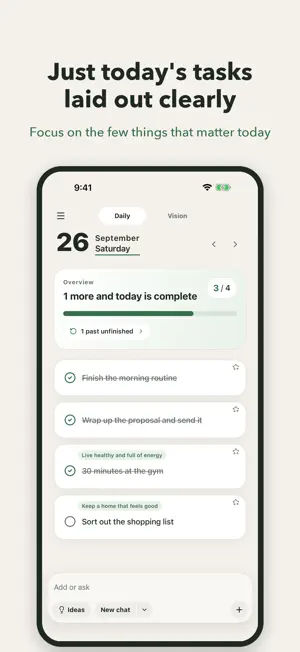
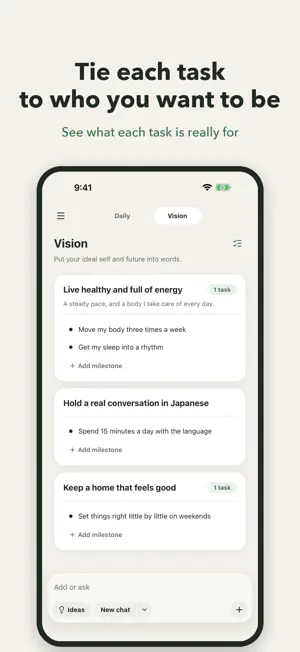
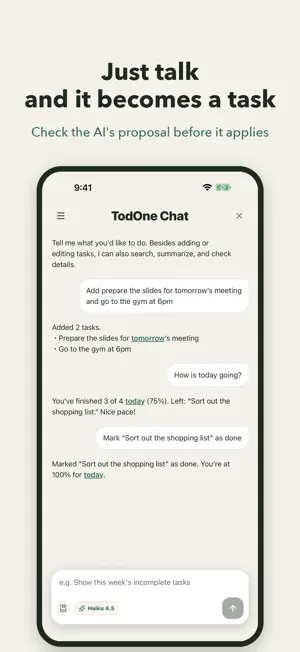
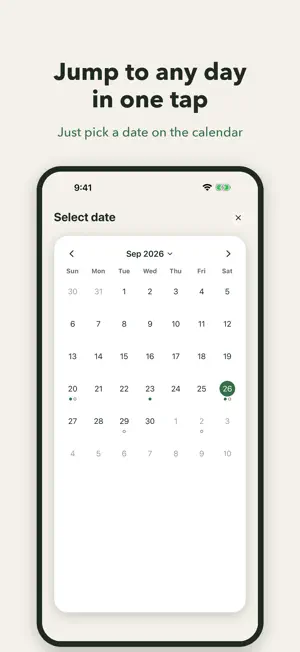
TodOne is a simple to-do app for focusing on today. Only the few things today needs, laid out quietly — and you can add them just by talking to AI. Tired of to-do apps that keep growing? TodOne keeps the screen calm and lets the AI assistant take the fiddly parts off your hands. ■ Features 【Run your list by talking to AI】 "Add finish the slides for tomorrow's meeting." "How am I doing today?" Say it in plain words and the AI adds, completes, edits, reorders, searches and summarizes your tasks. No forms to tap through — today gets sorted in a conversation. 【Connect today to how you want to be (Vision)】 "Live healthier." "Hold a real conversation in Japanese." Register those as Visions and link your daily tasks to them, so you can see what today is actually for. Visions can be created and linked from the AI chat too, and in a check-in conversation the AI helps you put the current distance into words and turn the next single step into a task on the spot. 【Only today】 TodOne shows today's tasks and nothing else. No past or future noise — just what is in front of you. 【Home Screen and Lock Screen widgets】 See what is left of today without opening the app. Put it on your Home Screen, or on the Lock Screen before you even unlock. Tap to jump straight into that day's list. 【Send a task from anywhere】 Share to TodOne from any other app. An article you want to read, a note you want to keep — park it as one thing to deal with today, without switching apps and typing it again. 【Morning and evening reminders】 A quiet notification at the start and the end of the day: morning to pick today's few, evening to look back. Both times are yours to change in Settings. 【Carry unfinished work into today】 If something did not get done, TodOne tells you at the top of the screen. Pick from the sheet and move them into today together, instead of dragging tasks over one at a time. 【Activity log】 Every add, complete and edit is recorded. Filter and search by period or type to see how your days are actually going. 【Look back on a calendar】 Browse your past records on a calendar and see completed and unfinished days at a glance. 【Search everything you have done】 Search across all your past tasks by keyword, filter by completed or unfinished, and jump straight to the day you found. "Wait, when did I do that?" — answered in seconds. 【Note the outcome】 Leave a note when you complete a task. Recording what you did, and how, makes the handover to tomorrow's you far easier. 【English and Japanese】 If your device is set to English, TodOne starts in English. You can switch between English, Japanese and "match device" in Settings — screen text, date formats and even the AI's replies follow the language you choose. 【Easy from the very first launch】 The first launch walks you through a live sample: how to focus on today, and how to talk to the AI. You try it rather than read about it. ■ Privacy Your tasks are stored on your device. Only when you use the AI chat is your input sent to an AI service to generate a reply. See the privacy policy in the app or on our site for details. ■ Terms and Privacy Terms of Use (EULA): https://www.apple.com/legal/internet-services/itunes/dev/stdeula/ Privacy Policy: https://2d1.app/en/privacy Put today in order.
What’s new
Version 1.18.1 · Updated October 25, 2026
Fixed an issue where the app closed immediately after opening on iOS 27.
App privacy
The developer, Takuya Saeki, reported these privacy practices to Apple.
Data Not Linked to You
The following data, which may be collected but is not linked to your identity, may be used for the following purposes:
- Purchases: Purchase History
- Identifiers: User ID
- Usage Data: Product Interaction
- Diagnostics: Other Diagnostic Data
Used for: Analytics, App Functionality
Alternatives to TodOne: Simple Today To-Do
Looking for apps like TodOne: Simple Today To-Do? Here are 6 similar apps on the App Store.
-
 To Day Do|今日のタスク管理
-
 Task Rainbow: Time Tracker
-
 MieruPlan 見える予定表
-
 POI - タスクをぽいっ!
-
 QuadTask - Eisenhower Matrix
-
 Dayly: Planner & Habit Tracker
| App | Rating | Price | Last updated | Compare |
|---|---|---|---|---|
| TodOne: Simple Today To-Do | – | Free | October 25, 2026 | |
| To Day Do|今日のタスク管理 | – | Free | Oct 23, 2026 | Compare |
| Task Rainbow: Time Tracker | – | Free | Oct 25, 2026 | Compare |
| MieruPlan 見える予定表 | – | Free | Aug 7, 2026 | Compare |
| POI - タスクをぽいっ! | – | Free | May 4, 2026 | Compare |
| QuadTask - Eisenhower Matrix | – | Free | Jun 3, 2026 | Compare |
| Dayly: Planner & Habit Tracker | – | Free | Sep 16, 2026 | Compare |