

Task Rainbow: Time Tracker
Toshiaki Nakamura Productivity iPhoneiPadiPod touch
Task Rainbow: Time Tracker is a free Productivity app for iPhone and iPad by Toshiaki Nakamura. Requires iOS 18.5. Updated October 25, 2026.
- Price
- Free
- on the App Store
- Size
- 85 MB
- Age 4+
- Updated
- Oct 25
- 2026 · v1.0.1
Screenshots


About Task Rainbow: Time Tracker
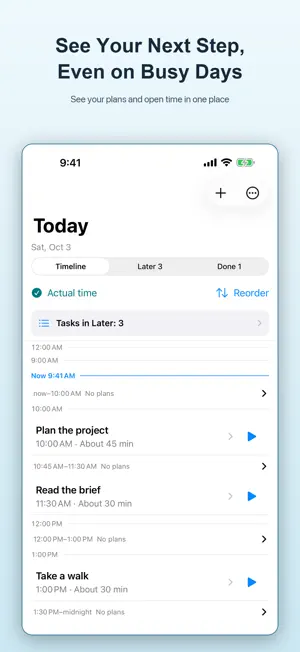
Tasks take longer than you expect, and the rest of your day slips. You stay busy, but it is hard to tell where the time went. Get a clearer sense of how long your work takes, so you can plan a day that fits your pace. Task Rainbow helps you compare your estimates with the time you actually spend and use today's experience to plan what comes next. Track time as you work, see it against your estimate in rainbow rings and bars, and review your records when you are done. MAKE ROOM FOR TODAY'S TASKS Organize the tasks you want to work on today and save other tasks for later. Add time estimates to give each task a starting point. KEEP YOUR ESTIMATE IN SIGHT Rainbow rings and bars show elapsed time relative to your estimate. See an estimate of the time remaining while you are within your planned duration. When there is no estimate, or you go over it, the display shows elapsed time. You can keep tracking beyond your estimate. USE TODAY'S RECORDS TO PLAN WHAT COMES NEXT Start, stop, and resume as you work, then mark the task complete. Review your recorded work sessions to see how you used your time and inform your next estimate. MAKE EVERYDAY PLANNING EASIER Group routines into sets and reuse them in your daily plans. Keep familiar steps ready for regular preparation and recurring work. START WITH THE FREE FEATURES Basic planning, time tracking, and records are free. Save up to 5 routine sets, with up to 10 routines in each set. TASK RAINBOW PREMIUM Remove the limits on routine sets and routines per set. Save and share a PDF of your tasks and time records for a selected day. Premium is available as a monthly or annual auto-renewable subscription. Your subscription renews automatically unless canceled. See the in-app purchase screen for pricing and purchase terms. Privacy Policy: https://sites.google.com/view/studio-rainbow-terms/ Terms of Use: https://www.apple.com/legal/internet-services/itunes/dev/stdeula/
What’s new
Version 1.0.1 · Updated October 25, 2026
• Separated date and time editing from adding work sessions to prevent accidental entries. • Made the work session editor more compact, with clearer separators between start, end, and duration. • Fixed outdated start notifications remaining after a task was started or moved to another date. • Removed unnecessary confirmation prompts when changing a date does not affect future recurring schedules.
App privacy
The developer, Toshiaki Nakamura, reported these privacy practices to Apple.
Data Not Linked to You
The following data, which may be collected but is not linked to your identity, may be used for the following purposes:
- Usage Data: Product Interaction
- Diagnostics: Crash Data
Used for: Analytics, App Functionality
Alternatives to Task Rainbow: Time Tracker
Looking for apps like Task Rainbow: Time Tracker? Here are 6 similar apps on the App Store.
-
 Core: AI Writing Studio
-
 TodOne: Simple Today To-Do
-
 DEA*PAD - Quick 3-Page Notepad
-
 引越しタスク - やること手続きチェックリスト
-
 Tana
-
 PickLog: Grocery Shared List
| App | Rating | Price | Last updated | Compare |
|---|---|---|---|---|
| Task Rainbow: Time Tracker | – | Free | October 25, 2026 | |
| Core: AI Writing Studio | – | Free | Oct 17, 2026 | Compare |
| TodOne: Simple Today To-Do | – | Free | Oct 25, 2026 | Compare |
| DEA*PAD - Quick 3-Page Notepad | – | Free | Mar 17, 2026 | Compare |
| 引越しタスク - やること手続きチェックリスト | – | Free | May 26, 2026 | Compare |
| Tana | – | Free | Oct 26, 2026 | Compare |
| PickLog: Grocery Shared List | – | Free | Jun 7, 2026 | Compare |