

BiblioFuse Reader & Compress
KIEN WEI CHOO Productivity iPhoneiPadiPod touchMac
BiblioFuse Reader & Compress is a free Productivity app for iPhone and iPad by KIEN WEI CHOO. Requires iOS 17.0. Updated September 8, 2026.
- Price
- Free
- on the App Store
- Size
- 53 MB
- Age 4+
- Updated
- Sep 8
- 2026 · v2.1.13(117)
Screenshots
About BiblioFuse Reader & Compress
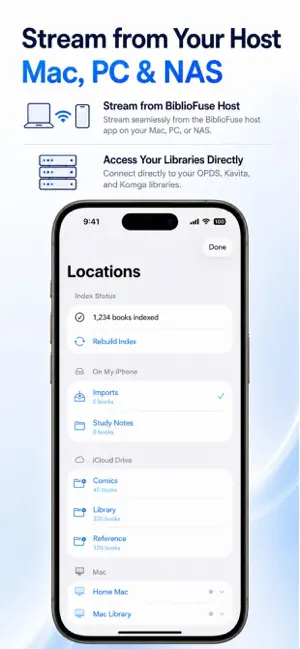
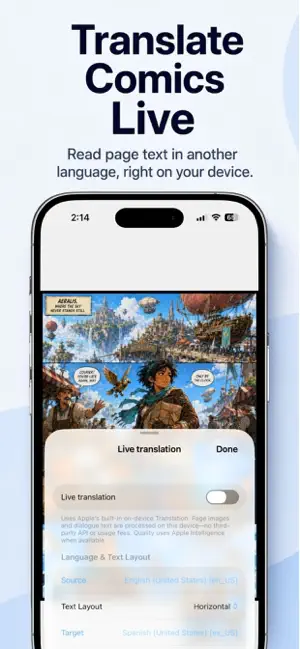
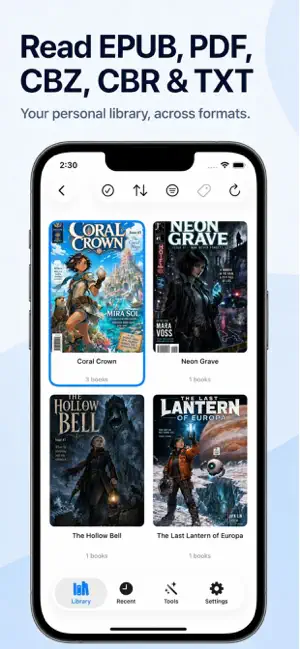
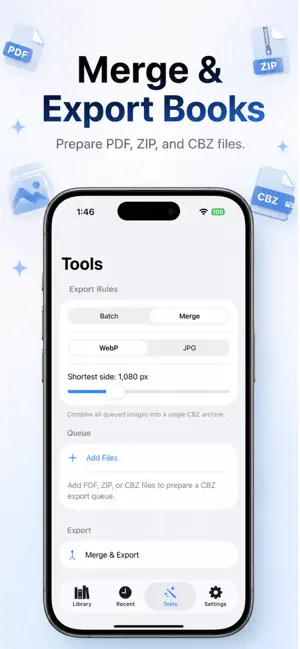
BiblioFuse is a native reader and library manager for personal ebook, comic, and document collections across iPhone, iPad, and Mac. Read EPUB, PDF, CBZ, CBR, RAR, ZIP, and text files — including comic and manga-style EPUBs and Japanese novels in vertical layout — in a focused reading experience built for long sessions. Keep your library organized with folders, search, ratings, tags, thumbnails, reading progress, bookmarks, and recent books. On iPhone and iPad: - Import books from Files, document picker, local transfer, or iCloud Drive - Browse local folders as your library, with Kavita-style series details and chapter/volume tabs; iCloud folders unlock with BiblioFuse Pro - Read PDF, EPUB, archives, comics, and text files - Use paged or continuous reading for image archives - Turn pages with an animated page-curl effect, included with BiblioFuse Pro - Track reading progress, bookmarks, ratings, and tags - Use text-to-speech for EPUB and text books - Navigate the library and readers with an optional Bluetooth game controller - Compress or merge supported book and image-document formats locally - Browse and open books streamed from your Mac over Wi-Fi or mobile data, when remote access is configured - Browse, stream, and read from standard OPDS, Komga, and Kavita library servers, including comic-format EPUBs and PDFs streamed directly, with optional offline downloads - Translate comic and manga pages live in the reader with Apple Intelligence — everything happens on-device, with no data upload and no API cost, included with BiblioFuse Pro - Translate and export a full CBZ copy of any comic or manga, translated page by page, included with BiblioFuse Pro On Mac: - Browse local and SMB network folders as your library, with Kavita-style series details and chapter/volume tabs; iCloud folders unlock with BiblioFuse Pro - Read and organize your library in a desktop split-view interface - Stream supported books — including PDF, EPUB, and comic-format EPUB pages — live to BiblioFuse on iPhone, iPad, and Vision Pro - Protect streaming access with an optional PIN - Send books to the shared iCloud BiblioFuse folder - Use the same local compression and merge tools on desktop - Use a game controller on Mac with the same customizable bindings Choose from three streaming connection modes in Settings: iCloud + Tailscale (default), Local Wi-Fi only, or a manually saved Tailscale address — every route secured with certificate-pinned HTTPS. Remote streaming over mobile data requires iCloud and Tailscale to be configured on both devices. BiblioFuse processes your reading files locally on your device. Network and streaming features are only used when you choose to enable them. Universal purchase supports iPhone, iPad, and Mac. Privacy Policy: https://mlt-solutions.github.io/app-legal-docs/bibliofuse/PRIVACY Terms of Use (EULA): https://www.apple.com/legal/internet-services/itunes/dev/stdeula/
What’s new
Version 2.1.13(117) · Updated September 8, 2026
- Live Comic Translation: translate manga and comic pages live in the reader with Apple Intelligence, entirely on-device — now part of BiblioFuse Pro - Translate & Export CBZ: save a fully translated copy of any comic or manga as a new CBZ — now part of BiblioFuse Pro - Browse folders directly as your library, on iPhone, iPad, Mac, and Vision Pro — with Kavita-style series details and chapter/volume tabs - Page Curl: turn pages with an animated curl on tap or swipe, now part of BiblioFuse Pro - iCloud folders are now part of BiblioFuse Pro, with unlimited access (previously free showed only the 25 most recent books) - Exact bookmarks and reading-position sync with Kavita - Find in Book, and a reading-direction switch that matches the page - Improved translations across all supported languages - Tablet landscape dual-page mode: read two pages side by side, like an open book, on iPad - Fixed the TTS button becoming unreachable after using Page Curl - Fixed iCloud folders not appearing under Locations, and BiblioFuse not showing up in the Files app or iCloud Drive settings - Comics and manga now page down through a long page instead of jumping to the next image — in Continuous mode, in Fit Width, and when zoomed in - Turning a page lands where you expect: forward at the top of the next page, back at the bottom of the previous one - Tap, Page Curl, auto-scroll, keyboard and game controller now all follow the same reading rules - PDFs: read down the hidden part of a Fill Width page before the page turns, on iPhone, iPad and Mac - Long vertical webtoon-style pages are no longer split across a two-page spread in landscape - iPad dual page: fixed a page being counted twice, and PDF spreads opening zoomed in - Mac: continuous PDFs and comics scroll a section at a time, the space bar pages correctly, and your place is saved as you scroll - New: reach us on Discord from Settings - Fixed illustrations in some EPUBs (often Chinese web novels) showing as a thin sliver the height of one line of text
App privacy
The developer, KIEN WEI CHOO, reported these privacy practices to Apple.
Data Not Collected
The developer does not collect any data from this app.
Alternatives to BiblioFuse Reader & Compress
Looking for apps like BiblioFuse Reader & Compress? Here are 6 similar apps on the App Store. The highest rated is TaskWarrior (4.5/5), and all 6 are free to download.
-
 Marky
Marky
-
 Lector: Clean Reading
-
 Article TTS
-
 TimeLog - 勤怠・業務記録
-
 QuickMark: Markdown Editor
-
 TaskWarrior
4.5
TaskWarrior
4.5
| App | Rating | Price | Last updated | Compare |
|---|---|---|---|---|
| BiblioFuse Reader & Compress | – | Free | September 8, 2026 | |
| Marky | – | Free | Jul 14, 2026 | Compare |
| Lector: Clean Reading | – | Free | May 29, 2026 | Compare |
| Article TTS | – | Free | Nov 24, 2025 | Compare |
| TimeLog - 勤怠・業務記録 | – | Free | Feb 25, 2026 | Compare |
| QuickMark: Markdown Editor | – | Free | Sep 28, 2026 | Compare |
| TaskWarrior | 4.5 / 5 (2) | Free | Apr 22, 2026 | Compare |