

Margina - Read & Highlight
Echo Persona LLC Productivity iPhoneiPadiPod touch
Margina - Read & Highlight is a free Productivity app for iPhone and iPad by Echo Persona LLC. Rated 5.0/5 from 1 ratings. Requires iOS 16.4.
- Rating
- 5.0
- 1 ratings
- Price
- Free
- on the App Store
- Size
- 68 MB
- Age 4+
- Updated
- Jul 18
- 2026 · v1.2.1
Screenshots

About Margina - Read & Highlight
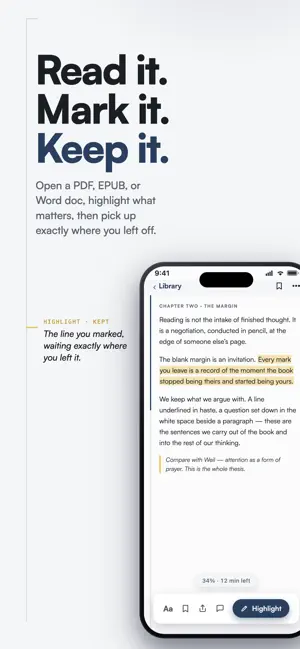
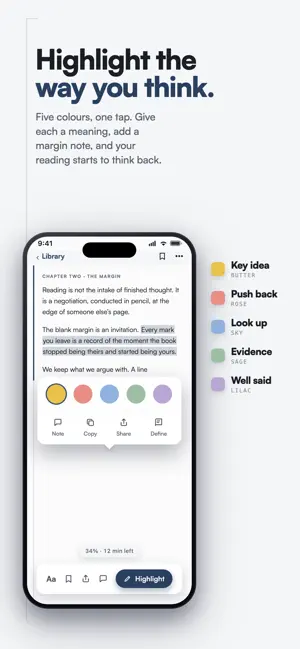
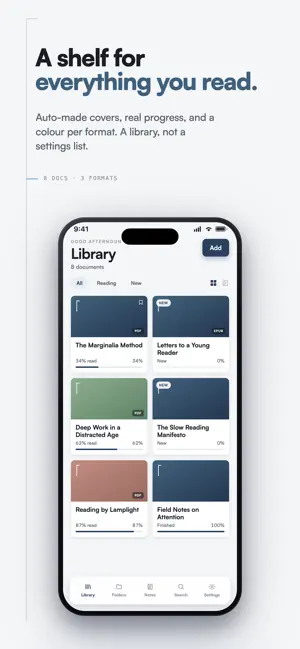
Margina is a calm, private home for everything you read. Send yourself a PDF, EPUB, Word doc, Markdown file, or plain text. Margina opens them all in one distraction-free reader that remembers exactly where you left off. No account, no cloud requirement, no clutter: just you and the page. A LIBRARY THAT LOOKS LIKE ONE Your documents live on a clean shelf of covers, each showing its format and how far you have read. Prefer rows? Switch to list view with one tap. Filter by what you are reading now, what is new, and what you have finished, and pin the book you keep coming back to. HIGHLIGHT AND ANNOTATE Mark passages in five colors, attach a note in the margin, and drop bookmarks anywhere. Drag across a PDF page to select and highlight in one motion. Every annotation is gathered in one place, ready to browse, filter, and revisit. Tap any highlight to jump straight back to its page. FIND ANYTHING, FAST Search across titles, authors, highlights, and notes at once. Matches light up inside the results exactly like highlights on a page, grouped by document so you always know where a passage came from. STAY ORGANIZED Sort your library into color-coded folders for work, study, research, or that stack of essays you have been meaning to get to. Jump back into any book at the exact spot, or the exact highlight, you were last at. MADE FOR LONG READING A reading experience designed like a well-set book: quiet paper tones, generous margins, and your progress drawn as a thin rule in the margin itself. Choose paper, sepia, or dark. Tune font, size, line spacing, and margins right in the reader. Includes a dyslexia-friendly typeface option and respects your system accessibility settings, from Dynamic Type to VoiceOver, Reduce Motion, and Reduce Transparency. EVERY FORMAT YOU ACTUALLY USE PDF reader, EPUB reader, Word document viewer, Markdown reader, and plain text, all in one app. Import from the share sheet, the Files app, email attachments, or anywhere else you can tap Share. Everything works offline, on the train, on a plane, or at the cabin with no signal. EXPORT AND SHARE Turn your highlights and notes into a clean Markdown file or a formatted PDF and send them to your notes app, your research workflow, or a friend. PRIVATE BY DESIGN Your library lives on your device. No account, no sign-up, no tracking, nothing to set up. Margina hosts nothing about you. Reading is personal; your reading data should be too. MARGINA PRO Upgrade to back up your library to your OWN iCloud, unlock the sepia reading theme, export your annotations, and add unlimited documents. Available monthly, annually, or as a one-time lifetime purchase. Your backup stays in your iCloud, never on our servers, so even Pro keeps your data yours. WHO MARGINA IS FOR Students annotating readings and lecture notes. Researchers working through papers. Book club readers who argue in the margins. Writers collecting passages. Anyone who sends themselves things to read later and actually wants to read them, without ads, feeds, or noise. Read anything. Mark it up. Keep it yours. Terms of Use (EULA): https://www.apple.com/legal/internet-services/itunes/dev/stdeula/ Privacy Policy: https://margina.app/privacy Margina Pro is offered as a monthly or annual auto-renewable subscription or a one-time Lifetime purchase. Subscriptions renew automatically unless cancelled at least 24 hours before the end of the current period. Manage or cancel anytime in your App Store account settings.
What’s new
Version 1.2.1 · Updated July 18, 2026
Margina 1.2 is a redesign from the ground up: quiet paper, deep ink blue, and the margin rule, a single mark that now carries the whole app, from the icon to your reading progress. • Library shelf with covers, plus a list view if you prefer rows • Redesigned reader: your progress lives in the margin, and you can drag the rule to jump anywhere • Drag to select and highlight text in PDFs, no long press needed • Paper, sepia, and dark reading themes, one tap away in the reader • A new app icon and a fresh typeface throughout • Cloud backup now keeps itself up to date automatically • Highlights land exactly where you selected, every time • Better VoiceOver support across menus and sheets • Leave a review button to support the team
App privacy
The developer, Echo Persona LLC, reported these privacy practices to Apple.
Data Not Linked to You
The following data, which may be collected but is not linked to your identity, may be used for the following purposes:
- Purchases: Purchase History
Used for: App Functionality
Alternatives to Margina - Read & Highlight
Looking for apps like Margina - Read & Highlight? Here are 6 similar apps on the App Store. The highest rated is // TODO (5.0/5), and all 6 are free to download.
-
 Ice Focus - Pomodoro Timer
-
 Deep Work - Funpatsu
-
 // TODO
5.0
// TODO
5.0
-
 Anti-Pomodoro: Focus Session
-
 streakr - One Task
-
 Readium: Text to Speech
| App | Rating | Price | Last updated | Compare |
|---|---|---|---|---|
| Margina - Read & Highlight | 5.0 / 5 (1 rating) | Free | July 18, 2026 | |
| Ice Focus - Pomodoro Timer | – | Free | May 4, 2026 | Compare |
| Deep Work - Funpatsu | – | Free | Mar 30, 2026 | Compare |
| // TODO | 5.0 / 5 (1) | Free | Oct 16, 2025 | Compare |
| Anti-Pomodoro: Focus Session | – | Free | May 12, 2026 | Compare |
| streakr - One Task | – | Free | Jun 27, 2025 | Compare |
| Readium: Text to Speech | – | Free | Sep 15, 2026 | Compare |