

NoteBoard: markdown and kanban
Peter Durlacher Productivity iPhoneiPadiPod touchMac
NoteBoard: markdown and kanban is a free Productivity app for iPhone and iPad by Peter Durlacher. Requires iOS 26.0. Updated November 14, 2026.
- Price
- Free
- on the App Store
- Size
- 8 MB
- Age 4+
- Updated
- Nov 14
- 2026 · v1.2
Screenshots


About NoteBoard: markdown and kanban
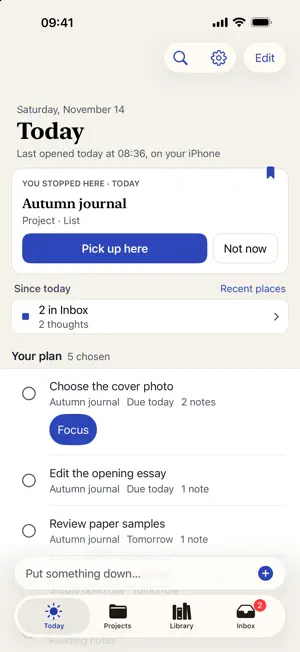
NoteBoard brings tasks, projects and Markdown notes into a calm daily workspace for iPhone and iPad. Capture a thought while it is fresh, keep supporting notes with its project, and choose what deserves your attention today. • Capture thoughts into Inbox and sort them one at a time. • Plan Today and move work to Later when it can wait. • Organize projects with lists, boards, calendars, mind maps and a spatial Corral. • Write Markdown notes with links and tables, and arrange notes and tasks on a canvas. • Search saved note text and task details, with matching excerpts. • Back up a complete workspace and restore it into a new folder. • Preview and restore earlier versions of a note while keeping the text you replace. • Send text and links through the Capture in NoteBoard action in Shortcuts, including a shortcut configured for Safari’s Share Sheet. Start with a private workspace on your device, or open a compatible NoteBoard folder you choose. Tasks are stored in JSON and notes in files. Open the same shared workspace folder on your devices to find recent work and continue a note. Synchronization and offline availability depend on the folder’s provider; NoteBoard does not provide its own sync service. Core tasks and notes do not require a NoteBoard account. New Gmail connections are not offered in this version. Existing Gmail connections can continue to work. On supported devices with Apple Intelligence available, review suggested task titles, summaries and Today picks generated on your device. AI features require a compatible device and Apple Intelligence availability.
What’s new
Version 1.2 · Updated November 14, 2026
Capture thoughts into Inbox and sort them one at a time. Dates in captured words apply only when you tap the date suggestion. Search inside saved notes and task details, with matching excerpts. Back up a complete workspace and restore it into a new folder. Preview and restore earlier versions of a note while keeping the text you replace. Continue from Recent on another device using the same shared workspace folder. File-provider synchronization and offline availability depend on your provider. Send text and links through the Capture in NoteBoard action in Shortcuts, including a shortcut configured for Safari’s Share Sheet.
App privacy
The developer, Peter Durlacher, reported these privacy practices to Apple.
Data Not Collected
The developer does not collect any data from this app.
Alternatives to NoteBoard: markdown and kanban
Looking for apps like NoteBoard: markdown and kanban? Here are 6 similar apps on the App Store. The highest rated is App Blocker & Focus: Hermit (5.0/5), and 5 of the 6 are free to download.
-
 Labyrinth: Tasks & Notes
-
 LISTA SMART
-
 PDF Creator – Auto Scan
-
 App Blocker & Focus: Hermit
5.0
-
 License Renewals Manager AI
-
 TodoMaster: To-Do & Planner
| App | Rating | Price | Last updated | Compare |
|---|---|---|---|---|
| NoteBoard: markdown and kanban | – | Free | November 14, 2026 | |
| Labyrinth: Tasks & Notes | – | Free | Aug 10, 2026 | Compare |
| LISTA SMART | – | Free | Oct 20, 2026 | Compare |
| PDF Creator – Auto Scan | – | Free | Oct 15, 2026 | Compare |
| App Blocker & Focus: Hermit | 5.0 / 5 (1) | Free | Oct 31, 2026 | Compare |
| License Renewals Manager AI | – | 1.99 USD | Nov 11, 2026 | Compare |
| TodoMaster: To-Do & Planner | – | Free | Sep 24, 2026 | Compare |