

Tempoa: Doomscroll Control
Tio Spicar Productivity iPhoneiPadiPod touch
Tempoa: Doomscroll Control is a free Productivity app for iPhone and iPad by Tio Spicar. Requires iOS 16.6. Updated March 12, 2026.
- Price
- Free
- on the App Store
- Size
- 68 MB
- Age 17+
- Updated
- Mar 12
- 2026 · v1.1
Screenshots

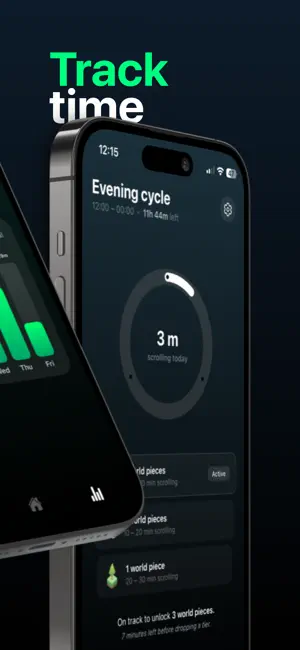


About Tempoa: Doomscroll Control
Tempoa helps you take control of social media use without quitting it. Select the apps you want to track. Set daily limits. Get notified before scrolling turns into hours. When you stay within your limits, you earn world pieces and grow your own evolving world. Less mindless scrolling. More intentional time. HOW TEMPOA WORKS 1. Track What Matters Choose the social media apps you want to monitor. Tempoa tracks daily usage and gives you a clear picture of where your time goes. 2. Smart Usage Notifications Receive gentle alerts as you approach your limit. No guilt. No shaming. Just awareness when you need it most. 3. Earn World Pieces Stay within your daily threshold and unlock a new piece of your world. Build landscapes, grow environments, and watch your planet evolve with every focused day. 4. Visualize Your Habits See your usage through clean block timelines and charts. Identify patterns. Spot improvement. Make better decisions tomorrow. WHY TEMPOA IS DIFFERENT Most screen time apps focus on restriction. Tempoa focuses on growth. Instead of locking you out, Tempoa rewards consistency. Instead of punishing excess, it helps you build something meaningful. Your progress becomes visible. Your discipline becomes creative. Your focus becomes a world. FEATURES • App-specific time tracking • Threshold-based reminders • Daily rewards system • Visual usage blocks and charts • Weekly progress insights You don’t need to delete social media. You just need better balance. Build your world. Reduce the scroll.
What’s new
Version 1.1 · Updated March 12, 2026
SDK updates. Improved user experience.
App privacy
The developer, Tio Spicar, reported these privacy practices to Apple.
Data Used to Track You
The following data may be used to track you across apps and websites owned by other companies:
- Purchases: Purchase History
- Location: Coarse Location
- Identifiers: User ID, Device ID
- Usage Data: Product Interaction, Other Usage Data
Data Linked to You
The following data, which may be collected and linked to your identity, may be used for the following purposes:
- Purchases: Purchase History
- Location: Coarse Location
- Identifiers: User ID, Device ID
- Usage Data: Product Interaction, Other Usage Data
Used for: Analytics, App Functionality
Data Not Linked to You
The following data, which may be collected but is not linked to your identity, may be used for the following purposes:
- Purchases: Purchase History
- Location: Coarse Location
- Identifiers: User ID, Device ID
- Usage Data: Product Interaction, Other Usage Data
Used for: Third-Party Advertising
Alternatives to Tempoa: Doomscroll Control
Looking for apps like Tempoa: Doomscroll Control? Here are 6 similar apps on the App Store. The highest rated is HelloAria: Reminders & To Dos (5.0/5), and all 6 are free to download.
-
 Doomscroll Totem
-
 ScrollKiller: Be in Control
3.7
-
 HelloAria: Reminders & To Dos
5.0
-
 Callvent – Calls to Calendar
1.0
-
 Reorder PDF Pages
5.0
-
 haatch. - Goal & Habit Tracker
5.0
| App | Rating | Price | Last updated | Compare |
|---|---|---|---|---|
| Tempoa: Doomscroll Control | – | Free | March 12, 2026 | |
| Doomscroll Totem | – | Free | Jun 24, 2026 | Compare |
| ScrollKiller: Be in Control | 3.7 / 5 (3) | Free | Oct 6, 2026 | Compare |
| HelloAria: Reminders & To Dos | 5.0 / 5 (53) | Free | Jul 29, 2026 | Compare |
| Callvent – Calls to Calendar | 1.0 / 5 (1) | Free | Oct 26, 2026 | Compare |
| Reorder PDF Pages | 5.0 / 5 (1) | Free | May 21, 2025 | Compare |
| haatch. - Goal & Habit Tracker | 5.0 / 5 (1) | Free | Dec 9, 2025 | Compare |