

MileTracker:AI Mileage Logbook
DUMITRU BUMBU Finance iPhoneiPadiPod touchApple Watch
MileTracker:AI Mileage Logbook is a free Finance app for iPhone and iPad by DUMITRU BUMBU. Rated 5.0/5 from 2 ratings. Requires iOS 18.0.
- Rating
- 5.0
- 2 ratings
- Price
- Free
- on the App Store
- Size
- 26 MB
- Age 4+
- Updated
- Oct 15
- 2026 · v2.8.0
Screenshots


About MileTracker:AI Mileage Logbook
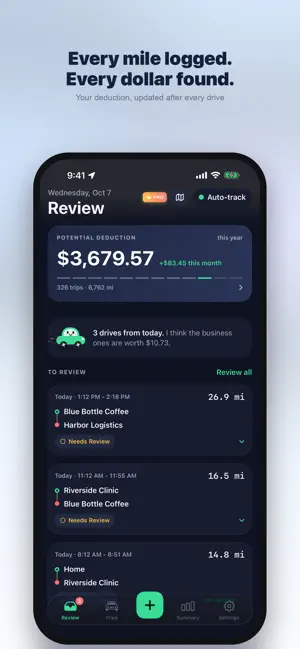
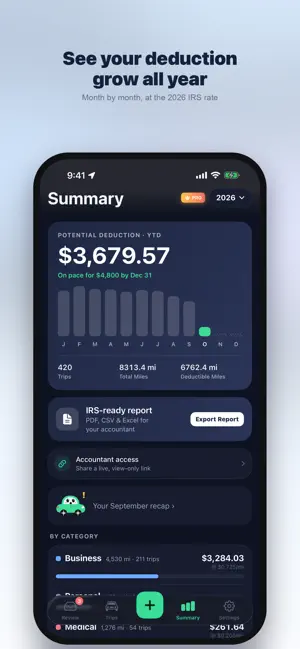
Every mile logged. Every dollar found. MileTracker records your drives automatically, lets you sort them with one tap, and hands your accountant an IRS-ready mileage log at tax time. JUST DRIVE MileTracker notices when you start driving and records the route in the background. No buttons to remember. Trips end on their own when you park, and a Live Activity shows your miles and potential deduction on the Lock Screen while you drive. SORT A TRIP IN ONE TAP Swipe through new drives full screen and watch each route draw itself from start to finish. Business, medical, charity or personal: on-device suggestions learn the places you visit, so most trips take one tap. 2026 IRS MILEAGE RATES, BY DATE • Business: 72.5¢ per mile Jan–Jun, 76¢ from July 1 • Medical: 20.5¢ per mile Jan–Jun, 23.5¢ from July 1 • Charity: 14¢ per mile Every trip uses the rate in force on the day you drove it, and earlier years keep their own rates. IRS-READY REPORTS Pick any period and combine Mileage, Fuel, Expenses and IFTA reports into one PDF, CSV, Excel or JSON file, with date, miles, purpose and potential deduction for every trip. VEHICLE COSTS Log repairs, oil changes, tires, insurance, registration, parking, tolls and car washes, scan receipts, and see each vehicle's cost per mile and which maintenance is due next. ACCOUNTANT LIVE LINK Give your accountant a private, view-only link to your log instead of emailing PDFs. Hide personal trips, and turn the link off any time. MAKE IT YOURS Six themes: Midnight, Paper, Electric, Highway, Glass and Classic. Glass puts a live map of where you are behind every screen. Meet Milo, the little car who keeps you company, cheers your streaks and wraps up your month. EVERYTHING ELSE YOU NEED • Lock Screen and Home Screen widgets • Tolls and parking per trip • Split and merge trips • Tracking modes from battery-saving Economy to real-time Rocket • Built-in troubleshooting that shows exactly which setting to change • Apple Watch app and a full iPad layout • Streaks, badges and a monthly recap • Available in 14 languages BUILT FOR PEOPLE WHO DRIVE FOR WORK Rideshare and delivery drivers, sales reps, real estate agents, home health workers, trades and anyone who drives for work. FREE AND PRO Free: 5 trips a month, 30 days of history and this month's summary. Pro: unlimited trips, full-year totals and charts, PDF, CSV and Excel exports, the accountant link, fuel, expense and maintenance logs, multiple vehicles and iCloud sync. Monthly and yearly plans include a 7-day free trial. PRIVACY Your trips are stored on your device and in your own iCloud. Nothing about your trips leaves your device unless you turn on the accountant link. Anonymous usage statistics (never your trips, places or location) help improve the app and can be turned off in Settings › Privacy. Amounts shown are potential deductions; what you actually save depends on your tax situation. Not tax advice. Terms of Use (EULA): https://www.apple.com/legal/internet-services/itunes/dev/stdeula/
What’s new
Version 2.8.0 · Updated October 15, 2026
A whole new MileTracker. • Six themes, including Glass with a live map of where you are • Meet Milo, your mileage sidekick • Full-screen trip review: watch each route draw from start to finish, then sort it in one tap • Updated 2026 IRS rates: 76¢ per business mile from July 1, applied by trip date • Combine Mileage, Fuel, Expenses and IFTA into one report (PDF, CSV, Excel) • Vehicle costs: repairs, maintenance due and cost per mile • Lock Screen widgets and a new Live Activity • Tracking modes and step-by-step troubleshooting • Accountant live link: share a view-only log • Streaks, badges, a monthly recap and Invite friends • iPad layout and Apple Watch app • Now in 13 more languages
App privacy
The developer, DUMITRU BUMBU, reported these privacy practices to Apple.
Data Not Linked to You
The following data, which may be collected but is not linked to your identity, may be used for the following purposes:
- Purchases: Purchase History
- Usage Data: Product Interaction
- Diagnostics: Crash Data, Performance Data
- Location: Precise Location
Used for: Analytics, App Functionality
Alternatives to MileTracker:AI Mileage Logbook
Looking for apps like MileTracker:AI Mileage Logbook? Here are 6 similar apps on the App Store. The highest rated is MileShield: Mileage Tracker (5.0/5), and all 6 are free to download.
-
 Receets
-
 MileShield: Mileage Tracker
5.0
MileShield: Mileage Tracker
5.0
-
 LaiSuat
5.0
LaiSuat
5.0
-
 Mileage Tracker - Driver Notes
5.0
Mileage Tracker - Driver Notes
5.0
-
 TaxMiles: IRS Mileage Tracker
5.0
TaxMiles: IRS Mileage Tracker
5.0
-
 TruMile: Mileage Tracker
5.0
TruMile: Mileage Tracker
5.0
| App | Rating | Price | Last updated | Compare |
|---|---|---|---|---|
| MileTracker:AI Mileage Logbook | 5.0 / 5 (2 ratings) | Free | October 15, 2026 | |
| Receets | – | Free | Feb 3, 2026 | Compare |
| MileShield: Mileage Tracker | 5.0 / 5 (1) | Free | Oct 21, 2026 | Compare |
| LaiSuat | 5.0 / 5 (1) | Free | Jan 30, 2026 | Compare |
| Mileage Tracker - Driver Notes | 5.0 / 5 (1) | Free | Jul 4, 2026 | Compare |
| TaxMiles: IRS Mileage Tracker | 5.0 / 5 (4) | Free | Oct 21, 2026 | Compare |
| TruMile: Mileage Tracker | 5.0 / 5 (2) | Free | Oct 15, 2026 | Compare |