

PDF Editor - Convert File
Wellresion Limited Productivity iPhoneiPadiPod touch
PDF Editor - Convert File is a free Productivity app for iPhone and iPad by Wellresion Limited. Rated 3.7/5 from 66 ratings. Requires iOS 16.6.
- Rating
- 3.7
- 66 ratings
- Price
- Free
- on the App Store
- Size
- 79 MB
- Age 4+
- Updated
- Jun 9
- 2026 · v1.2.2
Screenshots


About PDF Editor - Convert File
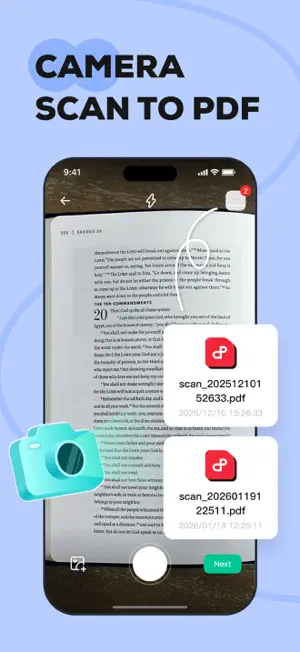
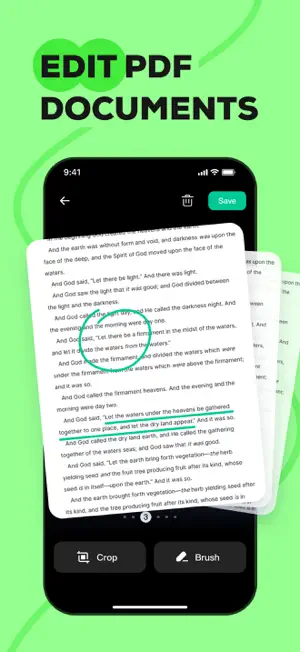
Transform your iPhone into a powerful mobile office with PDF Editor - Convert File. Whether you are a student, a business professional, or just organizing personal documents, our app provides you need to manage PDFs efficiently. KEY FEATURES Smart OCR & Text Recognition • Extract Text: Instantly recognize and extract text from images or scanned documents. • Digitize Docs: Convert paper notes, book pages, or receipts into editable digital text files. • High Accuracy: Powered by advanced scanning technology to ensure precise recognition. Professional PDF Editor • Page Management: Easily add, delete, or rearrange pages to organize your document exactly how you want it. • Annotate & Mark Up: Highlight key information, add text notes to improve readability. • Personalize: Make your documents stand out with custom editing tools. Image to PDF Converter • Batch Conversion: Import multiple images at once and merge them into a single, high-quality PDF file. • Clean Layout: Automatically align and format images for a polished look. Perfect for creating portfolios, photo albums, or ID copies. Easy File Management • Quick Import: Seamlessly import PDFs from your system files or other apps. • Open & Read: A smooth, fast viewing experience for all your PDF documents. • Share Anywhere: Export and share your finished documents via email or social media with just a tap. Why Choose PDF Editor? • User-Friendly Interface: Designed for simplicity and speed. • Privacy Focused: We respect your data; files are processed securely. • All-in-One Utility: No need to switch between a scanner app, an editor app, and a converter app. Contact Us Have questions or suggestions? We'd love to hear from you. Email: [email protected] Subscription Information: We offer a subscription service to provide users with an ad-free version. • Upon confirmation of subscription, the fee will be charged to your iTunes account at the time of purchase confirmation. • Subscriptions will automatically renew unless auto-renewal is turned off at least 24 hours before the end of the current subscription period, otherwise you will be charged for the next subscription period. • You can manage your subscription and turn off auto-renewal in Settings after purchase. • Cancellation of the current subscription is not allowed during the subscription period. Links: Privacy Policy: https://pdfeditorconvertfile.com/privacy.html Terms of Use: https://pdfeditorconvertfile.com/terms.html Subscription Terms: https://pdfeditorconvertfile.com/subscription_terms.html
Ratings & reviews
3.7
66 ratings
What’s new
Version 1.2.2 · Updated June 9, 2026
Optimize overall application performance and enhance stability
App privacy
The developer, Wellresion Limited, reported these privacy practices to Apple.
Data Used to Track You
The following data may be used to track you across apps and websites owned by other companies:
- Identifiers: Device ID
Data Not Linked to You
The following data, which may be collected but is not linked to your identity, may be used for the following purposes:
- Identifiers: Device ID
- Usage Data: Advertising Data
- Diagnostics: Crash Data, Other Diagnostic Data
Used for: Third-Party Advertising, Analytics, Product Personalization, App Functionality, Other Purposes
Alternatives to PDF Editor - Convert File
Looking for apps like PDF Editor - Convert File? Here are 6 similar apps on the App Store. The highest rated is PDF Converter - OCR Reader (4.5/5), and all 6 are free to download.
-
 PDF Converter - OCR Reader
4.5
PDF Converter - OCR Reader
4.5
-
 PDF Reader - OCR Scan Edit
4.3
PDF Reader - OCR Scan Edit
4.3
-
 PDF Scanner Pro *
4.4
PDF Scanner Pro *
4.4
-
 PDF Craft: Local Desk
3.7
PDF Craft: Local Desk
3.7
-
 PDF Toolkit - Organize & Edit
4.4
PDF Toolkit - Organize & Edit
4.4
-
 PDF Reader: Edit & OCR Scan
4.3
PDF Reader: Edit & OCR Scan
4.3
| App | Rating | Price | Last updated | Compare |
|---|---|---|---|---|
| PDF Editor - Convert File | 3.7 / 5 (66 ratings) | Free | June 9, 2026 | |
| PDF Converter - OCR Reader | 4.5 / 5 (44) | Free | Apr 29, 2026 | Compare |
| PDF Reader - OCR Scan Edit | 4.3 / 5 (498) | Free | May 12, 2026 | Compare |
| PDF Scanner Pro * | 4.4 / 5 (108) | Free | May 17, 2026 | Compare |
| PDF Craft: Local Desk | 3.7 / 5 (9) | Free | Aug 28, 2026 | Compare |
| PDF Toolkit - Organize & Edit | 4.4 / 5 (20) | Free | Jul 30, 2026 | Compare |
| PDF Reader: Edit & OCR Scan | 4.3 / 5 (100) | Free | Sep 13, 2026 | Compare |