

LockYit - Offline Secure Vault
TECHORION AI LLP Productivity iPhoneiPadiPod touchMac
LockYit - Offline Secure Vault is a free Productivity app for iPhone and iPad by TECHORION AI LLP. Requires iOS 15.0. Updated October 23, 2026.
- Price
- Free
- on the App Store
- Size
- 69 MB
- Age 4+
- Updated
- Oct 23
- 2026 · v1.3
Screenshots

About LockYit - Offline Secure Vault
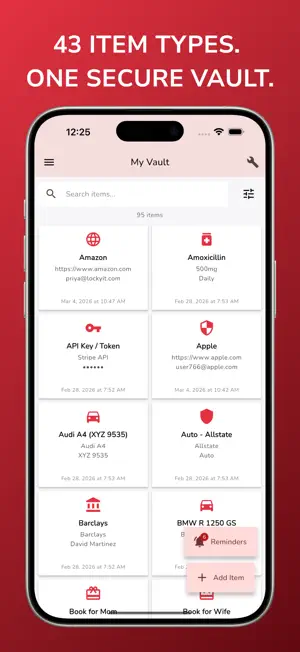
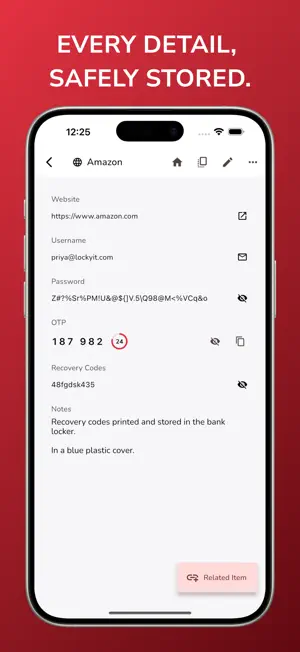
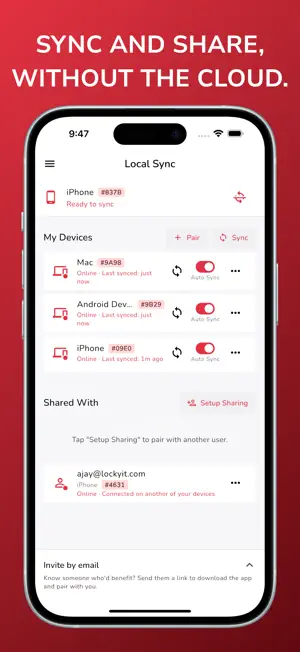
Own your digital life. On every device. Passwords, IDs, documents and more, encrypted in a vault that lives on your devices. Sync, share and back up without the cloud. Private by default. Connected when you choose. More than a password manager: one encrypted vault for your whole digital life. WHY LOCKYIT Most vaults keep your encrypted data on their servers, and that makes those servers a target. LockYit was built the other way around. Your vault is encrypted on your device, stored on your devices, and never kept on our servers. YOUR DOCUMENTS, ENCRYPTED Attach photos and documents to any item: a scan of your passport, the warranty for your laptop, your insurance card. • Encrypted on your device, file names included • Never passes through our servers • Syncs and shares along with its item • Up to 25 MB per file, as many files as you need AUTOMATIC BACKUP Lose your device, not your vault. Choose a folder once, such as a USB drive, an external disk, a memory card or a network folder, and LockYit keeps encrypted backups there for you. • Backs up when you make changes, daily or weekly • Keeps recent, daily and weekly copies • Goes straight to your folder, never to our servers • Restore your whole vault on a new device, files included SYNC AND SHARE WITHOUT THE CLOUD • Local Sync keeps your phone, tablet and computer in step over your own Wi-Fi, end-to-end encrypted • Local Sharing sends a single item to someone on the same network, with view or edit access MORE THAN PASSWORDS 43 item types, one vault: • Passwords, PINs and 2FA codes (work offline) • Passports, licences and IDs, with their scans • Bank accounts, cards, investments and insurance • Secure notes, tasks and reminders • API keys, server credentials and software licences • Devices, memberships and more SECURITY AND PRIVACY • AES-256-GCM encryption on your device • Zero-knowledge: only your master password unlocks your vault. We cannot see it. • Works fully offline after setup • Biometric unlock • No ads, no profiling, and no analytics or tracking code in the app • Export or delete your data on your terms FREE TO USE The vault, all 43 item types, Files and Automatic Backup are free, with unlimited items and devices. AVAILABLE IN 17 LANGUAGES English, French, German, Spanish, Italian, Hindi, Bengali, Gujarati, Kannada, Malayalam, Marathi, Nepali, Odia, Punjabi, Tamil, Telugu and Urdu. Your Data. Your Devices. Your Control.
What’s new
Version 1.3 · Updated October 23, 2026
LockYit 1.3 is a security release. It adds more protection to your account, your vault, Local Sync and Local Sharing, and makes the navigation menu simpler. Please update all your devices to 1.3. A device on 1.3 cannot sync or share with a device on 1.2 or earlier. That device shows as offline until it is updated. Ask the people you share with to update too. You do not need to pair again. MORE PROTECTION FOR YOUR ACCOUNT - Confirm it is you: a new master password, turning 2FA on or off, a new recovery key or deleting your account now asks for your master password again, and your 2FA code when 2FA is on. - A new master password, a 2FA change or a recovery signs out your other devices. Each device tells you why. - After too many wrong passwords or codes, LockYit shows a countdown before you can try again. Correct sign-ins never count. - Safer account recovery: the code from your email is no longer enough. Recovery also needs your recovery key, and your 2FA code when 2FA is on. - Verify your email before you turn on 2FA. Verify now is the first action in Settings > Account. - Clear Data on Device now also signs that device out of your account. - If your version of LockYit needs an update, the app tells you and takes you to the App Store. MORE PROTECTION ON YOUR IPHONE AND IPAD - Clear Clipboard: a copied password is cleared after 1 minute, or a time you choose, and when the vault locks. - Block Screenshots: your vault stays out of screenshots, and recordings and screen sharing show "Hidden while your screen is being recorded or shared" instead. On by default. - When the vault locks, LockYit removes your vault key from memory. - After 5 wrong master passwords, LockYit makes you wait before the next try. - The data LockYit keeps to find your items is now protected by your vault key. - LockYit no longer keeps an app log on your device. SAFER LOCAL SYNC AND LOCAL SHARING - Every transfer is signed. Your devices accept data only from the devices they paired with, and only once. - The 6-digit pairing code now proves both devices to each other, so no other device can get between them. - When you add a device, only your own devices show by name. Other people on the network cannot read those names. - Sharing setup shows the email and device of the other person. Check them before you enter the code. - Encrypted data copied onto another item, or an older copy of the same item, no longer opens. A SIMPLER NAVIGATION MENU - The button at the bottom of the menu now locks your vault. Logout is behind the arrow next to it. - Local Sync, Settings, Support and Lock are now one row of icons at the bottom of the menu, clear of the home bar. - The arrow next to Sync all has network help and Disable Local Sync. - App Title in Settings is now Device Name. You can also edit it with the pencil at the top of the Local Sync screen.
App privacy
The developer, TECHORION AI LLP, reported these privacy practices to Apple.
Data Not Linked to You
The following data, which may be collected but is not linked to your identity, may be used for the following purposes:
- Contact Info: Email Address
- Identifiers: User ID
- Diagnostics: Crash Data
Used for: Analytics, App Functionality
Alternatives to LockYit - Offline Secure Vault
Looking for apps like LockYit - Offline Secure Vault? Here are 6 similar apps on the App Store. The highest rated is AliasVault (4.9/5), and all 6 are free to download.
-
 SHIT: Attendance and Timetable
-
 Bramble: Password Manager
4.7
Bramble: Password Manager
4.7
-
 Qoob - Smart Search
4.8
Qoob - Smart Search
4.8
-
 AliasVault
4.9
AliasVault
4.9
-
 Netzilo Secure Browser
4.0
Netzilo Secure Browser
4.0
-
 Private Mind: Local AI
2.3
Private Mind: Local AI
2.3
| App | Rating | Price | Last updated | Compare |
|---|---|---|---|---|
| LockYit - Offline Secure Vault | – | Free | October 23, 2026 | |
| SHIT: Attendance and Timetable | – | Free | Sep 18, 2026 | Compare |
| Bramble: Password Manager | 4.7 / 5 (6) | Free | Oct 13, 2026 | Compare |
| Qoob - Smart Search | 4.8 / 5 (17) | Free | Oct 23, 2026 | Compare |
| AliasVault | 4.9 / 5 (11) | Free | Oct 15, 2026 | Compare |
| Netzilo Secure Browser | 4.0 / 5 (4) | Free | Oct 23, 2026 | Compare |
| Private Mind: Local AI | 2.3 / 5 (3) | Free | Oct 22, 2026 | Compare |