

Color Analysis - HueMe
Mathew Khairo Photo & Video iPhoneiPadiPod touch
Color Analysis - HueMe is a free Photo & Video app for iPhone and iPad by Mathew Khairo. Requires iOS 16.6. Updated June 2, 2026.
- Price
- Free
- on the App Store
- Size
- 216 MB
- Age 4+
- Updated
- Jun 2
- 2026 · v1.0.3
Screenshots
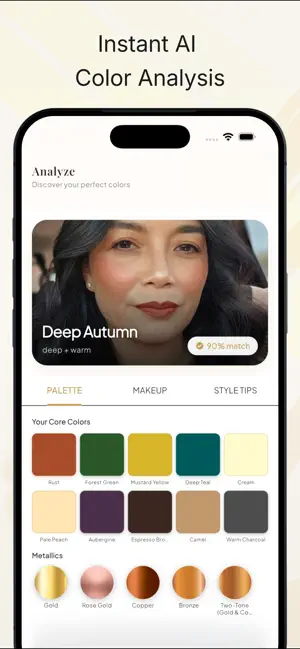


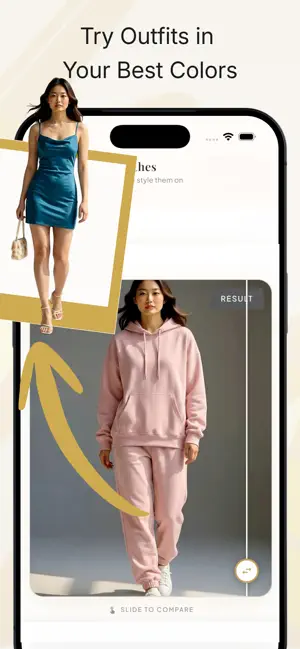
About Color Analysis - HueMe
Discover your best colors with AI-powered color analysis. HueMe scans your face, finds your seasonal palette, and lets you try realistic hair, makeup and outfits so you can see exactly what flatters you most. Stop guessing in front of the mirror or when shopping online. With HueMe, you get a personal color expert in your pocket, any time you need it. What HueMe does -Analyze your selfie to find your seasonal color palette -Show which shades of clothing, hair and makeup enhance your natural features -Let you try on looks virtually with highly realistic results -Help you make confident style and shopping decisions How it works 1. Take a quick selfie HueMe uses advanced AI and color science to analyze your skin tone, hair and eye color. 2. Get your seasonal palette See your best color family (like spring, summer, autumn or winter) and a curated palette of shades that work with your natural coloring. 3. Try realistic looks -Test different hair colors and styles on your own face -Apply makeup using a precise face mask for natural-looking results -Explore outfits in your colors with life-like lighting and textures 4. Save and use your palette anywhere Keep your palette handy for shopping, outfit planning and salon visits so you always stay within your best colors. Why people love HueMe -Clarity when shopping – quickly spot which clothes and accessories will suit you before you buy -Better hair and makeup choices – preview bold changes without the risk -Consistent style – build a wardrobe and beauty routine around colors that truly suit you -Fast and easy – no appointments, no color drapes, just your phone Built for realistic results HueMe uses high-quality AI rendering to keep your face structure and lighting natural while changing colors and styles. Hair, makeup and outfits look like real photos, not filters, so you can trust what you see. Free to start Begin with a free color analysis and explore your seasonal palette. Additional tools and advanced options may be available via in‑app purchases, so you can upgrade only if and when you need more. By using this app, you agree to the Apple Licensed Application End User License Agreement (https://www.apple.com/legal/internet-services/itunes/dev/stdeula/)
What’s new
Version 1.0.3 · Updated June 2, 2026
Performance improvements and bug fixes
App privacy
The developer, Mathew Khairo, reported these privacy practices to Apple.
Data Not Linked to You
The following data, which may be collected but is not linked to your identity, may be used for the following purposes:
- Contact Info: Email Address
- User Content: Photos or Videos
Used for: App Functionality
Alternatives to Color Analysis - HueMe
Looking for apps like Color Analysis - HueMe? Here are 6 similar apps on the App Store. The highest rated is Plinth – 3D Scanner for Art (5.0/5), and all 6 are free to download.
-
 Picoday
-
 Calibra Color Camera
-
 Hair Dresser - AI Style
-
 Plinth – 3D Scanner for Art
5.0
Plinth – 3D Scanner for Art
5.0
-
 Video Editor Master
5.0
Video Editor Master
5.0
-
 Image DPI Changer: 300 DPI
| App | Rating | Price | Last updated | Compare |
|---|---|---|---|---|
| Color Analysis - HueMe | – | Free | June 2, 2026 | |
| Picoday | – | Free | Mar 31, 2026 | Compare |
| Calibra Color Camera | – | Free | Jun 4, 2026 | Compare |
| Hair Dresser - AI Style | – | Free | Feb 3, 2026 | Compare |
| Plinth – 3D Scanner for Art | 5.0 / 5 (2) | Free | Oct 14, 2026 | Compare |
| Video Editor Master | 5.0 / 5 (1) | Free | Oct 9, 2026 | Compare |
| Image DPI Changer: 300 DPI | – | Free | Sep 5, 2026 | Compare |