

Plinth – 3D Scanner for Art
Plinth B.V. Photo & Video iPhoneiPadiPod touchMac
Plinth – 3D Scanner for Art is a free Photo & Video app for iPhone and iPad by Plinth B.V. Rated 5.0/5 from 2 ratings. Requires iOS 26.0.
- Rating
- 5.0
- 2 ratings
- Price
- Free
- on the App Store
- Size
- 99 MB
- Age 4+
- Updated
- Oct 14
- 2026 · v1.3
Screenshots
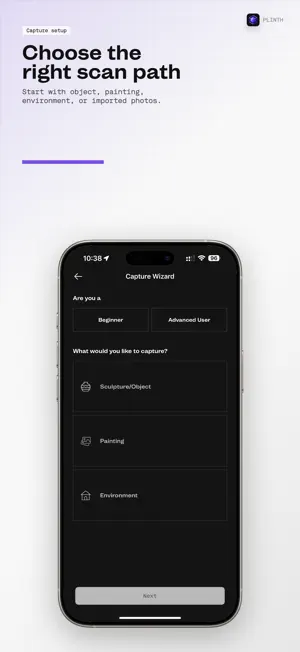


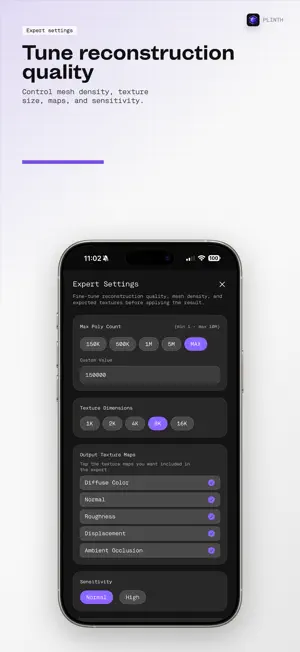
About Plinth – 3D Scanner for Art
Turn objects, artworks, and spaces into 3D assets with Plinth. Use guided capture or import photos and videos, review image quality, and choose photogrammetry or Gaussian Splatting workflows. • Capture up to 48 MP on supported iPhone Pro models. Resolution and file formats depend on your device and capture mode. • Review blur and exposure warnings before processing. • Inspect 3D and AR previews, adjust crop bounds, and export supported results in USDZ, GLB, or ZIP. • Export captured photos and metadata as a dataset for other 3D tools. On compatible devices with iOS/iPadOS 27, you can train Gaussian previews locally without a subscription. Gaussian Quick Scan automatically records images as you move around a stationary subject and requires LiDAR. Requires iOS/iPadOS 26 or later. Capture modes and local processing depend on compatible hardware. Uploading imported or Gaussian projects, cloud Gaussian training, and exporting on-device models require Professional access. Cloud processing is subject to your plan and available credits. Terms of Use (EULA): https://plinth.it/terms-of-service.html Privacy Policy: https://plinth.it/privacy-policy.html
What’s new
Version 1.3 · Updated October 14, 2026
• Optimized for iPhone Duo — Keep photo galleries and model controls comfortably arranged as you fold, unfold or rotate, with improved iPad and landscape layouts. • Improved Quick Scan training — Train Gaussian models on compatible iOS 27 LiDAR devices, watch a live preview, and use Keep Training to refine your result. • Clearer capture guidance — Follow distance, movement, side and height coverage indicators, with markers showing where photos were taken. • An easier first scan — Choose Gaussian Splat or Photos in the beginner guide, with local training starting after a supported Gaussian scan. • Keep your training progress — Pause and resume training, finish early, and optionally receive a reminder when training pauses in the background. • Keep your local model handy — View your on-device model after uploading, while cloud processing is running or if it fails. • Export your on-device model — With Professional access, export a trained Quick Scan model in SOG format for other Gaussian Splatting tools. • More consistent reconstruction settings — Correct custom quality defaults and texture selections, and show when a model’s unlock is already included. • Improved translations — More screens, settings, progress messages and errors follow your selected language. • Reliable tutorial playback — Fix capture guide videos that could appear black.
App privacy
The developer, Plinth B.V., reported these privacy practices to Apple.
Data Linked to You
The following data, which may be collected and linked to your identity, may be used for the following purposes:
- Identifiers: Device ID, User ID
- Usage Data: Product Interaction
- Diagnostics: Crash Data, Performance Data, Other Diagnostic Data
- Purchases: Purchase History
- Location: Precise Location, Coarse Location
- Contact Info: Email Address, Name
- User Content: Photos or Videos, Customer Support, Other User Content
- Surroundings: Environment Scanning
Used for: Analytics, App Functionality
Alternatives to Plinth – 3D Scanner for Art
Looking for apps like Plinth – 3D Scanner for Art? Here are 6 similar apps on the App Store. The highest rated is Augment - 3D Scanner App (5.0/5), and all 6 are free to download.
-
 TNF360
-
 Combine Videos: Meimo
-
 AI Image Generator
-
 Orbiar Scan – 3D Capture
-
 Calibra Color Camera
-
 Augment - 3D Scanner App
5.0
Augment - 3D Scanner App
5.0
| App | Rating | Price | Last updated | Compare |
|---|---|---|---|---|
| Plinth – 3D Scanner for Art | 5.0 / 5 (2 ratings) | Free | October 14, 2026 | |
| TNF360 | – | Free | Sep 21, 2026 | Compare |
| Combine Videos: Meimo | – | Free | Sep 15, 2026 | Compare |
| AI Image Generator | – | Free | May 15, 2026 | Compare |
| Orbiar Scan – 3D Capture | – | Free | Mar 10, 2026 | Compare |
| Calibra Color Camera | – | Free | Jun 4, 2026 | Compare |
| Augment - 3D Scanner App | 5.0 / 5 (1) | Free | Oct 1, 2025 | Compare |