

TranscribeEN: Video to Text
Dinesh Gurung Productivity iPhoneiPadiPod touch
TranscribeEN: Video to Text is a paid Productivity app for iPhone and iPad by Dinesh Gurung. Requires iOS 26.0. Updated January 29, 2026.
- Price
- 1.99 USD
- on the App Store
- Size
- 4 MB
- Age 4+
- Updated
- Jan 29
- 2026 · v0.3
Screenshots

About TranscribeEN: Video to Text
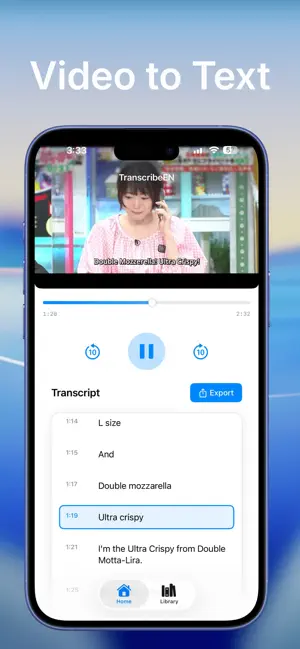
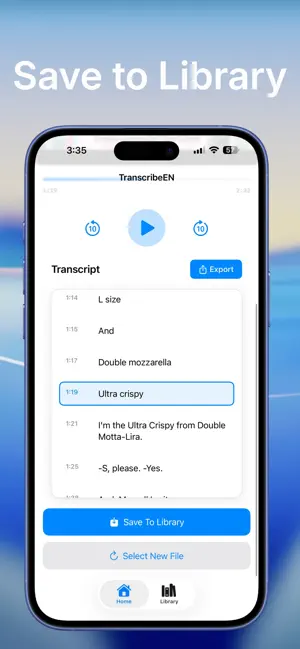
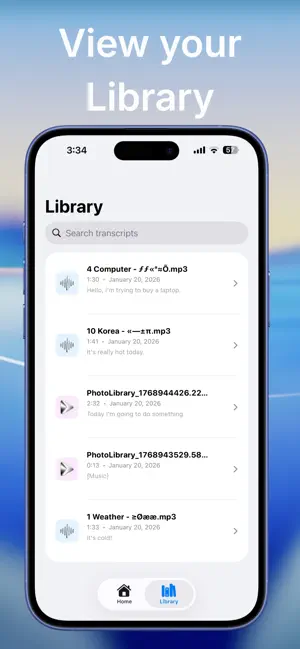
TranscribeEN converts audio and video in any language into accurate English text transcripts. Whether you're learning a new language, creating subtitles, or need to understand foreign media, TranscribeEN makes it easy. POWERFUL TRANSLATION & TRANSCRIPTION - Supports any language: Japanese, Korean, Spanish, Hindi, Arabic, French, German, Chinese, and more - Automatic language detection - Accurate English translation and transcription - On-device AI processing for privacy and offline use - Fast processing powered by advanced speech recognition PROFESSIONAL TRANSCRIPTION FEATURES - Real-time synchronized transcript highlighting - Word-level and segment-level synchronization - Clean, easy-to-read transcript display - Save transcripts to your library for later access MEDIA PLAYBACK CONTROLS - Watch video or listen to audio while reading English transcript - Play, pause, and skip controls - 10-second skip forward and backward - Seek to any point in your media - Background audio playback support FLEXIBLE EXPORT OPTIONS - Export as text files (.txt) for documents and notes - Export as SRT subtitle files for videos - Share transcripts via Messages, Mail, or any app - Perfect for YouTube subtitles, language study, or accessibility PERFECT FOR: - Language Learners - Understand foreign content in English - Content Creators - Add English subtitles to international videos - Students - Transcribe foreign language lectures and courses - Professionals - Translate international meetings and presentations - Accessibility - Make foreign media accessible in English SUPPORTED FILE FORMATS: Audio: MP3, M4A, WAV, AAC Video: MP4, MOV, M4V, AVI PRIVACY & SECURITY - All processing happens on your device - No cloud uploads or data sharing - Your files stay private and secure - Works completely offline after initial setup HOW IT WORKS: 1. Select an audio or video file from your device 2. TranscribeEN automatically detects the language 3. Watch or listen while reading the English transcript 4. Save to library or export as text/subtitles PROFESSIONAL QUALITY TranscribeEN uses state-of-the-art AI speech recognition technology (Whisper) to deliver accurate transcriptions. The app is designed for productivity with a clean, modern interface that makes transcription fast and easy. Whether you need to translate a Japanese podcast, add English subtitles to a Korean video, transcribe a Spanish lecture, or understand any foreign language content, TranscribeEN is your all-in-one solution.
What’s new
Version 0.3 · Updated January 29, 2026
-Added Settings Tab
App privacy
The developer, Dinesh Gurung, reported these privacy practices to Apple.
Data Not Collected
The developer does not collect any data from this app.
Alternatives to TranscribeEN: Video to Text
Looking for apps like TranscribeEN: Video to Text? Here are 6 similar apps on the App Store. The highest rated is Clip Flow: Snippet Manager (5.0/5), and all 6 are free to download.
-
 Clip Flow: Snippet Manager
5.0
Clip Flow: Snippet Manager
5.0
-
 DeviceScribe: Local AI Scribe
5.0
DeviceScribe: Local AI Scribe
5.0
-
 Wortlaut AI
-
 My Local Voice
5.0
My Local Voice
5.0
-
 Calmetric
5.0
Calmetric
5.0
-
 dfCal
5.0
dfCal
5.0
| App | Rating | Price | Last updated | Compare |
|---|---|---|---|---|
| TranscribeEN: Video to Text | – | 1.99 USD | January 29, 2026 | |
| Clip Flow: Snippet Manager | 5.0 / 5 (5) | Free | Oct 21, 2026 | Compare |
| DeviceScribe: Local AI Scribe | 5.0 / 5 (1) | Free | Jan 19, 2026 | Compare |
| Wortlaut AI | – | Free | Mar 17, 2026 | Compare |
| My Local Voice | 5.0 / 5 (1) | Free | Jan 22, 2026 | Compare |
| Calmetric | 5.0 / 5 (4) | Free | Oct 15, 2026 | Compare |
| dfCal | 5.0 / 5 (1) | Free | Apr 13, 2026 | Compare |