

dfCal
Ananda Theerthan Jagannathan Productivity iPhoneiPadiPod touch
dfCal is a free Productivity app for iPhone and iPad by Ananda Theerthan Jagannathan. Rated 5.0/5 from 1 ratings. Requires iOS 17.0. Updated April 13, 2026.
- Rating
- 5.0
- 1 ratings
- Price
- Free
- on the App Store
- Size
- 8 MB
- Age 4+
- Updated
- Apr 13
- 2026 · v1.9
Screenshots
About dfCal
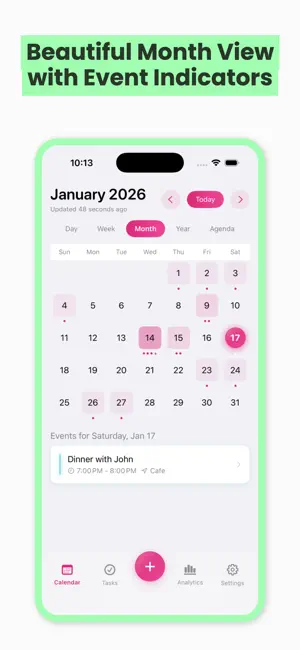
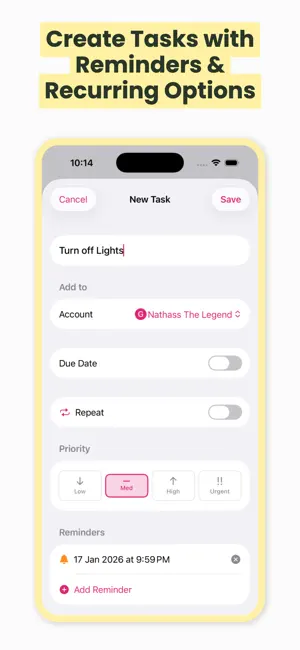
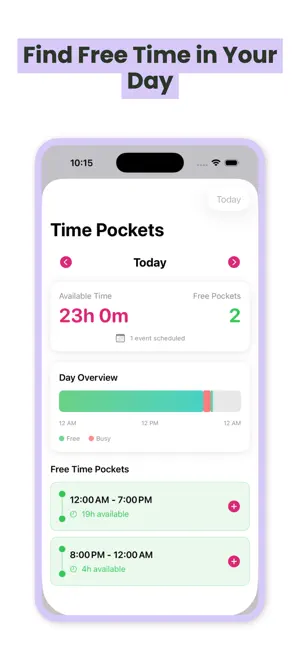
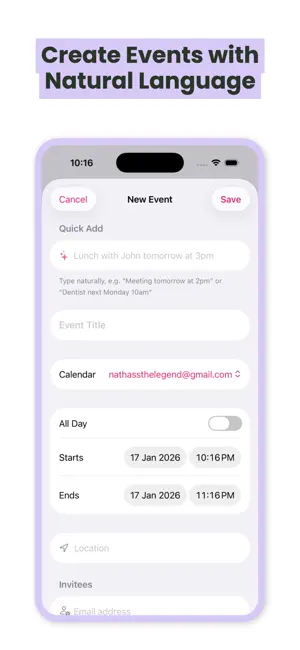
dfCal is the intelligent calendar app designed to help you take control of your schedule, boost productivity, and make the most of every day. SMART CALENDAR VIEWS - Beautiful month, week, and day views with event indicators - Seamless sync with Google Calendar and Microsoft Outlook - Quick natural language event creation — just type "Lunch with John tomorrow at 2pm" - Color-coded calendars to organize work, personal, and more FIND YOUR FREE TIME - Time Pockets automatically discovers available slots in your day - See exactly when you have 30 minutes, 1 hour, or more available - Never double-book again with visual day overview PRODUCTIVITY ANALYTICS - Track how you spend your time with detailed insights - See your productivity score and get personalized tips - Busiest hours chart to optimize your schedule - Weekly, monthly, and quarterly time audits SMART TASK MANAGEMENT - Create tasks with due dates, priorities, and reminders - Recurring tasks that automatically advance when completed - Priority levels from Low to Urgent with visual indicators - Sync tasks with Google Tasks POWERFUL TOOLS - Focus Timer for deep work sessions - Tally Counter for tracking habits and counts - Calendar Sets to quickly switch between work and personal views - Schedule Templates to block focus time automatically GOAL TRACKING - Set weekly goals for meetings and focus work - Track your progress toward time targets - Meeting cost calculator to understand the true cost of meetings BUILT FOR PRIVACY - Your data stays on your device - Secure OAuth authentication with Google and Microsoft - No tracking, no ads, just productivity Whether you're a busy professional, student, or anyone looking to optimize their time, dfCal gives you the tools to understand and improve how you spend each day. Download dfCal today and transform the way you manage your time.
What’s new
Version 1.9 · Updated April 13, 2026
Bug fixes to Google Tasks integration where the time was captured incorrectly during edit.
App privacy
The developer, Ananda Theerthan Jagannathan, reported these privacy practices to Apple.
Data Not Linked to You
The following data, which may be collected but is not linked to your identity, may be used for the following purposes:
- Usage Data: Product Interaction
- Diagnostics: Crash Data
Used for: Analytics, App Functionality
Alternatives to dfCal
Looking for apps like dfCal? Here are 6 similar apps on the App Store. The highest rated is Clip Flow: Snippet Manager (5.0/5), and all 6 are free to download.
-
 Clip Flow: Snippet Manager
5.0
Clip Flow: Snippet Manager
5.0
-
 Hourish: Routine Timer
-
 Calmetric
5.0
Calmetric
5.0
-
 DeviceScribe: Local AI Scribe
5.0
DeviceScribe: Local AI Scribe
5.0
-
 Levora: Resolution Tracker
-
 Ethos: Daily Habits To Do
5.0
Ethos: Daily Habits To Do
5.0
| App | Rating | Price | Last updated | Compare |
|---|---|---|---|---|
| dfCal | 5.0 / 5 (1 rating) | Free | April 13, 2026 | |
| Clip Flow: Snippet Manager | 5.0 / 5 (5) | Free | Oct 21, 2026 | Compare |
| Hourish: Routine Timer | – | Free | Feb 26, 2026 | Compare |
| Calmetric | 5.0 / 5 (4) | Free | Oct 15, 2026 | Compare |
| DeviceScribe: Local AI Scribe | 5.0 / 5 (1) | Free | Jan 19, 2026 | Compare |
| Levora: Resolution Tracker | – | Free | Jan 20, 2026 | Compare |
| Ethos: Daily Habits To Do | 5.0 / 5 (1) | Free | Jan 13, 2026 | Compare |
Compare dfCal with the top alternatives: ratings, updates, ASO score and keyword gaps →