

Devoro
Kaya Aykut Cesur Productivity iPhoneiPadiPod touch
Devoro is a free Productivity app for iPhone and iPad by Kaya Aykut Cesur. Rated 5.0/5 from 2 ratings. Requires iOS 16.4. Updated October 20, 2026.
- Rating
- 5.0
- 2 ratings
- Price
- Free
- on the App Store
- Size
- 100 MB
- Age 4+
- Updated
- Oct 20
- 2026 · v2.0.2
Screenshots


About Devoro
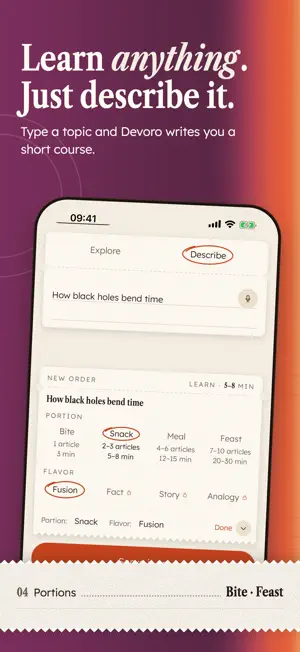
Replace your scroll with something worth your time. Devoro turns spare minutes into reading you actually remember: pick anything you're curious about, read it one word at a time, and finish with a quiz and a proper “Devoured.” Devoro uses RSVP (Rapid Serial Visual Presentation) to show text one word at a time at a single fixed point, with the key letter of each word highlighted. Your eyes stay put, your attention has one target, and it's easy to stay with the text. OPTIONAL: APP LOCK Want a push? Switch on App lock under your daily goal and choose the apps you open without thinking: social feeds, short videos, games. Until you've read today, opening one shows a “Read first” page instead, with the article you were in the middle of one tap away. Read a few minutes at your speed, hit your goal, and those apps open normally for the rest of the day. • Off unless you switch it on. In Normal mode you can pause it for the day or switch it off any time • Continue where you left off, or pick something new • Free locks 1 app. Premium locks up to 50, adds set hours and Strict mode • On iPhone, your picks stay on your phone, inside Apple's Screen Time framework LEARN Type any topic (philosophy, nutrition, how satellites work) and Devoro writes an article on it for you. Want more? Ask for a whole curriculum and work through it article by article. Choose your portion: Bite, Snack, Meal or Feast. Every article ends with a quiz that shows what stuck. READ Bring your own content. Paste a link, import a PDF or EPUB, drop in plain text, or share a link to Devoro from another app. Devoro does not bypass paywalls and only imports readable content you provide. PRACTICE Build your speed on ready-made articles across 15 topics, each followed by a quiz. With Premium you can earn speed certificates to keep and share. LOOK AND FEEL Devoro feels like a food magazine for your mind: cream paper, color-block cards and bold serif headlines. • Five themes, each in light and dark: Supper Club, Persimmon & Lilac, Tomato & Butter, Neapolitan, and Chili, Chartreuse & Aubergine • Set the app and the reader separately to Light, Dark or System • Four reader fonts: Lexend, Atkinson Hyperlegible Next, Reddit Sans Condensed and Lora • A daily reading goal in minutes or words, drawn as a plate that fills as you read • Cards take a bite as you make progress; finished items collapse into a Devoured row • A “Devoured.” screen with The bill: retention, correct answers, average speed, words and time FREE AND PREMIUM Free: read up to 600 WPM, and generate 2 AI articles and 2 curricula every week. Premium: read up to 1,500 WPM, with unlimited AI articles and curricula, a higher-quality learning model, multi-device sync and speed certificates. Available in 12 languages. Feed your mind. Terms of Service: https://devoro.app/en/terms/ Privacy Policy: https://devoro.app/en/privacy/
What’s new
Version 2.0.2 · Updated October 20, 2026
New, and optional: App lock. Read first, then scroll. Under App lock in Settings, set Lock apps to Off, Until goal or Always, and pick the apps you open without thinking. Until you've hit today's reading goal, opening one shows a “Read first” page instead, with your last read one tap away. With Until goal, they then open normally for the rest of the day. With Always, they open after a short nudge to read a bit more, and “Open anyway” lets you through for 15 minutes. • Set it up on the welcome screens or under App lock in Settings • In Normal mode, pause for today when you need to • Free locks 1 app. Premium locks more, adds set hours and Strict mode • Your picks stay on your phone Devoro 2.0: a whole new look, served fresh. • Five themes, each in light and dark: Supper Club, Persimmon Lilac, Tomato Butter, Neapolitan and Chili Chartreuse. • Light or dark for the app, and a separate choice for the reader. • A new Home: your daily goal on a plate and everything you're reading on the pass. • A “Devoured.” screen after every finish. • New read, redone: Learn, Read or Practice, set up on a pad of paper. • Choices are circled with a pen, and everything opens and closes smoothly. • A new app icon and launch animation. • New to Devoro? Try speed reading on the very first screen, set up in a few taps, and find your first reads already served on Home. Same fast reader. A lot more taste.
App privacy
The developer, Kaya Aykut Cesur, reported these privacy practices to Apple.
Data Not Collected
The developer does not collect any data from this app.
Alternatives to Devoro
Looking for apps like Devoro? Here are 6 similar apps on the App Store. The highest rated is WhisperAI: AI Speech to Text (5.0/5), and all 6 are free to download.
-
 Winston - Productivity & Focus
-
 Horizen - Year Planner
-
 WhisperAI: AI Speech to Text
5.0
WhisperAI: AI Speech to Text
5.0
-
 Kleta App
-
 Bulut Santral
-
 Screenshot Organizer - Visuel
4.0
Screenshot Organizer - Visuel
4.0
| App | Rating | Price | Last updated | Compare |
|---|---|---|---|---|
| Devoro | 5.0 / 5 (2 ratings) | Free | October 20, 2026 | |
| Winston - Productivity & Focus | – | Free | Sep 14, 2026 | Compare |
| Horizen - Year Planner | – | Free | Oct 5, 2026 | Compare |
| WhisperAI: AI Speech to Text | 5.0 / 5 (2) | Free | Oct 29, 2026 | Compare |
| Kleta App | – | Free | Oct 26, 2026 | Compare |
| Bulut Santral | – | Free | Nov 22, 2023 | Compare |
| Screenshot Organizer - Visuel | 4.0 / 5 (8) | Free | Oct 12, 2026 | Compare |
Compare Devoro with the top alternatives: ratings, updates, ASO score and keyword gaps →