

BillSwift
Wellington Mukahiwa Business iPhoneiPadiPod touch
BillSwift is a free Business app for iPhone and iPad by Wellington Mukahiwa. Rated 5.0/5 from 2 ratings. Requires iOS 17.0. Updated April 20, 2026.
- Rating
- 5.0
- 2 ratings
- Price
- Free
- on the App Store
- Size
- 3 MB
- Age 4+
- Updated
- Apr 20
- 2026 · v2.1.0
Screenshots



About BillSwift
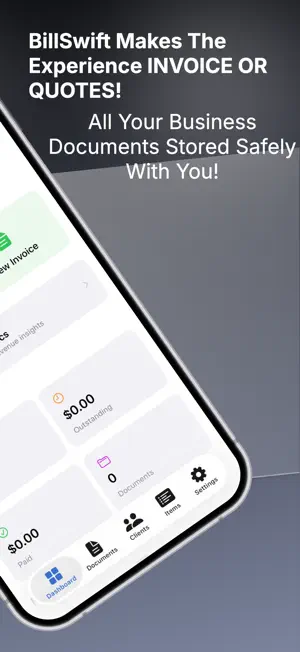
BillSwift is the fastest way to create professional quotes and invoices on your iPhone. Built for contractors, freelancers, and business owners who need to bill clients — without the complexity. QUOTE & INVOICE IN UNDER 30 SECONDS • Create, preview, and share a PDF in three taps • Save clients and items to reuse instantly • Convert accepted quotes to invoices with one tap • Works completely offline — no internet required 15 PROFESSIONAL PDF TEMPLATES • Classic, Modern, Minimal, Bold, Elegant, Executive, and more • Add your business logo and brand colors • Customize fonts, columns, headers, and layout • Include payment details, notes, and terms BUSINESS ANALYTICS DASHBOARD • Revenue trends, monthly income, and growth tracking • Document status breakdowns at a glance • Top clients ranked by revenue • Aging analysis for overdue invoices • Compare performance across multiple businesses MULTI-BUSINESS SUPPORT • Run multiple businesses from one app • Switch between profiles with a single tap • Documents stay linked to the right business • Clients and items shared across all profiles STAY ORGANIZED • Organize documents in custom folders • Track status: Draft, Sent, Accepted, Paid, Overdue • Search, filter, and sort your documents • Client insights with spending history and trends FULLY CUSTOMIZABLE • Multiple tax rules for different rates • Automatic document numbering with custom prefixes • Currency and date format options • Default terms and payment info per template YOUR DATA, YOUR DEVICE • All data stored locally — nothing leaves your phone • Optional iCloud sync across your Apple devices • Export and import your data anytime • No account required. No sign-up. No tracking. BillSwift respects your privacy. We collect zero data. Your invoices and client information never leave your device unless you choose to share them. Perfect for: • Freelancers and consultants • Contractors and tradespeople • Business owners • Anyone who needs to send professional invoices Download BillSwift and start billing like a pro.
What’s new
Version 2.1.0 · Updated April 20, 2026
BillSwift 2.1 is a major update packed with features you've been asking for. PAYMENT TRACKING Record full or partial payments on any invoice. See payment history, balance due, and payment methods at a glance. Swipe left on any invoice in your list to mark it as paid in one gesture. PAYMENT REMINDERS Never chase a payment again. BillSwift now sends you automatic reminders when invoices are coming due, on the due date, and when they're overdue. Tap the notification to confirm payment instantly — "Yes, Paid" or "Not Yet." We'll keep reminding you every 3 days until it's resolved. iCLOUD SYNC Your invoices, clients, and templates now sync across all your Apple devices. Enable it in Settings > Cloud. Your data stays in your personal iCloud — no third-party servers ever touch it. RECURRING INVOICES Set up automatic invoice generation for regular clients. Choose weekly, every 2 weeks, monthly, quarterly, or yearly. BillSwift generates the invoice and schedules payment reminders automatically. Perfect for retainers, subscriptions, and ongoing services. SMARTER EDITOR - Save button is now right in the toolbar — one tap, not buried in a menu - Document title field so you can name your invoices beyond just numbers - Unsaved changes protection — accidentally swipe to dismiss and we'll ask before discarding - Keyboard "Done" button on all number fields - Search in client and item pickers — find what you need instantly - Status picker now only shows valid transitions (no more setting a draft to "Overdue") MARK AS SENT After sharing a PDF, BillSwift asks if you want to update the status to Sent. One less step in your workflow. OVERDUE DASHBOARD The dashboard now shows each overdue invoice with client name, days overdue, balance due, and a "Mark Paid" button right there. No more digging through menus to resolve overdue invoices.
App privacy
The developer, Wellington Mukahiwa, reported these privacy practices to Apple.
Data Not Collected
The developer does not collect any data from this app.
Alternatives to BillSwift
Looking for apps like BillSwift? Here are 6 similar apps on the App Store. The highest rated is WrongPerson (5.0/5), and all 6 are free to download.
-
 WrongPerson
5.0
-
 SwiftInvoice AI
-
 MotoTrust
-
 Faarli for Agencies
-
 Vekta: Fleet Rental Manager
-
 ClientPay: Client Billing App
| App | Rating | Price | Last updated | Compare |
|---|---|---|---|---|
| BillSwift | 5.0 / 5 (2 ratings) | Free | April 20, 2026 | |
| WrongPerson | 5.0 / 5 (3) | Free | Sep 16, 2026 | Compare |
| SwiftInvoice AI | – | Free | Mar 23, 2026 | Compare |
| MotoTrust | – | Free | Oct 24, 2026 | Compare |
| Faarli for Agencies | – | Free | Oct 24, 2026 | Compare |
| Vekta: Fleet Rental Manager | – | Free | Oct 30, 2026 | Compare |
| ClientPay: Client Billing App | – | Free | Nov 1, 2026 | Compare |
Compare BillSwift with the top alternatives: ratings, updates, ASO score and keyword gaps →