

Mockup & Demo Maker: Screeny
Lazare Kolebka Developer Tools iPhoneiPadiPod touchMac
Mockup & Demo Maker: Screeny is a free Developer Tools app for iPhone and iPad by Lazare Kolebka. Rated 4.6/5 from 28 ratings. Requires iOS 26.0.
- Rating
- 4.6
- 28 ratings
- Price
- Free
- on the App Store
- Size
- 320 MB
- Age 4+
- Updated
- Oct 24
- 2026 · v2.0.1
Screenshots


About Mockup & Demo Maker: Screeny
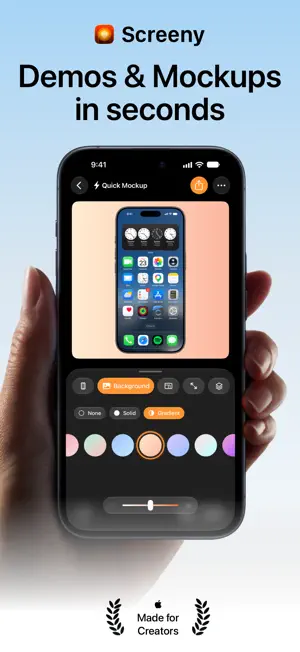
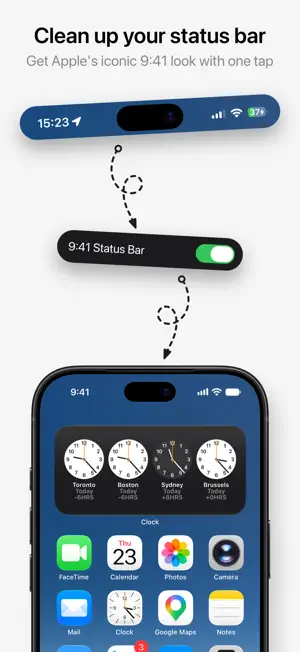
Put your app in a device frame in seconds. Screenshots for the App Store, posts for social, demo videos for your launch - in 2D or in real 3D. THE OLD WAY WAS SLOW Send the screenshot to a computer. Open a design tool. Hunt for the right bezel. Line it up. Mask the status bar by hand. Export at the right size. 15 minutes. Every single time. THE NEW WAY TAKES 3 SECONDS 1. Import your screenshot or screen recording 2. Pick your device 3. Export That's it. Status bar cleaned, frame applied, ready for your App Store page, your feed or your landing page. 2D OR 3D Flat and clean, or a real 3D device you turn with your finger. Show the front, the edge, even the back, and light it in one of five studios. Same screenshot, one tap apart. FOR YOUR APP STORE SCREENSHOTS Export the framed device with no background and drop it into Figma, Sketch or Keynote. Import up to 10 screenshots at once, style them together, and export the whole set in one tap. FOR SOCIAL Pick your ratio - 1:1, 4:5, 9:16, 16:9. Add a solid color, a gradient, your own photo, or one of thousands from Unsplash. Post it. CLEAN STATUS BAR, AUTOMATICALLY A polished screenshot shows 9:41, full signal, full battery - not 3:47, 23% and a recording indicator. One tap, and Screeny rebuilds a clean status bar while keeping the background behind it intact. On video, it does it on every single frame. EVERY DEVICE YOU NEED More than 40 frames in their real colors: iPhone 11 to iPhone 18 Pro, iPhone Air, iPhone Duo, every current iPad, MacBook, iMac and Studio Display. 21 of them in 3D. New devices the day they launch. MAKE IT MOVE Turn a screen recording into a demo video. In 3D, pick one of 13 camera moves - Sweep, Settle, Tumble, Showcase - and your app moves like a keynote. In 2D, drop a keyframe and zoom on the tap that matters. Screenshots animate too: add a move to a still and it exports as a video. Want your own shot? Turn the device at any moment on the timeline and Screeny records the pose. IPHONE DUO, OPENING AND CLOSING The foldable gets its own animations. Open it, close it, stand it like a tent or sit it like a laptop. Each display takes its own screenshot. PROJECTS: PICK UP WHERE YOU LEFT OFF A project keeps your media, your settings and your animation. Projects live in iCloud Drive, so they sync across iPhone, iPad and Mac, and you can sort them into folders, right in the Files app. In a hurry? The Quick Mockup is always there: drop in a screenshot, export, done. Like where it's going? Save it as a project. ON MAC, YOUR AI AGENT CAN DRIVE IT Screeny for Mac is a fully native app with a built-in MCP server. Connect Claude Code, Cursor or Codex and ask for your mockups in plain language. It runs locally, on folders you approve. YOUR JAR COLLECTION Every export drops a marble in your jar - 1 for a photo, 3 for a video. PRIVATE BY DEFAULT No cloud upload, no server processing. Every frame is rendered on your own device. PRICING Start with 10 free credits - 1 per image, 3 per video, same price in 3D. No watermark, ever. Then: a credit pack for occasional use, monthly or yearly for unlimited, or Lifetime - one payment, forever, across all your devices. Made by one indie developer who thought a great mockup shouldn't take an afternoon in Photoshop. - Lazare Privacy: https://getscreeny.app/privacy Terms: https://getscreeny.app/terms/
Ratings & reviews
4.6
28 ratings
What’s new
Version 2.0.1 · Updated October 24, 2026
Screeny 2.0 is the biggest update yet: real 3D devices, 3D animation, Projects and a brand new UI. 3D MODELS ARE HERE iPhone, iPad and Mac, rendered in real 3D. Drag to spin the device, tilt it, and frame it the way you want. iPhone 18 Pro and iPhone Duo included. 3D ANIMATIONS Drop in a camera move like Sweep or Settle, or build your own on the timeline. It works on screen recordings and on screenshots. ZOOM BECOMES SCENE In 3D, pick one of five studios, then dial in the lens and the angle of the light. IPHONE DUO, IN MOTION The foldable has its own animations. Show it opening, closing, standing or sitting. PROJECTS ARE HERE Save your work and pick it back up later. Projects sync through iCloud Drive across iPhone, iPad and Mac, and you can organize them in folders. QUICK MOCKUP Still just need one fast export? Drop in a screenshot and go. Save it as a project if you want to keep it. NEW UI Simpler, with more room for your mockup. Every tool is one tap away, and steps aside when you're done. ALSO NEW - Export video at 60 or 30 fps, and cancel a render any time - Short video guides in Settings - Screeny for Mac is now a fully native Mac app - Lazare
App privacy
The developer, Lazare Kolebka, reported these privacy practices to Apple.
Data Not Linked to You
The following data, which may be collected but is not linked to your identity, may be used for the following purposes:
- Purchases: Purchase History
- Identifiers: Device ID, User ID
- Usage Data: Product Interaction
Used for: Analytics, App Functionality
Alternatives to Mockup & Demo Maker: Screeny
Looking for apps like Mockup & Demo Maker: Screeny? Here are 6 similar apps on the App Store. The highest rated is Protato: 3D Mockup Generator (5.0/5), and all 6 are free to download.
-
 Protato: 3D Mockup Generator
5.0
Protato: 3D Mockup Generator
5.0
-
 Toplify: App Rankings
4.4
Toplify: App Rankings
4.4
-
 Screenfully: App Demo Creator
5.0
Screenfully: App Demo Creator
5.0
-
 AppScout: App Metrics
5.0
AppScout: App Metrics
5.0
-
 brrr • send push notifications
4.5
brrr • send push notifications
4.5
-
 Appstead: App Sales Dashboard
5.0
Appstead: App Sales Dashboard
5.0
| App | Rating | Price | Last updated | Compare |
|---|---|---|---|---|
| Mockup & Demo Maker: Screeny | 4.6 / 5 (28 ratings) | Free | October 24, 2026 | |
| Protato: 3D Mockup Generator | 5.0 / 5 (1) | Free | Sep 17, 2026 | Compare |
| Toplify: App Rankings | 4.4 / 5 (24) | Free | Oct 3, 2026 | Compare |
| Screenfully: App Demo Creator | 5.0 / 5 (3) | Free | Aug 18, 2026 | Compare |
| AppScout: App Metrics | 5.0 / 5 (9) | Free | Oct 30, 2026 | Compare |
| brrr • send push notifications | 4.5 / 5 (15) | Free | Aug 10, 2026 | Compare |
| Appstead: App Sales Dashboard | 5.0 / 5 (6) | Free | Oct 20, 2026 | Compare |