

Screenfully: App Demo Creator
Amir Fahd Hadji Usop Developer Tools iPhoneiPadiPod touch
Screenfully: App Demo Creator is a free Developer Tools app for iPhone and iPad by Amir Fahd Hadji Usop. Rated 5.0/5 from 3 ratings. Requires iOS 16.6.
- Rating
- 5.0
- 3 ratings
- Price
- Free
- on the App Store
- Size
- 103 MB
- Age 4+
- Updated
- Aug 18
- 2026 · v1.8.0
Screenshots



About Screenfully: App Demo Creator
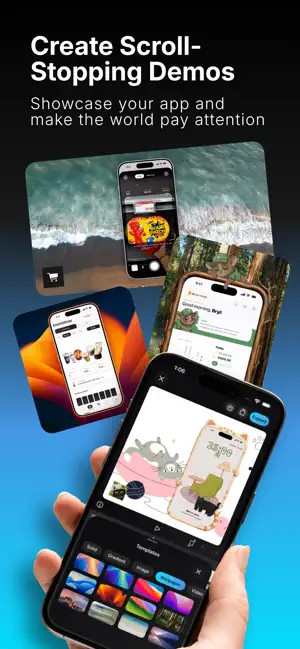
Screenfully is the fastest way to turn raw mobile screen recordings into polished app demos. Record, import, edit, style, and export high-quality videos and screenshots in one mobile workflow, with no desktop tools required. Built for developers, founders, creators, and product teams who need clean, professional app content fast. FEATURES Record or Import in Seconds • Capture your screen with optional microphone audio • Import videos directly from Photos • Jump straight into editing from your library or recorder flow Powerful Mobile Editor • Precise trim controls with timeline ruler and live scrubbing • Undo and redo support across major editing actions • Smoother playback and timeline behavior for reliable edits • Zoom controls with multiple motion styles (Default, Smooth, Snappy, Ease In, Ease Out) Professional Templates & Styling • Ready-made templates for fast, polished output • Solid colors, gradients, image backgrounds, and wallpapers • Device frames with expanded iPhone color options • Blur and shadow controls for depth and focus Screenshot Studio • Create high-resolution screenshots for product pages, social posts, and docs • Crop, adjust padding, corner radius, backgrounds, and frames • Improved preview/export alignment for accurate final output Export Built for Distribution • Aspect ratios for vertical, horizontal, square, and more • Resolution controls with HD export options • Reliable export flow with dedicated result screens • Save to Photos/Files and share to your social and work channels Privacy-First & On-Device • Processing stays on your device • No account required • No cloud upload needed • Works offline SCREENFULLY PRO Unlock the full experience: • All Pro templates • All Pro device frames • All Pro aspect ratios • Custom color backgrounds • Custom gradient backgrounds • Custom image backgrounds • Zoom controls • 1080p, 2K and 4K exports • 30, 50 and 60 FPS exports • Remove watermark Subscriptions renew automatically unless canceled in App Store settings. Pricing may vary by region. WHO IT’S FOR Screenfully is built for people who work with mobile apps: • Developers: feature demos, bug reports, release previews • Founders: launches, updates, walkthroughs • Product teams: onboarding and UI showcases • Support teams: fast how-to guides • Creators: tutorials, reviews, social content CONTACT & LEGAL Terms of Service — https://screenfully.app/terms Privacy Policy — https://screenfully.app/privacy Contact Us Any questions about Screenfully? We’d love to hear from you. Email: [email protected] Follow Screenfully for updates, tips, and examples of mobile app demos: • X (Twitter): https://x.com/screenfullyapp • Threads: https://www.threads.com/@screenfullyapp • Instagram: https://www.instagram.com/screenfullyapp • TikTok: https://www.tiktok.com/@screenfullyapp • YouTube: https://www.youtube.com/@screenfullyapp
What’s new
Version 1.8.0 · Updated August 18, 2026
What’s New in 1.8.0: • Added generated 9:41 status bars, custom device frames, recent backgrounds, and more precise background/image adjustment tools • Added audio tools for importing, trimming, placing, adjusting volume, and deleting audio tracks in the editor • Added transparent PNG export with a no-background option for cleaner image exports • Improved timeline behavior, playback speed controls, tool ordering, and editor precision across video and screenshot flows • Improved project saving, presets, undo/redo, auto-save, layer ordering, and overall editor reliability • Improved overall app performance Thanks for using Screenfully.
App privacy
The developer, Amir Fahd Hadji Usop, reported these privacy practices to Apple.
Data Not Linked to You
The following data, which may be collected but is not linked to your identity, may be used for the following purposes:
- Identifiers: User ID, Device ID
- Usage Data: Product Interaction
- Diagnostics: Crash Data
Used for: Analytics
Alternatives to Screenfully: App Demo Creator
Looking for apps like Screenfully: App Demo Creator? Here are 6 similar apps on the App Store. The highest rated is Protato: 3D Mockup Generator (5.0/5), and all 6 are free to download.
-
 Protato: 3D Mockup Generator
5.0
-
 Toplify: App Rankings
4.4
-
 Mockup & Demo Maker: Screeny
4.7
-
 Orca IDE
4.7
-
 Supanator: Supabase Manager
4.8
-
 Rev for Vercel
4.4
| App | Rating | Price | Last updated | Compare |
|---|---|---|---|---|
| Screenfully: App Demo Creator | 5.0 / 5 (3 ratings) | Free | August 18, 2026 | |
| Protato: 3D Mockup Generator | 5.0 / 5 (1) | Free | Sep 17, 2026 | Compare |
| Toplify: App Rankings | 4.4 / 5 (24) | Free | Oct 3, 2026 | Compare |
| Mockup & Demo Maker: Screeny | 4.7 / 5 (29) | Free | Oct 24, 2026 | Compare |
| Orca IDE | 4.7 / 5 (65) | Free | Oct 30, 2026 | Compare |
| Supanator: Supabase Manager | 4.8 / 5 (24) | Free | Oct 27, 2026 | Compare |
| Rev for Vercel | 4.4 / 5 (91) | Free | Sep 10, 2026 | Compare |