

My Envelopes
Vinicius Lara Finance iPhoneiPadiPod touch
My Envelopes is a free Finance app for iPhone and iPad by Vinicius Lara. Rated 5.0/5 from 2 ratings. Requires iOS 18.5. Updated September 17, 2026.
- Rating
- 5.0
- 2 ratings
- Price
- Free
- on the App Store
- Size
- 23 MB
- Age 17+
- Updated
- Sep 17
- 2026 · v1.6.10
Screenshots

About My Envelopes
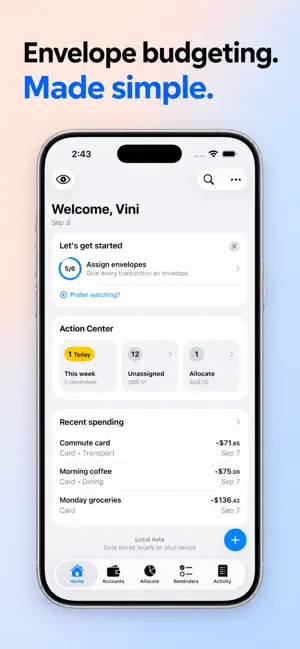
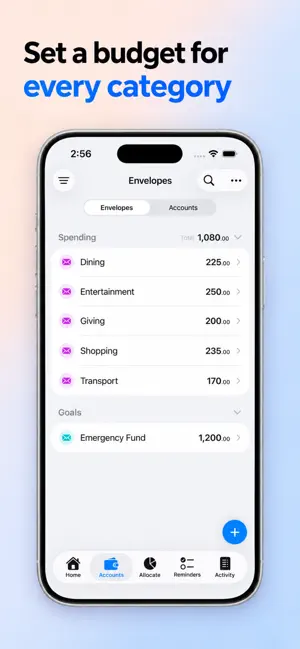
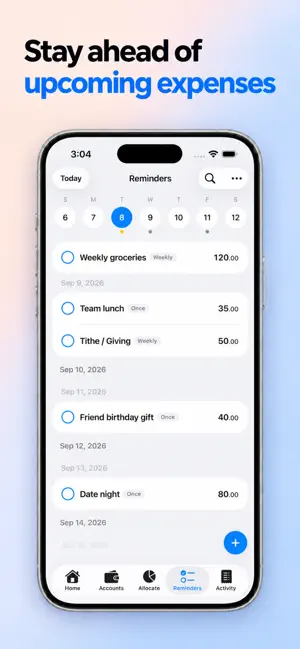
A simple budgeting system that works in real life. Know where your money is, where it goes, and what’s available to spend. My Envelopes helps you set clear spending limits, save toward your goals, and adjust your plan as life changes. Get started with a straightforward method: 1. Create envelopes for spending limits and savings goals. 2. Allocate your income to your envelopes. 3. Record your spending and assign each expense to an envelope. 4. Review your balances and adjust your plan as needed. Clear limits, visible progress, and more peace of mind. Start with a free plan Get started with up to 2 accounts and 8 envelopes, with data stored locally on your device. Upgrade when you need more, including cloud sync with Personal or shared workspaces with Team. Main features: - Spending envelopes for everyday limits and goal envelopes with savings targets. - Income allocation with a history of past allocations. - Transactions with notes, status, and quick edits. - Transfers between accounts and between envelopes. - Tools to identify spending that hasn’t been assigned to an envelope. - Bill reminders with recurring schedules and a calendar view. - An overview of spending, balances, and upcoming reminders. - Transaction search and filters. - Restore deleted transactions from Trash and review change history. - Local storage, cloud sync, and shared workspaces, depending on your plan. Subscriptions: - Payment is charged to your Apple ID at confirmation of purchase. - Subscriptions auto-renew unless canceled at least 24 hours before the end of the current period. - Your account is charged for renewal within 24 hours before the end of the current period. - Manage or cancel anytime in your App Store subscription settings. Support: - In-app user guide is available to all users. - Support: https://support.myenvelopes.app Privacy Policy: https://myenvelopes.app/privacy Terms of Service: https://myenvelopes.app/terms Terms of Use (EULA): https://www.apple.com/legal/internet-services/itunes/dev/stdeula/
What’s new
Version 1.6.10 · Updated September 17, 2026
We re-recorded the Basics video series on YouTube, and this version lines up with it. Tap Get Started on the Home screen to watch: short, practical lessons that walk through real examples of Accounts, Envelopes, allocating money, tracking spending, reminders, and transfers. Also in this version: • Cleaner amounts: balances and transactions now show just the number, with no currency symbol, everywhere in the app. • Reminder notifications: if you tap "Not now" or swipe the notification prompt away, it waits a day before asking again instead of never asking at all. • Get Started: "Create reminders" now opens Add Reminder after the notification prompt, instead of closing it before you can answer.
App privacy
The developer, Vinicius Lara, reported these privacy practices to Apple.
Data Linked to You
The following data, which may be collected and linked to your identity, may be used for the following purposes:
- Identifiers: User ID
- Usage Data: Product Interaction, Other Usage Data
- Diagnostics: Other Diagnostic Data, Crash Data
- Financial Info: Other Financial Info
- Contact Info: Email Address
- User Content: Other User Content
Used for: Analytics, App Functionality
Alternatives to My Envelopes
Looking for apps like My Envelopes? Here are 6 similar apps on the App Store. The highest rated is Secure Budget (5.0/5), and all 6 are free to download.
-
 Truly Simple Envelopes
-
 Budget Envelope
4.0
Budget Envelope
4.0
-
 Secure Budget
5.0
Secure Budget
5.0
-
 Budget Envelope Planner: Pla
-
 Budget Daily
5.0
Budget Daily
5.0
-
 Tuck - Sinking Funds
| App | Rating | Price | Last updated | Compare |
|---|---|---|---|---|
| My Envelopes | 5.0 / 5 (2 ratings) | Free | September 17, 2026 | |
| Truly Simple Envelopes | – | Free | May 27, 2026 | Compare |
| Budget Envelope | 4.0 / 5 (1) | Free | Mar 12, 2026 | Compare |
| Secure Budget | 5.0 / 5 (2) | Free | May 28, 2026 | Compare |
| Budget Envelope Planner: Pla | – | Free | Jul 9, 2026 | Compare |
| Budget Daily | 5.0 / 5 (1) | Free | Jan 7, 2026 | Compare |
| Tuck - Sinking Funds | – | Free | Jul 21, 2026 | Compare |
Compare My Envelopes with the top alternatives: ratings, updates, ASO score and keyword gaps →