

Money Tracker: My Financials
RJ Software LLC Finance iPhoneiPadiPod touchMac
Money Tracker: My Financials is a free Finance app for iPhone and iPad by RJ Software LLC. Rated 5.0/5 from 1 ratings. Requires iOS 18.6.
- Rating
- 5.0
- 1 ratings
- Price
- Free
- on the App Store
- Size
- 64 MB
- Age 4+
- Updated
- Oct 24
- 2026 · v1.1.6
Screenshots
About Money Tracker: My Financials
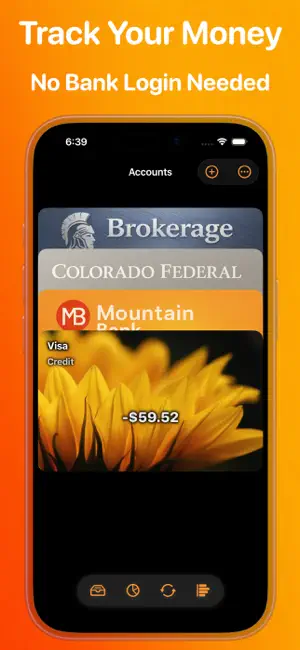
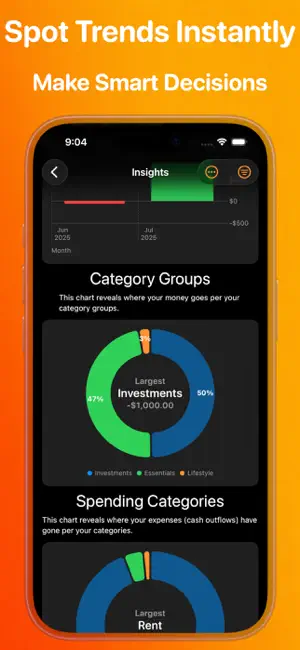
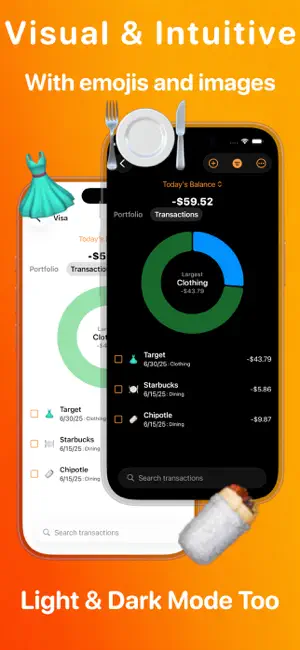
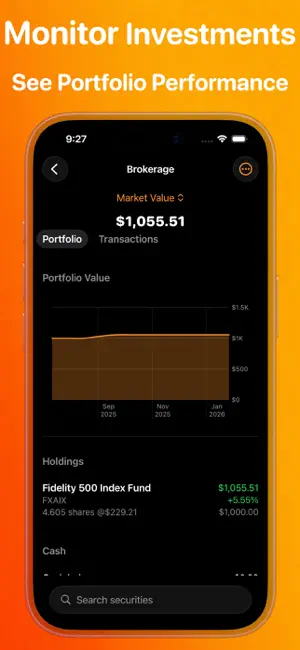
Take control of your budget, spending, investments, and net worth in one personal finance app for iPhone, iPad, and Mac—without sharing bank logins or using third-party servers. My Financials combines an expense tracker, budget planner, checkbook register, and investment tracker in one intuitive money manager. Powerful financial management with familiar Apple simplicity. Capture Apple Pay transaction details using Shortcuts, or enter receipts with Siri—without connecting bank accounts. Keep your financial data private, portable, and under your control. Why My Financials? --------------------- Your Complete Financial Picture • Track net worth, account transactions, balances, and spending trends. • Manage checking, savings, credit cards, loans, investments, and other assets. • Track stocks, bonds, mutual funds, and portfolios. • Understand your finances with insightful charts and reports. Budget Your Way • Create traditional or zero-based budgets. • Organize spending with customizable category groups. • Track expenses against your budget. • Plan around recurring income, bills, and transactions. Smart Receipts: Less Typing, More Control • Capture Apple Pay details with a configured Shortcuts Transaction automation. • Review captured transactions in your Receipts inbox. • Confirm and add transactions to your accounts with a tap. • Capture transactions from text messages with Shortcuts. • Use Siri for convenient receipt entry. • Access receipts on your Apple devices through iCloud. Less typing. No bank credentials. Initial Shortcuts setup required. Familiar Apple Simplicity • Navigate with familiar Apple-style interactions. • Use a consistent interface on iPhone, iPad, and Mac. • Sync automatically with iCloud on devices signed into the same Apple Account — no sync setup required. • Choose a classic account list or visual Wallet mode. • Recognize transactions at a glance with category emojis and payee images. • Personalize accounts with custom images. Privacy Without Compromise • No bank credentials required. • No financial data scraping or third-party aggregators. • Your data stays on your devices and in your iCloud account. • No tracking or advertising-based data collection. Your Data. Your Freedom. Your financial history should never be locked inside an app. • Import and export financial records using a documented, open CSV format. • Back up accounts, transactions, budgets, investments, and more. • Restore data or use CSV files in Apple Numbers and other tools. • Avoid proprietary data lock-in. Built for Real Life • Transfers between accounts. • Portfolio tracking. • Multi-currency support. • Recurring income and bill management. • Flexible budgets and financial reports. One App. All Your Apple Devices. One purchase includes iPhone, iPad, and Mac. Start with a free trial, then choose either a subscription or a one-time lifetime purchase. The choice is yours. A Clearer Financial Future Starts Here From daily expenses to long-term net worth, see where you stand. Go beyond budgeting with a complete picture of your finances, helping you make confident decisions. Take control. Reduce stress. Understand your finances. Download My Financials today! Watch a 60-second tour at https://myfinancials.app Pricing --------------------- Start with a free trial. Unlock all features with a subscription or one-time lifetime purchase. Your payment will be charged to your Apple Account once you confirm your purchase. Subscriptions renew automatically unless auto-renewal is turned off at least 24 hours before the end of the current period. You can manage or cancel your subscription in your Apple Account Settings. Any unused portion of a free trial period, if offered, will be forfeited when you purchase a subscription, where applicable. Legal --------------------- Terms of Service: https://myfinancials.app/termsofservice.html Privacy Policy: https://myfinancials.app/privacy.html
What’s new
Version 1.1.6 · Updated October 24, 2026
v1.1.6 - New Feature: Duo Mode - You can have both wallet mode and classic mode at the same time! And of course, they’re better together. On the iPhone Duo you have the option in the settings to now turn on Duo Mode after selecting Wallet Mode. This setting allow you to have Wallet mode on the outer display of your device and, when you open it fully, you’ll have Classic mode on the interior display of the device! And of course you’ll have beautiful transitions in between.
App privacy
The developer, RJ Software LLC, reported these privacy practices to Apple.
Data Not Collected
The developer does not collect any data from this app.
Alternatives to Money Tracker: My Financials
Looking for apps like Money Tracker: My Financials? Here are 6 similar apps on the App Store. The highest rated is Starmingo (5.0/5), and all 6 are free to download.
-
 Starmingo
5.0
Starmingo
5.0
-
 Unicorn Money
5.0
Unicorn Money
5.0
-
 Pennies-AI
5.0
Pennies-AI
5.0
-
 Money Guard: Spend Smart
-
 Kova: Money Made Simple
5.0
Kova: Money Made Simple
5.0
-
 Babil: Money & Work Tracker
5.0
Babil: Money & Work Tracker
5.0
| App | Rating | Price | Last updated | Compare |
|---|---|---|---|---|
| Money Tracker: My Financials | 5.0 / 5 (1 rating) | Free | October 24, 2026 | |
| Starmingo | 5.0 / 5 (1) | Free | Aug 10, 2026 | Compare |
| Unicorn Money | 5.0 / 5 (1) | Free | Jun 27, 2026 | Compare |
| Pennies-AI | 5.0 / 5 (1) | Free | Oct 19, 2026 | Compare |
| Money Guard: Spend Smart | – | Free | Mar 31, 2026 | Compare |
| Kova: Money Made Simple | 5.0 / 5 (3) | Free | Oct 21, 2026 | Compare |
| Babil: Money & Work Tracker | 5.0 / 5 (1) | Free | Aug 13, 2026 | Compare |