

Shuttery: RAW Photo Culler
Dawid Mazur Photo & Video iPadMac
Shuttery: RAW Photo Culler is a free Photo & Video app for iPad and Mac by Dawid Mazur. Requires iOS 17.0. Updated September 4, 2026.
- Price
- Free
- on the App Store
- Size
- 6 MB
- Age 4+
- Updated
- Sep 4
- 2026 · v1.0
Screenshots

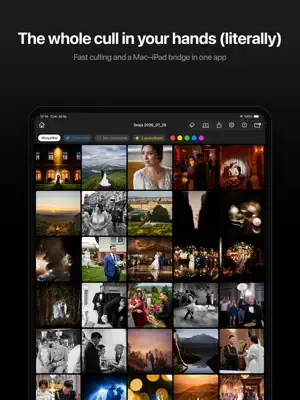


About Shuttery: RAW Photo Culler
Cull your photos wherever you actually want to sit. Shuttery for iPad is the second half of your workstation. The originals stay on the drive next to your computer while you review and rate on the sofa, on the road or on location — full-resolution previews, real focus checking at 100%, and ratings that travel back to your Mac with a single tap. FULL-RESOLUTION PREVIEWS, REAL FOCUS CHECKING Previews carry your camera's full resolution, not thumbnails. Zoom to 100% and you see exactly what you would see on the computer, so you can judge critical focus on the sofa as confidently as at your desk. A whole shoot takes a fraction of the space of the originals — a dozen jobs fit on the iPad at once. THE RATING SYSTEM YOU ALREADY USE Five colours and five stars — the same set you use in Lightroom, Capture One and Photo Mechanic. Swipe up to apply a mark, swipe down to remove it. You choose what the swipe does: any colour or any number of stars. In the grid, press and hold a frame to start selecting, then rate dozens of photos in one move. Every action can be undone in full, with one tap. RATINGS GO BACK WHERE THEY BELONG Shuttery writes ratings to XMP sidecar files next to the originals, in the standard that Lightroom, Capture One and Photo Mechanic read. Nothing to retype, nothing to export: open your catalogue on the computer and the selection is already there. WORKS WITH SHUTTERY FOR MAC If you have Shuttery on your Mac, the two apps talk to each other over your own Wi-Fi network or a USB-C cable. One click on the computer and the session appears on the iPad. Rate in the evening; in the morning the ratings are on the Mac and visible in your catalogue. Nothing travels through the internet or anyone else's server — the data goes straight from your computer to your iPad. One subscription covers both platforms: buy once, use it on Mac and iPad. WORKS ON ITS OWN TOO You do not need a computer to get started. Open a folder from the Files app or a card reader, review the images, rate them and send the ratings onwards. Shuttery reads JPEG, HEIC, PNG and TIFF. SUPPORTED FORMATS JPEG, HEIC, HEIF, PNG, TIFF, and session previews prepared in Shuttery for Mac. SHUTTERY PRO The free version lets you rate 30 photos — enough to find out whether this way of working suits you. A PRO subscription removes the limit and unlocks session and rating exchange with Shuttery for Mac. The subscription renews automatically and can be cancelled at any time in your Apple account settings. Terms: https://shuttery.pl/terms Privacy: https://shuttery.pl/privacy
App privacy
The developer, Dawid Mazur, reported these privacy practices to Apple.
Data Linked to You
The following data, which may be collected and linked to your identity, may be used for the following purposes:
- Contact Info: Email Address
- User Content: Other User Content
- Diagnostics: Other Diagnostic Data
Used for: App Functionality
Alternatives to Shuttery: RAW Photo Culler
Looking for apps like Shuttery: RAW Photo Culler? Here are 6 similar apps on the App Store. The highest rated is TG RAW Photo (5.0/5), and 5 of the 6 are free to download.
-
 Remote Photo Organizer
-
 TG RAW Photo
5.0
-
 Cull: Photo Picker
-
 CullKit: NAS Photo Cull & Rate
-
 PhotoCuller Mobile
5.0
-
 PhotoCull
1.0
| App | Rating | Price | Last updated | Compare |
|---|---|---|---|---|
| Shuttery: RAW Photo Culler | – | Free | September 4, 2026 | |
| Remote Photo Organizer | – | Free | Mar 25, 2026 | Compare |
| TG RAW Photo | 5.0 / 5 (1) | 2.99 USD | Feb 10, 2026 | Compare |
| Cull: Photo Picker | – | Free | Oct 2, 2026 | Compare |
| CullKit: NAS Photo Cull & Rate | – | Free | Sep 16, 2026 | Compare |
| PhotoCuller Mobile | 5.0 / 5 (4) | Free | Oct 7, 2026 | Compare |
| PhotoCull | 1.0 / 5 (1) | Free | Jun 10, 2025 | Compare |