

SafeCalc+ Private Album
faizahmad dae Photo & Video iPhoneiPadiPod touch
SafeCalc+ Private Album is a free Photo & Video app for iPhone and iPad by faizahmad dae. Rated 5.0/5 from 3 ratings. Requires iOS 16.0.
- Rating
- 5.0
- 3 ratings
- Price
- Free
- on the App Store
- Size
- 44 MB
- Age 4+
- Updated
- Oct 27
- 2026 · v3.2.0
Screenshots


About SafeCalc+ Private Album
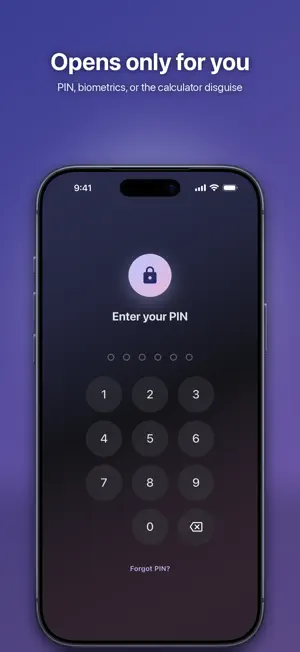
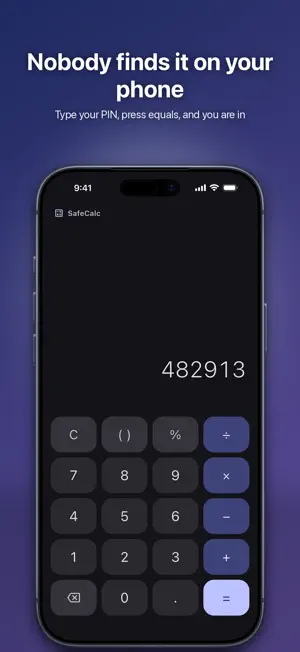
SafeCalc+ opens as a calculator. It adds, subtracts and divides like any other. Type your PIN on its keys and your private gallery appears instead. To anyone who picks up your phone, it is a calculator. HOW IT WORKS Set a PIN, then turn on the calculator disguise. The app's icon and name on your home screen become a calculator's. To get in, type your PIN on the keypad and press =. WHAT YOU CAN KEEP IN IT • Photos and videos, imported from your library • Documents — PDFs, archives, whatever you need out of sight • Notes you write inside the app ORGANISED • Albums you make yourself • Favourites • Recently Deleted, so a mistake is not final LOCKED • A PIN, with Face ID or Touch ID if you want it • Locks itself the moment you leave the app • Blurred in the app switcher; screenshots and screen recording are blocked • A recovery question, so a forgotten PIN is not the end of your photos BUILT FOR YOUR SCREEN • iPad: a navigation rail and wider grids • 12 accent colours, dark mode, and a true-black AMOLED mode • 11 languages, with full right-to-left layout YOUR FILES STAY ON YOUR DEVICE Everything you put in the vault is stored on this iPhone or iPad alone. No account. No cloud. No upload. The app is free and paid for by ads, which use an advertising identifier — you are asked before any tracking happens, and you can say no. If you would rather not see ads for a while, watch one on the Support screen and the next hour has none at all.
What’s new
Version 3.2.0 · Updated October 27, 2026
• Easier PIN recovery: a hint after a few wrong PINs, a clearer ad step and the support email • Persian digits and Solar Hijri dates in Persian • New tab bar icons • Smoother gallery and viewer: a scroll thumb for big galleries, and add photos to an album from its own page • Choose to watch an ad and get an hour without ads, now on a simple card • Fixed crashes and freezes: rotating photos, emoji in notes, imports when storage is full
App privacy
The developer, faizahmad dae, reported these privacy practices to Apple.
Data Used to Track You
The following data may be used to track you across apps and websites owned by other companies:
- Identifiers: Device ID
- Usage Data: Advertising Data
Data Not Linked to You
The following data, which may be collected but is not linked to your identity, may be used for the following purposes:
- Identifiers: Device ID
- Usage Data: Advertising Data
Used for: Third-Party Advertising, Developer’s Advertising or Marketing
Alternatives to SafeCalc+ Private Album
Looking for apps like SafeCalc+ Private Album? Here are 6 similar apps on the App Store. The highest rated is Secret Photo Vault - Hide Pics (4.7/5), and all 6 are free to download.
-
 Calculator Vault: Photo Lock
4.6
Calculator Vault: Photo Lock
4.6
-
 Calculator Vault : Hide Photo
4.6
Calculator Vault : Hide Photo
4.6
-
 Secret Photo Vault : PSV
4.1
Secret Photo Vault : PSV
4.1
-
 Secret Photo Vault - Hide Pics
4.7
Secret Photo Vault - Hide Pics
4.7
-
 Hidden Photos Vault: Locxafe
4.7
Hidden Photos Vault: Locxafe
4.7
-
 Photo Vault-Secret Calculator
4.6
Photo Vault-Secret Calculator
4.6
| App | Rating | Price | Last updated | Compare |
|---|---|---|---|---|
| SafeCalc+ Private Album | 5.0 / 5 (3 ratings) | Free | October 27, 2026 | |
| Calculator Vault: Photo Lock | 4.6 / 5 (21) | Free | Oct 16, 2026 | Compare |
| Calculator Vault : Hide Photo | 4.6 / 5 (36) | Free | Sep 19, 2026 | Compare |
| Secret Photo Vault : PSV | 4.1 / 5 (49) | Free | Oct 23, 2026 | Compare |
| Secret Photo Vault - Hide Pics | 4.7 / 5 (438) | Free | Jul 2, 2026 | Compare |
| Hidden Photos Vault: Locxafe | 4.7 / 5 (156) | Free | Aug 12, 2026 | Compare |
| Photo Vault-Secret Calculator | 4.6 / 5 (344) | Free | Dec 20, 2024 | Compare |