

Calculator Vault : Hide Photo
CLOUD HONEST LLC Photo & Video iPhoneiPadiPod touch
Calculator Vault : Hide Photo is a free Photo & Video app for iPhone and iPad by CLOUD HONEST LLC. Rated 4.6/5 from 35 ratings. Requires iOS 17.0.
- Rating
- 4.6
- 35 ratings
- Price
- Free
- on the App Store
- Size
- 12 MB
- Age 4+
- Updated
- Sep 19
- 2026 · v1.9
Screenshots



About Calculator Vault : Hide Photo
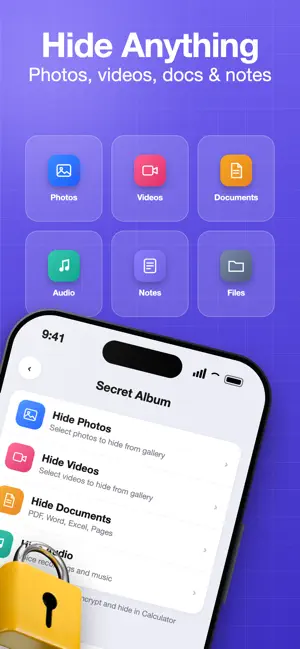
Calculator Vault looks exactly like a real calculator — because it is one. But enter your secret PIN and press "=" and a private encrypted vault opens that no one else knows exists. To everyone who picks up your phone: it's just a calculator. — WHY CALCULATOR VAULT IS DIFFERENT Most private photo apps look like private photo apps. Anyone who opens your phone knows exactly what you're hiding. Calculator Vault solves this differently. Your vault lives behind a working calculator. Every feature is designed around one goal: making sure nobody suspects anything is hidden at all. — THE 3 FEATURES NO OTHER VAULT HAS EMERGENCY PIN Enter a separate emergency PIN to instantly show an empty vault. If someone pressures you to unlock your app, enter the emergency PIN — your real files stay completely hidden behind the empty view. INTRUDER DETECTION Wrong PIN entered? The front camera captures a photo of whoever tried to unlock your vault. iOS displays a camera indicator while this happens. The photo is timestamped with the date, time, and location so you see exactly who attempted access. MULTIPLE INDEPENDENT VAULTS Create separate vaults, each with its own PIN, for different areas of your life. Personal photos in one vault. Work documents in another. Private notes in a third. Each vault is encrypted independently. — WHAT YOU CAN STORE · Photos and videos in all formats · Documents — PDF, Word, Excel, Pages · Audio files and voice recordings · Private notes and diary entries · Any file from the Files app, Photos app, or Camera Everything stored inside is encrypted with AES-256 — the same encryption standard used by banks and government agencies. Encryption runs entirely on your device. — DISGUISE OPTIONS 6 alternate app icons let you make Calculator Vault look like a completely different app on your Home Screen: · Calculator · Notebook · Forecast · Timer · Planner · Step Counter Switch icons anytime. No one will know which app hides your vault. — FULL SECURITY SUITE · AES-256 encryption — local, on-device only · Face ID and Touch ID unlock · 4 to 8 digit PIN protection · Emergency PIN — wipes vault data instantly when entered under duress · Break-in detection with front camera photo + GPS timestamp · Auto-lock when app goes to background · Screenshot alert and app-switcher blur — A REAL CALCULATOR — NOT A FAKE Calculator Vault handles all standard math operations with a full calculation history. It works exactly like a calculator app should, so it holds up to real inspection. — PRIVACY FIRST — ALWAYS We never receive your files, PIN codes, or encryption keys. No account required. We run no servers. Optional backup uses your own iCloud account, and your keys never leave your device. Anonymous crash reports and usage analytics help us improve the app. Both can be turned off in Settings → Privacy. We do not use tracking. We do not sell data. We do not run ads. Your files are yours — completely. — FREE PLAN INCLUDES: · Store up to 20 items · Intruder detection (photo + location) · Emergency PIN (shows empty vault under duress) · Multiple vault profiles · All security features · All 6 disguise icons CALCULATOR VAULT PRO: · Unlimited file storage · iCloud backup and sync · Priority support · All future Pro features Pro: monthly, yearly, or a one-time Lifetime purchase. Current prices are shown before you buy. Payment is charged to your Apple ID account at purchase confirmation. Subscriptions automatically renew unless canceled at least 24 hours before the end of the current period. Manage or cancel subscriptions in your Apple ID Account Settings at any time. — TERMS AND PRIVACY Terms of Use: https://app.cloudhonest.com/calcvault/terms.html Privacy Policy: https://app.cloudhonest.com/calcvault/privacy.html
Ratings & reviews
4.6
35 ratings
What’s new
Version 1.9 · Updated September 19, 2026
Improved subscription pricing display across all devices. Reliability improvements for photo and video encryption. Bug fixes and performance improvements.
App privacy
The developer, CLOUD HONEST LLC, reported these privacy practices to Apple.
Data Not Linked to You
The following data, which may be collected but is not linked to your identity, may be used for the following purposes:
- Identifiers: Device ID
- Diagnostics: Crash Data
Used for: App Functionality
Alternatives to Calculator Vault : Hide Photo
Looking for apps like Calculator Vault : Hide Photo? Here are 6 similar apps on the App Store. The highest rated is Secret Photo Vault: Paranoid (5.0/5), and all 6 are free to download.
-
 Calculator Vault: Photo Lock
4.6
Calculator Vault: Photo Lock
4.6
-
 Secret Photo Vault : PSV
4.1
Secret Photo Vault : PSV
4.1
-
 Calculator+ Private Vault
2.0
Calculator+ Private Vault
2.0
-
 Photo Vault: Hidden Calculator
4.5
Photo Vault: Hidden Calculator
4.5
-
 Calculatix: Secret Photo Vault
-
 Secret Photo Vault: Paranoid
5.0
Secret Photo Vault: Paranoid
5.0
| App | Rating | Price | Last updated | Compare |
|---|---|---|---|---|
| Calculator Vault : Hide Photo | 4.6 / 5 (35 ratings) | Free | September 19, 2026 | |
| Calculator Vault: Photo Lock | 4.6 / 5 (19) | Free | Oct 16, 2026 | Compare |
| Secret Photo Vault : PSV | 4.1 / 5 (49) | Free | Oct 23, 2026 | Compare |
| Calculator+ Private Vault | 2.0 / 5 (1) | Free | Feb 10, 2026 | Compare |
| Photo Vault: Hidden Calculator | 4.5 / 5 (4) | Free | Oct 20, 2026 | Compare |
| Calculatix: Secret Photo Vault | – | Free | Aug 13, 2026 | Compare |
| Secret Photo Vault: Paranoid | 5.0 / 5 (3) | Free | Oct 21, 2026 | Compare |