

Listr: Shared List
Benjamin Rogers Productivity iPhoneiPadiPod touchApple Watch
Listr: Shared List is a free Productivity app for iPhone and iPad by Benjamin Rogers. Requires iOS 26.0. Updated November 13, 2026.
- Price
- Free
- on the App Store
- Size
- 51 MB
- Age 4+
- Updated
- Nov 13
- 2026 · v1.7
Screenshots
Save to Pinterest


About Listr: Shared List
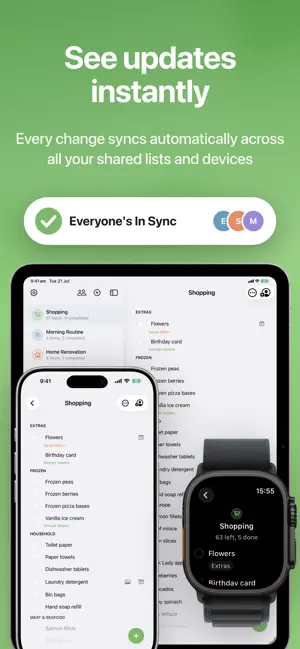
One app for every list in your life — groceries, to-dos, projects, packing, plans. Make a list in seconds, share it with a link, and it stays perfectly in sync with everyone, on every device. No more juggling three apps, texting screenshots of shopping lists, or wondering if your partner saw the update. Listr keeps it all in one clean, organized place. Add anything, instantly One tap and it's on the list. No friction, no fuss — capture it before you forget it. It organizes itself Items automatically group into categories as you add them, so your lists never feel cluttered. Share with a link. Stay in sync. Invite family, friends, or housemates with a simple shareable link — no email addresses or phone numbers needed. See exactly who added what with names, avatars, and colors, and get notified the moment someone adds or checks off an item. Real-time sync across everyone's devices, powered by iCloud. Make every list yours Drag to reorder. Custom list colors with auto-saved swatches. Add notes and photos to any item so nobody buys the wrong thing. With you everywhere • iPhone, iPad, and Apple Watch • Home Screen widget for your most used lists Perfect for • Grocery and shopping lists with your partner or family • To-dos, tasks, and daily reminders • Projects, trips, packing lists, gift ideas, and more • Working solo or sharing with up to 6 people on a family plan
What’s new
Version 1.7 · Updated November 13, 2026
This version of Listr includes: App icon badge • See how many items are left right on Listr's app icon. • Long-press the app icon to choose a badge for all your lists or just one list, or turn it off. • The badge updates as items are added and checked off, including changes from people you share a list with. New widget sizes • New Small and Medium widgets join the Large one. • Small shows how many items are left and done at a glance. Medium shows up to 6 items you can check off right from your Home Screen. • Each widget can show its own list. Touch and hold a widget, then tap Edit Widget to pick one. Widget and design improvements • Checking off an item in a widget now shows the tick before it moves, just like in the app. • Bigger text and easier-to-tap buttons in widgets. • A redesigned Large widget. • New progress rings around list icons in the app and in widgets show how much of each list is done.
App privacy
The developer, Benjamin Rogers, reported these privacy practices to Apple.
Data Linked to You
The following data, which may be collected and linked to your identity, may be used for the following purposes:
- Identifiers: User ID
- Contact Info: Email Address, Name
- User Content: Photos or Videos, Other User Content
Used for: Analytics, App Functionality
Data Not Linked to You
The following data, which may be collected but is not linked to your identity, may be used for the following purposes:
- Purchases: Purchase History
- Identifiers: Device ID
- Usage Data: Product Interaction
Used for: Analytics
Alternatives to Listr: Shared List
Looking for apps like Listr: Shared List? Here are 6 similar apps on the App Store. The highest rated is Shared Family: MyPerson (5.0/5), and all 6 are free to download.
-
 ListMango - Shared Checklists
-
 Shared List App by Planhive
-
 Softomato
2.0
-
 SharedList: Real-time List
-
 Shared Family: MyPerson
5.0
-
 Grocery List & To Do - Racoz
| App | Rating | Price | Last updated | Compare |
|---|---|---|---|---|
| Listr: Shared List | – | Free | November 13, 2026 | |
| ListMango - Shared Checklists | – | Free | Mar 10, 2026 | Compare |
| Shared List App by Planhive | – | Free | Nov 1, 2026 | Compare |
| Softomato | 2.0 / 5 (1) | Free | Sep 17, 2026 | Compare |
| SharedList: Real-time List | – | Free | Nov 10, 2026 | Compare |
| Shared Family: MyPerson | 5.0 / 5 (1) | Free | Feb 5, 2026 | Compare |
| Grocery List & To Do - Racoz | – | Free | May 12, 2026 | Compare |
Compare Listr: Shared List with the top alternatives: ratings, updates, ASO score and keyword gaps →