

Numio - Calculator Widget
GameOcean Utilities iPhoneiPadiPod touch
Numio - Calculator Widget is a paid Utilities app for iPhone and iPad by GameOcean. Requires iOS 26.2. Updated April 6, 2026.
- Price
- 0.99 USD
- on the App Store
- Size
- 5 MB
- Age 4+
- Updated
- Apr 6
- 2026 · v1.1
Screenshots


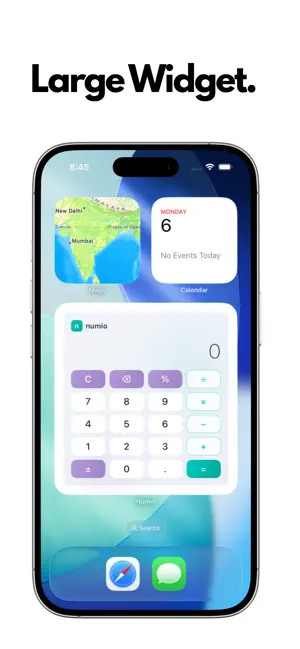

About Numio - Calculator Widget
Stop opening apps just to do quick math. numio puts a fully interactive calculator right on your Home Screen. TAP. CALCULATE. DONE. numio's interactive widget is not just a shortcut — it's a real, working calculator built directly into your Home Screen. Tap numbers, choose operations, and get results without ever leaving your Home Screen. WIDGET SIZES FOR EVERY NEED • Small Widget — Quick 3-column calculator for fast calculations • Medium Widget — Full 4-column calculator with all operations • Large Widget — Complete calculator experience with branded display • Lock Screen Widgets — See your last result at a glance (circular & rectangular) BEAUTIFUL, PURPOSEFUL DESIGN numio isn't another clone. Every detail is crafted with intention: • Unique teal accent theme — stands out from every other calculator • Glassmorphism buttons with smooth gradient backgrounds • Fluid spring animations and haptic feedback on every tap • Rounded pill-shaped buttons designed for precision tapping FULL-FEATURED CALCULATOR • Add, subtract, multiply, divide • Percentage calculations • Positive/negative toggle • Decimal support • Backspace for quick corrections • Up to 9-digit precision with smart scientific notation for large numbers CALCULATION HISTORY Never lose track of your work. numio saves your last 50 calculations so you can: • Review previous results anytime • Tap any history item to reuse the result • Swipe to delete individual entries • Clear all history with one tap DARK & LIGHT MODE Switch between a stunning deep blue-purple dark theme and a clean, crisp light theme. Your preference is remembered across sessions. DESIGNED FOR SPEED numio is built for people who calculate throughout the day — students, professionals, shoppers, anyone who needs quick answers. The Home Screen widget means zero wait time. No app launch. No loading screen. Just instant math. WHY numio? → Only $0.99 — no subscriptions, no ads, no in-app purchases → The widget alone is worth it — calculate without opening a single app → Privacy first — no data collection, no analytics, no tracking → Lightweight — minimal battery and storage impact Download numio and turn your Home Screen into a calculator.
What’s new
Version 1.1 · Updated April 6, 2026
- Interactive Home Screen calculator widget (small, medium, large) - Lock Screen widgets (circular & rectangular) - Calculation history with swipe-to-delete - Dark & light mode toggle - Performance improvements
App privacy
The developer, GameOcean, reported these privacy practices to Apple.
Data Not Collected
The developer does not collect any data from this app.
Alternatives to Numio - Calculator Widget
Looking for apps like Numio - Calculator Widget? Here are 6 similar apps on the App Store. The highest rated is XE Calculator Pro (5.0/5), and 4 of the 6 are free to download.
-
 Ping Monkey
-
 ChatShareApp
-
 XE Calculator Pro
5.0
-
 Recent Contacts
4.7
-
 WhyNot Widgets
4.2
-
 Miracast・Screen Mirroring
4.4
| App | Rating | Price | Last updated | Compare |
|---|---|---|---|---|
| Numio - Calculator Widget | – | 0.99 USD | April 6, 2026 | |
| Ping Monkey | – | Free | Oct 12, 2026 | Compare |
| ChatShareApp | – | 5.99 USD | Mar 11, 2026 | Compare |
| XE Calculator Pro | 5.0 / 5 (1) | Free | Oct 16, 2026 | Compare |
| Recent Contacts | 4.7 / 5 (601) | 4.99 USD | Apr 6, 2026 | Compare |
| WhyNot Widgets | 4.2 / 5 (85) | Free | Oct 27, 2026 | Compare |
| Miracast・Screen Mirroring | 4.4 / 5 (48) | Free | Oct 9, 2026 | Compare |