

DocFila: PDF Scanner & Editor
NotaNovice UG (haftungsbeschrankt) Productivity iPhoneiPadiPod touch
DocFila: PDF Scanner & Editor is a free Productivity app for iPhone and iPad by NotaNovice UG (haftungsbeschrankt). Rated 5.0/5 from 2 ratings.
- Rating
- 5.0
- 2 ratings
- Price
- Free
- on the App Store
- Size
- 369 MB
- Age 4+
- Updated
- Oct 2
- 2026 · v2.6.0
Screenshots


About DocFila: PDF Scanner & Editor
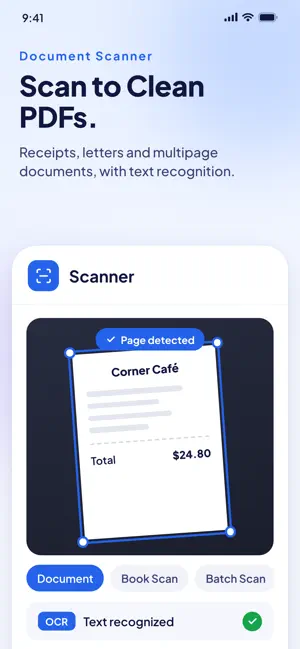
Scan, edit and sign documents in one app. DocFila is a document scanner, PDF editor and e-signature app with an AI assistant that reads your files for you, on iPhone and iPad. A receipt to keep. A contract to understand and sign. A CV to send, an invoice to issue, a deck to present. DocFila turns paperwork into finished work. DOCUMENT SCANNER WITH OCR Scan receipts, letters and multipage documents into clean PDFs. Book Scanner for bound pages, batch scanning, business cards, QR codes and ID photos sized for the document you need. Text recognition reads many scripts, including Arabic, Chinese, Japanese, Korean and Hindi, and tells you when part of a page was hard to read. AI DOCUMENT ASSISTANT DocAgent finds what your files actually say, with the page it came from, takes you to the right tool and runs multi-step jobs you approve once and can undo. Ask it from Siri. Explain a document, translate it, compare two versions, draft a reply or fill a form. Long documents are read to the end. AI output needs review, especially names, dates and amounts. PDF EDITOR AND WORD FILES Edit PDF text in place in the document's own fonts. Merge, split, compress, annotate, fill PDF forms and convert between formats, with a clear message when something cannot be converted. Open Word documents on real pages and accept or reject tracked changes. SIGN PDFs AND REQUEST SIGNATURES Add your signature without printing. Send documents for signature to one person or many, in the order you choose, from your own templates. REDACT AND PROTECT Privacy & Redaction finds personal data on your device and removes it for real, then reads the file back to check. Keep sensitive files in the Secure Vault, with optional zero-knowledge encryption tied to your own recovery phrase. CV, COVER LETTERS AND JOBS Build an ATS-friendly CV, write cover letters, import your LinkedIn profile, and find jobs and prepare applications with JobHunter. Share a public ProTree profile. INVOICES, QUOTES AND CONTRACTS Create quotes, invoices and receipts, manage customer appointments, and keep finances in order with FinFlow. Generate NDAs, freelance, rental and employment agreements, and review contracts for obligations and risks. PRESENTATIONS AND DESIGN Design presentations from fresh template families, flyers, one-pagers and logos in DocFila Studio. Edit photos, remove backgrounds and make videos and collages with VynCut. SHARE AND TEAM UP Send files nearby with DocFila Drop, share secure links, work together in team workspaces and whiteboards, and automate routine steps with workflows. IN YOUR LANGUAGE DocFila speaks 14 languages, and the language you choose carries through every tool, AI answers included. PLANS AND AVAILABILITY Free to download with optional in-app subscriptions. Some features and usage limits depend on your plan. Online services, including document AI, require an internet connection. Review the current in-app offer before subscribing. Subscriptions are charged to your Apple Account at confirmation and renew automatically unless canceled at least 24 hours before the end of the current period. Manage or cancel subscriptions in your Apple Account settings. Privacy: https://www.docfila.com/privacy Terms: https://www.docfila.com/terms Support: https://www.docfila.com/contact
What’s new
Version 2.6.0 · Updated October 2, 2026
DocFila 2.6 is our biggest update yet. • DocAgent, your document assistant, takes you to any screen, runs multi-step jobs you approve once (and can undo), and answers questions like "the DHL invoice from 2024" from what your documents actually say, with the page it found it on. Ask it from Siri too. • Edit text in a PDF right where it is, in the document's own fonts. • Word documents lay out on real pages, and you can see, accept and reject tracked changes. • Privacy & Redaction: find personal data on your iPhone and remove it for real, with a read-back check, in PDF, Word, Excel, PowerPoint, text and images. • A new Convert hub that says plainly when something could not be converted. • Scans are read with Apple's text recognition: Arabic, Chinese, Japanese, Korean and Hindi pages come out whole, and DocFila tells you when part of a page was hard to read and lets you correct it. • Long documents are read to the end, and AI answers say when part of a file could not be read. • CVs, cover letters and documents you create follow your language, write Arabic and Hebrew right to left, and print Chinese, Japanese and Korean correctly. • Photos: crop, remove backgrounds with a magic brush, and choose new backgrounds. • Twelve new presentation template families. • The language you choose now carries through every tool, AI answers and voice included, with over 1,600 translations corrected. • Privacy: a shared public CV now shows only what your CV prints, never your private details. • Fixed: Quotes keep your entries while you scroll and save; amounts with a decimal comma are read correctly; Appointments take a country code for the customer's phone (245 countries); the cover letter "Generate with AI" button is labelled; rating DocFila opens the App Store review page; encrypted vault files open properly. • Many more fixes for reliability, accessibility and clarity.
App privacy
The developer, NotaNovice UG (haftungsbeschrankt), reported these privacy practices to Apple.
Data Linked to You
The following data, which may be collected and linked to your identity, may be used for the following purposes:
- Contact Info: Email Address, Name, Physical Address, Phone Number
- User Content: Photos or Videos, Customer Support, Emails or Text Messages
- Identifiers: User ID, Device ID
- Diagnostics: Performance Data, Crash Data, Other Diagnostic Data
- Purchases: Purchase History
Used for: Developer’s Advertising or Marketing, Analytics, Product Personalization, App Functionality
Alternatives to DocFila: PDF Scanner & Editor
Looking for apps like DocFila: PDF Scanner & Editor? Here are 6 similar apps on the App Store.
-
 Swychat
-
 SignSeal - Sign & Fill PDF
-
 Duplix : Automatisation & IA
-
 Linkup: Networking Reimagined
-
 ProDoc AI
-
 Papyr - Document Scanner
| App | Rating | Price | Last updated | Compare |
|---|---|---|---|---|
| DocFila: PDF Scanner & Editor | 5.0 / 5 (2 ratings) | Free | October 2, 2026 | |
| Swychat | – | Free | Nov 28, 2023 | Compare |
| SignSeal - Sign & Fill PDF | – | Free | Mar 13, 2026 | Compare |
| Duplix : Automatisation & IA | – | Free | Oct 9, 2026 | Compare |
| Linkup: Networking Reimagined | – | Free | Feb 16, 2026 | Compare |
| ProDoc AI | – | Free | May 6, 2026 | Compare |
| Papyr - Document Scanner | – | Free | Oct 2, 2026 | Compare |