

AudiFusion: Equalizer & Bass
Mustafa BILGIC Music iPhoneiPadiPod touch
AudiFusion: Equalizer & Bass is a free Music app for iPhone and iPad by Mustafa BILGIC. Requires iOS 15.1. Updated October 15, 2026.
- Price
- Free
- on the App Store
- Size
- 76 MB
- Age 4+
- Updated
- Oct 15
- 2026 · v7.6.3
Screenshots


About AudiFusion: Equalizer & Bass
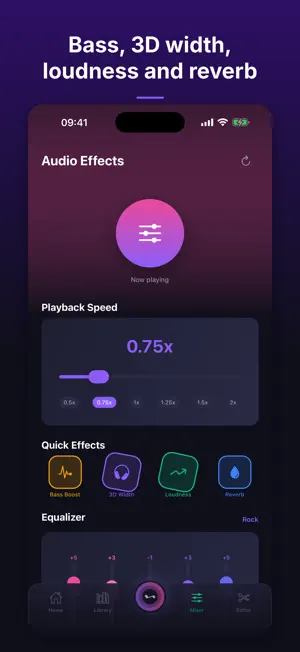
AudiFusion Pro plays the music you import and gives you tools to edit audio, turn part of a song into a short video, make beats and record podcasts. LIBRARY - Import songs, or a whole folder with its subfolders, from the Files app. The music is kept inside the app. - Files you open in AudiFusion Pro from other apps, and files you copy in through Finder file sharing, are added to your library too. - Collections (your own playlists), favorites, recently played and most played. - Each song has a menu to add it to a collection or delete it. PLAYER - Queue, shuffle and repeat. - Playback continues in the background. - Lock screen and Control Center playback controls. - Playback speed from 0.25x to 3x, with pitch correction. - Sleep timer. - Tap the progress bar to jump to that point in the song. SOUND - On iPhone and iPad the equalizer, bass, treble, 3D width, reverb, loudness and volume boost process the audio as it plays. EDITOR - Work with several audio tracks on a timeline. - Cut and split, with undo and redo. - Fade in and fade out when you export. - Export your mix as an audio file. CONTENT VIDEO - Turn part of a song into a short video to share. - Choose 9:16, 1:1 or 16:9. - The video shows an animated visualizer drawn from the song, plus the song title and artist. - Send it to other apps from the share sheet. - Free: clips up to 30 seconds in 720p, with a small "Made with AudiFusion" watermark. BEAT MAKER - 16-step drum sequencer with kick, snare, hi-hat and clap. - BPM control. - Starter patterns: Lo-Fi, Trap 808, Boom Bap and House. - Export your beat. PODCAST STUDIO - Record your voice, with pause and resume. - Voice presets (Clear, Warm, Radio) are applied when you export. - Export as MP3 at 128, 192 or 320 kbps. CREATOR STUDIO - Pick an audio or video file, choose an aspect ratio (9:16, 4:5, 1:1 or 16:9) and an audio preset (Punchy, Chill, Hype or Voice), then export. - Video export requires AudiFusion Pro. AUDIFUSION PRO The AudiFusion Pro subscription is optional. Every plan includes the same features: - No ads. - Content videos up to 3 minutes in 1080p, without the watermark. - Video export in the Editor and Creator Studio, up to 4K. Plans: - Monthly Starter: $0.99 per month, with no free trial. - Monthly Premium: $2.99 per month; new subscribers start with a 7-day free trial, then $2.99 per month. - Yearly Pro: $14.99 per year; new subscribers start with a 7-day free trial, then $14.99 per year. Prices are in USD; your local price is shown at checkout. The subscription renews automatically, and a free trial turns into a paid subscription when it ends, unless it is cancelled at least 24 hours before the end of the current period. You can manage or cancel it in your App Store account settings. Without a subscription, the Home screen shows a banner ad. Privacy Policy: https://cinderspire.github.io/support/privacy-audifusion.html Terms of Use (EULA): https://www.apple.com/legal/internet-services/itunes/dev/stdeula/
What’s new
Version 7.6.3 · Updated October 15, 2026
Fixed Library tracks sometimes not switching and the Next button not responding. New Battery saver in Settings turns on automatically in Low Power Mode or at 20% battery, and playback now uses less battery.
App privacy
The developer, Mustafa BILGIC, reported these privacy practices to Apple.
Data Used to Track You
The following data may be used to track you across apps and websites owned by other companies:
- Identifiers: Device ID
- Usage Data: Advertising Data
Data Not Linked to You
The following data, which may be collected but is not linked to your identity, may be used for the following purposes:
- Identifiers: Device ID
- Usage Data: Advertising Data, Product Interaction
- Diagnostics: Crash Data, Performance Data, Other Diagnostic Data
- Purchases: Purchase History
Used for: Third-Party Advertising, Analytics, App Functionality
Alternatives to AudiFusion: Equalizer & Bass
Looking for apps like AudiFusion: Equalizer & Bass? Here are 6 similar apps on the App Store. The highest rated is PureBit: Hi-Res Music Player (5.0/5), and all 6 are free to download.
-
 Hushplay: Offline Music Player
-
 SonicBoost: Volume Booster EQ
-
 PureBit: Hi-Res Music Player
5.0
-
 Music Equalizer - Bass Booster
4.2
-
 Volume Booster: Bass Boost EQ
4.6
-
 Lark & Lynk Player: Music, Mp3
4.7
| App | Rating | Price | Last updated | Compare |
|---|---|---|---|---|
| AudiFusion: Equalizer & Bass | – | Free | October 15, 2026 | |
| Hushplay: Offline Music Player | – | Free | Aug 27, 2026 | Compare |
| SonicBoost: Volume Booster EQ | – | Free | Sep 24, 2026 | Compare |
| PureBit: Hi-Res Music Player | 5.0 / 5 (7) | Free | Oct 13, 2026 | Compare |
| Music Equalizer - Bass Booster | 4.2 / 5 (34) | Free | Jun 12, 2026 | Compare |
| Volume Booster: Bass Boost EQ | 4.6 / 5 (49) | Free | Aug 28, 2026 | Compare |
| Lark & Lynk Player: Music, Mp3 | 4.7 / 5 (3) | Free | Oct 16, 2026 | Compare |