

BookyAI
DIGITAL APP Productivity iPhoneiPadiPod touchMac
BookyAI is a free Productivity app for iPhone and iPad by DIGITAL APP. Requires iOS 17.0. Updated October 5, 2026.
- Price
- Free
- on the App Store
- Size
- 11 MB
- Age 12+
- Updated
- Oct 5
- 2026 · v3.5
Screenshots

About BookyAI
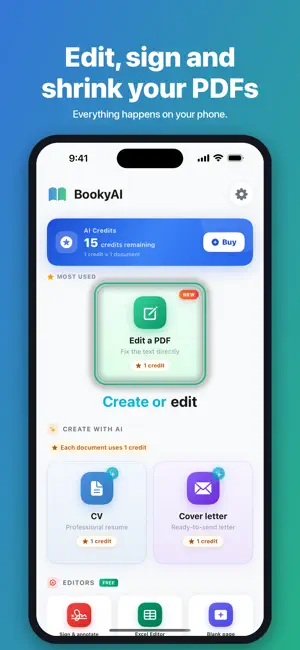
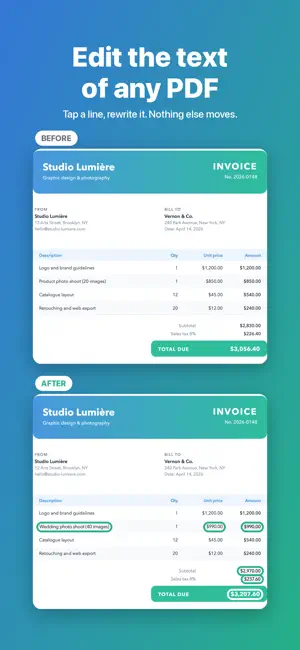
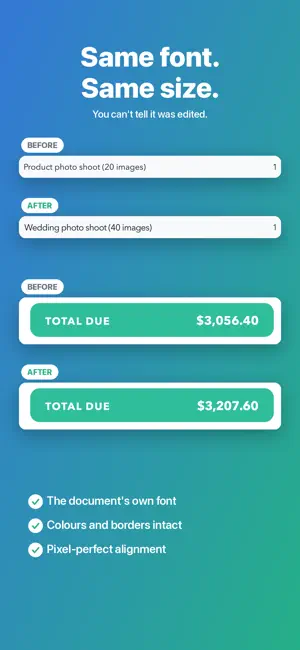
Fix a typo on an invoice. Change a date on a contract. No computer, no software, no account. EDIT THE TEXT OF A PDF Tap a line, rewrite it. The original font, size and colour are kept — nothing else on the page moves. Almost no app can do this on a phone. SIGN AND ANNOTATE Your signature drawn with a finger, your stamps, text, drawings. Save your signatures and stamps once and they are waiting for you on the next document. SCAN The camera straightens the page by itself. Several pages in a row, colour, grey or black-and-white filters, and you can adjust the edges by hand. COMPRESS A PDF, some photos or a video, in three plain choices. The final size is written on every choice before you decide, and when a file cannot be made smaller, the app says so instead of making you wait. CONVERT Word to PDF, PDF to images, images to PDF. BLANK PAGE A real Word editor: headings, bold, colours, lists, and templates ready to write in — letter, note, invoice, report. CV AND COVER LETTER WRITTEN BY AI Answer a few questions and the AI writes. Professional templates, export to PDF or Word. NO SUBSCRIPTION The PDF tools, scanning, compression and signing are free and unlimited. The rest runs on credits: 1 credit = 1 document. You pay once for a document, then you export it as many times as you like, even after correcting it again. Credits never expire. NO ACCOUNT No sign-up. The PDF tools, scanning and compression work on your phone. Only the CV and the cover letter go through our server, for as long as it takes to write them. BookyAI speaks 17 languages.
What’s new
Version 3.5 · Updated October 5, 2026
Editing a PDF, even simpler: • Tap a line and it's always the right one that opens, even zoomed in or in a tight table. • One text field, set in the document's own font. Long sentences show in full. • The document's name and your number of changes sit at the top. • One Done button to save, or share as PDF or images. • A thumb-friendly toolbar: Undo, Redo, Preview, Before.
App privacy
The developer, DIGITAL APP, reported these privacy practices to Apple.
Data Not Linked to You
The following data, which may be collected but is not linked to your identity, may be used for the following purposes:
- Purchases: Purchase History
- User Content: Other User Content
Used for: App Functionality
Alternatives to BookyAI
Looking for apps like BookyAI? Here are 6 similar apps on the App Store. The highest rated is Dokly - PDF Editor & Scanner (5.0/5), and all 6 are free to download.
-
 Dokly - PDF Editor & Scanner
5.0
Dokly - PDF Editor & Scanner
5.0
-
 Nlarj for Churches
-
 InstantAyah
-
 Oaklet Notes
5.0
Oaklet Notes
5.0
-
 Leaf: Document Scanner & PDF
-
 Docs & PDF Editor & Scanner
| App | Rating | Price | Last updated | Compare |
|---|---|---|---|---|
| BookyAI | – | Free | October 5, 2026 | |
| Dokly - PDF Editor & Scanner | 5.0 / 5 (1) | Free | Jul 17, 2026 | Compare |
| Nlarj for Churches | – | Free | Sep 26, 2026 | Compare |
| InstantAyah | – | Free | Apr 22, 2026 | Compare |
| Oaklet Notes | 5.0 / 5 (1) | Free | Oct 19, 2026 | Compare |
| Leaf: Document Scanner & PDF | – | Free | Sep 13, 2026 | Compare |
| Docs & PDF Editor & Scanner | – | Free | Sep 30, 2026 | Compare |
Compare BookyAI with the top alternatives: ratings, updates, ASO score and keyword gaps →