

Image to Text: Scan & Summary
Musa Tasci Utilities iPhoneiPadiPod touch
Image to Text: Scan & Summary is a free Utilities app for iPhone and iPad by Musa Tasci. Requires iOS 15.1. Updated January 30, 2026.
- Price
- Free
- on the App Store
- Size
- 54 MB
- Age 4+
- Updated
- Jan 30
- 2026 · v1.0.1
Screenshots
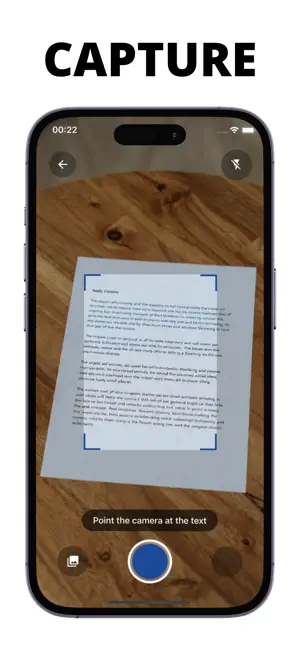


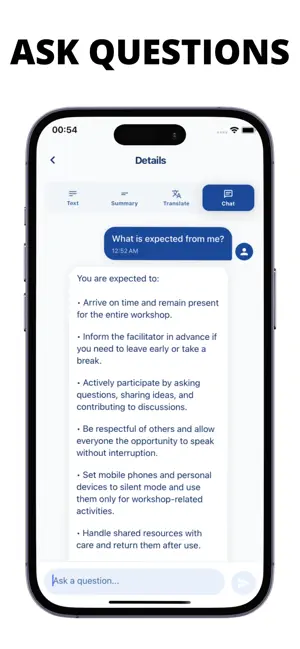
About Image to Text: Scan & Summary
Transform any image into text with Image to Text – Scan & Summary. Our powerful OCR technology extracts text from photos, documents, screenshots, and handwritten notes with remarkable accuracy. Simply point your camera at any text or upload an image, and watch as our advanced AI recognizes and extracts the content in seconds. Perfect for digitizing documents, capturing notes from whiteboards, converting printed materials to digital text, and more. **Key Features:** • **Instant Text Extraction** – High-precision OCR that works with printed text, handwriting, and low-light photos • **AI-Powered Summarization** – Get concise summaries of long documents in seconds • **Multi-Language Translation** – Translate your extracted text into over 50 languages • **AI Chat Assistant** – Ask questions about your documents and get instant, context-aware answers • **Smart Context Understanding** – Our AI understands structure and meaning, not just characters • **Organized Scan History** – Keep all your scans in one place, easily accessible and searchable • **Clean, Intuitive Interface** – Designed for speed and simplicity **Pro Features:** Unlock the full potential with Pro subscription: • **Skip Processing Queue** – Instant processing with no waiting time • **Unlimited Scans** – Scan and extract text as much as you need • **Unlimited AI Chat** – Ask unlimited questions about your documents • **Multiple Translations** – Translate to multiple languages simultaneously • **Priority Processing** – Faster AI responses and processing Whether you're a student digitizing lecture notes, a professional converting documents, or someone breaking language barriers, Image to Text – Scan & Summary gives you the tools you need to work smarter and faster. Download now and experience the future of text extraction. Terms of Use: https://www.apple.com/legal/internet-services/itunes/dev/stdeula
What’s new
Version 1.0.1 · Updated January 30, 2026
Bug fixes
App privacy
The developer, Musa Tasci, reported these privacy practices to Apple.
Data Not Linked to You
The following data, which may be collected but is not linked to your identity, may be used for the following purposes:
- Usage Data: Product Interaction
- Diagnostics: Crash Data, Performance Data, Other Diagnostic Data
- User Content: Photos or Videos
- Identifiers: User ID
Used for: Analytics, App Functionality
Alternatives to Image to Text: Scan & Summary
Looking for apps like Image to Text: Scan & Summary? Here are 6 similar apps on the App Store.
-
 Summafy AI
-
 Chat with PDF: DoCMind AI
-
 Image To Text Scanner-OCR
-
 Extract Text from Image
-
 Sicurezza Aman
-
 Copioni Teatrali
| App | Rating | Price | Last updated | Compare |
|---|---|---|---|---|
| Image to Text: Scan & Summary | – | Free | January 30, 2026 | |
| Summafy AI | – | Free | Aug 12, 2025 | Compare |
| Chat with PDF: DoCMind AI | – | Free | Jun 27, 2026 | Compare |
| Image To Text Scanner-OCR | – | Free | Jul 2, 2025 | Compare |
| Extract Text from Image | – | Free | Jul 28, 2026 | Compare |
| Sicurezza Aman | – | Free | Jun 24, 2026 | Compare |
| Copioni Teatrali | – | Free | Dec 1, 2025 | Compare |