

grosift: Organize photos
Adrian Grochla Productivity iPhoneiPadiPod touchMac
grosift: Organize photos is a paid Productivity app for iPhone and iPad by Adrian Grochla. Requires iOS 16.6. Updated October 23, 2026.
- Price
- 3.99 USD
- on the App Store
- Size
- 123 MB
- Age 4+
- Updated
- Oct 23
- 2026 · v1.7.0
Screenshots



About grosift: Organize photos
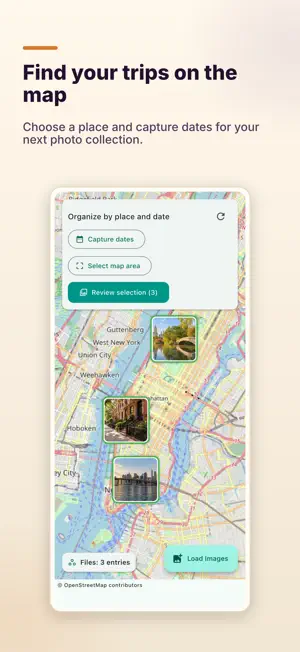
Bring together what belongs together. grosift helps you organize photos and files, filter your collection and clear out what you no longer need. FIND TRIPS ON THE MAP Read existing GPS information from your photos and explore their capture locations on the map. Select an area and capture dates to gather, for example, the photos from your latest New York trip. Date filtering uses the EXIF capture date; photos without that date are excluded while the date filter is active. ORGANIZE YOUR SELECTION Review related photos in the gallery. On your computer, copy or move selected files into a destination folder. Existing files are not overwritten, and copies are verified before a source is removed. On mobile devices, export your selection through the system sharing dialog. FILTER AND BRING ORDER Use saved filter rules, search recognized text in images and PDFs, browse the timeline and rename files in batches. Storage analysis, date repair and GPS tools support your next organizing task. CLEAR OUT WHAT YOU NO LONGER NEED Find exact duplicates by file content and compare similar images. You decide what stays. Directly accessible files can be restored from the app's Delete Center. Photos from the system photo library are deleted through the system after confirmation; grosift cannot undo that action. Access and file actions depend on your device and permissions. Analysis runs on your device; maps and model downloads may require an internet connection.
What’s new
Version 1.7.0 · Updated October 23, 2026
New: select photos by map area and EXIF capture dates. Verified folder actions protect existing filenames. GPS editing preserves capture time and orientation. Improved narrow layouts, updated libraries and more reliable file workflows.
App privacy
The developer, Adrian Grochla, reported these privacy practices to Apple.
Data Not Collected
The developer does not collect any data from this app.
Alternatives to grosift: Organize photos
Looking for apps like grosift: Organize photos? Here are 6 similar apps on the App Store. The highest rated is DictaWiz: AI Keyboard & Notes (4.8/5), and 5 of the 6 are free to download.
-
 Keeplet - Screenshot Organizer
-
 ZMI - FotoArchiv
-
 Weeklane: Weekly To-Do Planner
4.7
-
 DictaWiz: AI Keyboard & Notes
4.8
-
 Auto Translate for Safari
3.6
-
 Passwords for Nextcloud
4.1
| App | Rating | Price | Last updated | Compare |
|---|---|---|---|---|
| grosift: Organize photos | – | 3.99 USD | October 23, 2026 | |
| Keeplet - Screenshot Organizer | – | Free | Oct 26, 2026 | Compare |
| ZMI - FotoArchiv | – | Free | Oct 27, 2026 | Compare |
| Weeklane: Weekly To-Do Planner | 4.7 / 5 (3) | Free | Nov 4, 2026 | Compare |
| DictaWiz: AI Keyboard & Notes | 4.8 / 5 (22) | Free | Jul 30, 2026 | Compare |
| Auto Translate for Safari | 3.6 / 5 (17) | 4.99 USD | Oct 16, 2026 | Compare |
| Passwords for Nextcloud | 4.1 / 5 (21) | Free | Nov 4, 2026 | Compare |