

PayShare: Expense Tracker
BOGDAN-GEORGIAN ALEXA Finance iPhoneiPadiPod touchMac
PayShare: Expense Tracker is a free Finance app for iPhone and iPad by BOGDAN-GEORGIAN ALEXA. Rated 5.0/5 from 1 ratings. Requires iOS 18.5.
- Rating
- 5.0
- 1 ratings
- Price
- Free
- on the App Store
- Size
- 29 MB
- Age 4+
- Updated
- Oct 17
- 2026 · v1.4.0
Screenshots



About PayShare: Expense Tracker
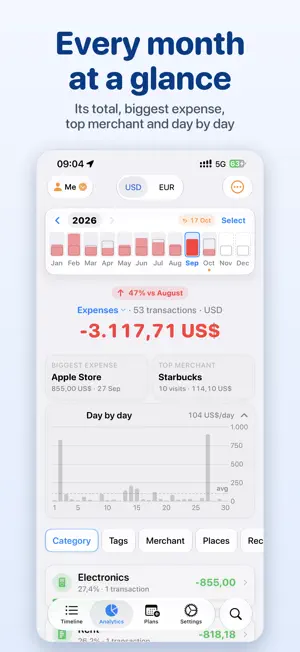
Track your spending on your own, as a couple or as a family. PayShare is a native app for iPhone, iPad and Mac that keeps your transactions in your own iCloud and shares them only with the people you invite. With a Shortcuts automation you set up once, a tap to pay with Apple Wallet becomes an expense in PayShare: you just pick the category. No ads, no account to create, no bank to connect. PAY WITH APPLE WALLET, PICK A CATEGORY Create one personal automation in the Shortcuts app. From then on, each time you tap to pay with a card in Apple Wallet, it runs PayShare's Add Expense action: you choose a category without opening the app, and PayShare saves the expense. Skip the question and it is saved as Uncategorized, ready to edit later. A payment in another currency is converted to your primary currency with the latest rates PayShare has downloaded. Wallet can report a payment a few seconds late and Apple's automations do not always run, so now and then a payment still needs adding by hand. SHARE WITH THE PEOPLE YOU CHOOSE Invite a partner, family or friends through private iCloud sharing. Everyone keeps ownership of their own transactions: you share yours, and you see theirs once they share back. Give each person read-only or read-and-write access, decide whether they may delete or split your transactions, and remove a connection at any time. Switch your Timeline to anyone who shares with you, search their transactions, see their spending in your budgets and insights, and hide any single transaction from the people you pick. YOUR TIMELINE • Expenses and income with a category, merchant, payment method and tags • Location and notes, and splitting one payment across categories • Your own categories, with more than 700 icons and any color • Your five most recent payment methods ready in a menu • Transactions grouped by day, with what each day cost • Recurring transactions for rent, salary or subscriptions, from daily to yearly • A second currency shown alongside your primary one • Search by text or category, and filter by date, amount, tag or place • Export to CSV, JSON or PDF, import from CSV or JSON, and restore from backups SEE WHERE IT WENT Your months sit side by side as a bar chart. Pick one to see its total, the change from the month before, your biggest expense, your top merchant, a day-by-day chart and your categories, for expenses or income. Group by tag, merchant, place, payment method or recurring transaction, choose several months, the whole year or a past year, and open any group for the details. BUDGETS AND SAVINGS Set a monthly budget and a budget for any category, and follow your progress. A marker shows how far through the month you are, so you can compare what you have spent with how much of the month has gone, and a row of months shows which ones stayed within budget. Plan across several months, and track savings accounts toward a goal. Turn on activity budgets to unlock spending through your Apple Health steps, running minutes and mindful minutes. ON IPHONE, IPAD AND MAC Everything stays in sync through your iCloud account. PayShare works offline and syncs when you are back online. Home Screen widgets show today's spending and this month's by category. PRIVACY Your transactions are stored in your own iCloud and shared only with the people you invite. PayShare sends anonymous usage events and crash reports to help improve the app; they never include amounts, merchants, notes or categories. Exchange rates come from a public currency service, and on iPhone and iPad the app asks Apple Ads whether an ad led to the install. Some features require PayShare Premium, offered as a monthly or annual subscription or a one-time purchase. A subscription renews automatically unless it is cancelled at least 24 hours before the end of the current period; manage it in your Apple Account settings. Terms of Use: https://boogdan.com/apps/payshare/terms/ Privacy Policy: https://boogdan.com/apps/payshare/privacy/
What’s new
Version 1.4.0 · Updated October 17, 2026
• Analytics, redesigned on iPhone and iPad: your months as a bar chart, a day-by-day chart, and grouping chips above the list • Budgets and Savings: a Month Rail with each month's budget status and a marker for your pace • A new app icon • Month and weekday names, years and periods follow your device's language • When saving or deleting fails, PayShare now tells you • Fixes for budgets, savings accounts, categories and tags • Many smaller fixes
App privacy
The developer, BOGDAN-GEORGIAN ALEXA, reported these privacy practices to Apple.
Data Not Linked to You
The following data, which may be collected but is not linked to your identity, may be used for the following purposes:
- Purchases: Purchase History
- Location: Coarse Location
- Identifiers: Device ID
- Usage Data: Product Interaction, Advertising Data
- Diagnostics: Crash Data, Performance Data, Other Diagnostic Data
Used for: Analytics
Alternatives to PayShare: Expense Tracker
Looking for apps like PayShare: Expense Tracker? Here are 6 similar apps on the App Store. The highest rated is Zeroed: Offline Budget Planner (5.0/5), and all 6 are free to download.
-
 TapExpense: Expense Tracker
-
 SpendSteps: Expense Tracker
-
 Money Envelope: Budget Tracker
-
 Persue Budget
-
 Ledgery
-
 Zeroed: Offline Budget Planner
5.0
| App | Rating | Price | Last updated | Compare |
|---|---|---|---|---|
| PayShare: Expense Tracker | 5.0 / 5 (1 rating) | Free | October 17, 2026 | |
| TapExpense: Expense Tracker | – | Free | Sep 7, 2026 | Compare |
| SpendSteps: Expense Tracker | – | Free | Oct 19, 2026 | Compare |
| Money Envelope: Budget Tracker | – | Free | Sep 4, 2026 | Compare |
| Persue Budget | – | Free | Oct 21, 2026 | Compare |
| Ledgery | – | Free | Oct 21, 2026 | Compare |
| Zeroed: Offline Budget Planner | 5.0 / 5 (1) | Free | Oct 17, 2026 | Compare |