

Artist Assistant
Allan Bremer Business iPhoneiPadiPod touch
Artist Assistant is a free Business app for iPhone and iPad by Allan Bremer. Requires iOS 15.6. Updated October 27, 2026.
- Price
- Free
- on the App Store
- Size
- 51 MB
- Age 4+
- Updated
- Oct 27
- 2026 · v1.0.13
Screenshots

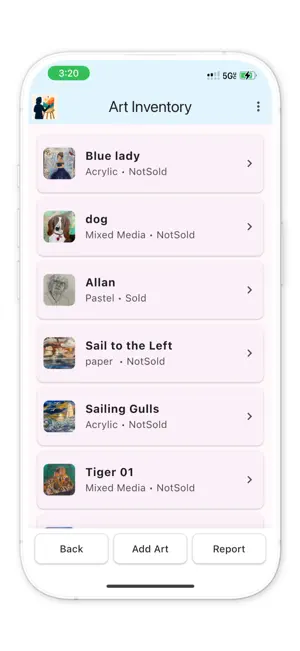


About Artist Assistant
PRO UPGRADE & ACCESS: Artist Assistant requires an active subscription or a one-time purchase to unlock full access to all professional tools and comprehensive art management features: • Shows & Festivals: Seamlessly track event schedules, log full details (booth fees, application windows, contacts, and distances), auto-input results from show searches, and generate comprehensive event reports. • Color Matcher: Instantly analyze palettes and match pigments or reference colors on the go. • Full AI Access: Unlimited smart show searches and assistant queries. CORE FEATURES & TOOLS: Art Inventory: Catalog and track your entire portfolio with ease. Find Art Shows: Discover and search upcoming events and exhibitions. The Master's Eye: Advanced visual analysis and reference insights. Shows & Festivals: Comprehensive event planning, logistics, and automated reporting. Color Matcher: Instant pigment and color palette matching. Art Show Checklist: Stay organized and never miss crucial setup steps. Art Show Logbook: Keep detailed historical records of your event performance. Art Terms: Quick access to essential industry terminology. Notes: Capture ideas and client communications instantly. Help Center: Built-in guidance and support. Choose your access plan to get started: • Weekly Access: 3-day free trial, then $4.99 per week (auto-renewing) • Lifetime Access: $29.99 one-time purchase (own forever) SUBSCRIPTION TERMS: Payment will be charged to your Apple ID account at confirmation of purchase or at the end of your free trial. Subscriptions automatically renew unless auto-renew is turned off at least 24 hours before the end of the current period. Your account will be charged for renewal within 24 hours prior to the end of the current period at the weekly rate. You can manage or cancel your subscription anytime in your App Store Account Settings after purchase. Terms of Use: https://appqasolutions.com/art-terms.html Privacy Policy: https://appqasolutions.com/art-privacy.html
What’s new
Version 1.0.13 · Updated October 27, 2026
Welcome to Version 1.0.13 of Artist Assistant! This update introduces powerful new professional tools to streamline your exhibition planning and pigment workflow: • Shows & Festivals: Seamlessly track event schedules, log full details (booth fees, application windows, contacts, and travel distances), auto-input results straight from your show searches, and generate comprehensive event reports. • Color Matcher: Instantly analyze palettes and match pigments or reference colors on the go. • Performance enhancements and workflow refinements across all core art management modules.
App privacy
The developer, Allan Bremer, reported these privacy practices to Apple.
Data Not Linked to You
The following data, which may be collected but is not linked to your identity, may be used for the following purposes:
- Purchases: Purchase History
- Usage Data: Product Interaction
- Diagnostics: Crash Data, Performance Data
- User Content: Photos or Videos
- Identifiers: Device ID
Used for: Analytics, App Functionality
Alternatives to Artist Assistant
Looking for apps like Artist Assistant? Here are 6 similar apps on the App Store. The highest rated is artwOOrk: Artist Business App (5.0/5), and all 6 are free to download.
-
 artwOOrk: Artist Business App
5.0
artwOOrk: Artist Business App
5.0
-
 Avenlas
-
 Art Monster
5.0
Art Monster
5.0
-
 iYap: Private Voice Notes
-
 Shade Craft
-
 PhotoChroma
| App | Rating | Price | Last updated | Compare |
|---|---|---|---|---|
| Artist Assistant | – | Free | October 27, 2026 | |
| artwOOrk: Artist Business App | 5.0 / 5 (4) | Free | Sep 14, 2026 | Compare |
| Avenlas | – | Free | Jun 13, 2026 | Compare |
| Art Monster | 5.0 / 5 (4) | Free | Apr 28, 2026 | Compare |
| iYap: Private Voice Notes | – | Free | Aug 25, 2026 | Compare |
| Shade Craft | – | Free | Sep 9, 2024 | Compare |
| PhotoChroma | – | Free | Jan 26, 2026 | Compare |
Compare Artist Assistant with the top alternatives: ratings, updates, ASO score and keyword gaps →