

Art Monster
nichole pelaez Productivity iPhoneiPadiPod touch
Art Monster is a free Productivity app for iPhone and iPad by nichole pelaez. Rated 5.0/5 from 4 ratings. Requires iOS 15.0. Updated April 28, 2026.
- Rating
- 5.0
- 4 ratings
- Price
- Free
- on the App Store
- Size
- 13 MB
- Age 4+
- Updated
- Apr 28
- 2026 · v2
Screenshots


About Art Monster
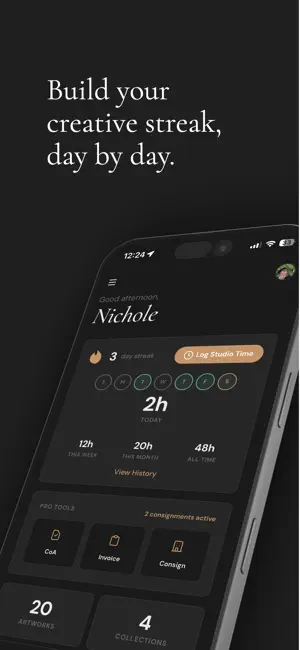
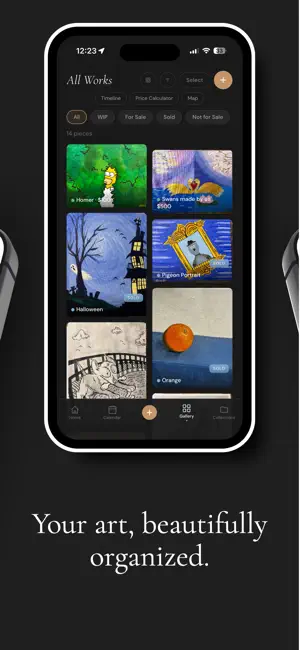
Art Monster is the all-in-one studio manager designed to handle the paperwork so you can get back to the canvas. From inventory tracking to professional invoicing, manage your entire creative empire right from your pocket. Master Your Inventory Never lose track of a masterpiece again. Organize your body of work with professional-grade tools: Visual Catalog: High-res photos, medium, dimensions, and pricing at your fingertips. Smart Status: Instantly see what’s In Progress, Available, or Sold. Curated Collections: Group your work by series, year, or theme. The Timeline: A visual history of your evolution as an artist. Own Your Studio Time What gets measured gets managed. Build a disciplined creative practice: Session Logger: Track every hour spent in the studio and build daily streaks. Data-Driven Insights: Review weekly and monthly trends to see your most productive hours. Project Linking: Connect your time directly to specific pieces to understand your true ROI. Scale with Studio Pro Level up with the tools used by high-volume working artists: Professional Sales: Generate branded Invoices and Certificates of Authenticity in seconds. The Ledger: Automated tracking of revenue, costs, and profit margins. Smart Pricing: Use the built-in hourly rate or square-inch calculators to price with confidence. Gallery Management: Keep tabs on consignments and external exhibitions. A Portfolio That Sells Turn followers into collectors. Launch a sleek, mobile-optimized public portfolio page with a single tap. Choose between a gallery-grade Light or Dark theme to showcase your work in its best light. Choose Your Level Studio Lite: Perfect for emerging artists getting organized. Studio Pro: Unlimited artwork, advanced business analytics, and your public portfolio. Art Monster - Crush Your Art Goals! Download today and reclaim your studio time. Terms of Use: https://artmonster.app/terms.html Privacy Policy: https://artmonster.app/privacy.html
What’s new
Version 2 · Updated April 28, 2026
Added Artist Portfolio themes (light vs dark), Auto tagging Certificate of Authenticity to artwork, and image loading performance.
App privacy
The developer, nichole pelaez, reported these privacy practices to Apple.
Data Linked to You
The following data, which may be collected and linked to your identity, may be used for the following purposes:
- Contact Info: Physical Address, Email Address, Name
- Financial Info: Other Financial Info
- Search History: Search History
- User Content: Photos or Videos
- Identifiers: User ID
Used for: Developer’s Advertising or Marketing, Analytics, Product Personalization, App Functionality
Data Not Linked to You
The following data, which may be collected but is not linked to your identity, may be used for the following purposes:
- Usage Data: Product Interaction, Other Usage Data
- Diagnostics: Crash Data, Performance Data
Used for: Analytics, Product Personalization, App Functionality
Alternatives to Art Monster
Looking for apps like Art Monster? Here are 6 similar apps on the App Store. The highest rated is artwOOrk: Artist Business App (5.0/5), and all 6 are free to download.
-
 Studio Archive
-
 artwOOrk: Artist Business App
5.0
artwOOrk: Artist Business App
5.0
-
 CatalogIt: Manage Collections
3.7
CatalogIt: Manage Collections
3.7
-
 Auto Clicker : Auto Tap
3.6
Auto Clicker : Auto Tap
3.6
-
 Grammar Check: Spell Corrector
4.8
Grammar Check: Spell Corrector
4.8
-
 AI Assistant Ask & Chat
4.8
AI Assistant Ask & Chat
4.8
| App | Rating | Price | Last updated | Compare |
|---|---|---|---|---|
| Art Monster | 5.0 / 5 (4 ratings) | Free | April 28, 2026 | |
| Studio Archive | – | Free | Oct 16, 2026 | Compare |
| artwOOrk: Artist Business App | 5.0 / 5 (4) | Free | Sep 14, 2026 | Compare |
| CatalogIt: Manage Collections | 3.7 / 5 (35) | Free | Sep 30, 2026 | Compare |
| Auto Clicker : Auto Tap | 3.6 / 5 (10) | Free | Aug 6, 2024 | Compare |
| Grammar Check: Spell Corrector | 4.8 / 5 (448) | Free | Oct 19, 2026 | Compare |
| AI Assistant Ask & Chat | 4.8 / 5 (2,112) | Free | Nov 4, 2025 | Compare |
Compare Art Monster with the top alternatives: ratings, updates, ASO score and keyword gaps →