

Castoro — Sheet Cutting
Dmitriy Trofimov Productivity iPhoneiPadiPod touch
Castoro — Sheet Cutting is a free Productivity app for iPhone and iPad by Dmitriy Trofimov. Requires iOS 15.0. Updated September 24, 2026.
- Price
- Free
- on the App Store
- Size
- 46 MB
- Age 4+
- Updated
- Sep 24
- 2026 · v4.8.0
Screenshots

About Castoro — Sheet Cutting
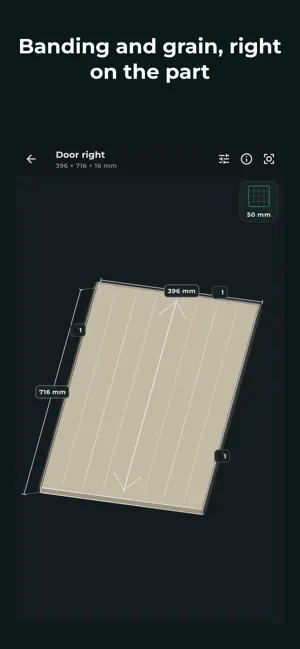
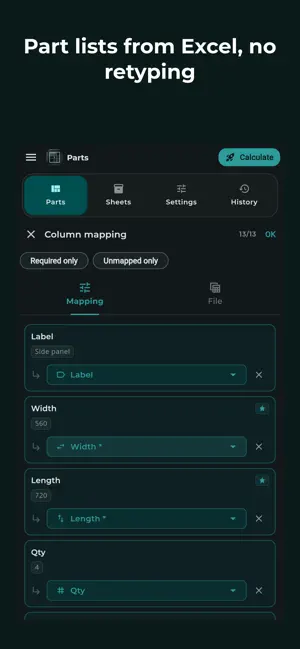
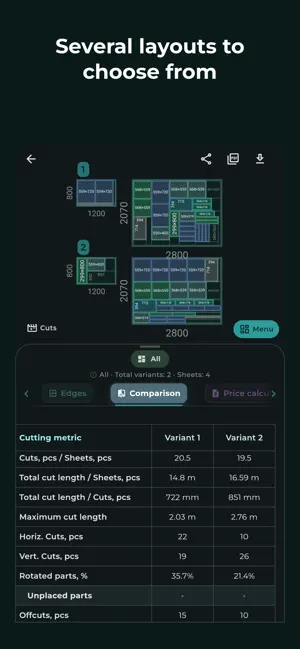
Castoro is sheet cutting for furniture workshops and independent makers. A part stores its finished size — the size it will have once the edge banding is on. Castoro works out the saw blank itself, from the banding thickness on each side and the premill. Enter 600 and the part is 600, no matter how much banding goes onto it. The core features are free. No account needed to start. Sizes and edge banding - finished and blank sizes shown side by side in the table and in the PDF - banding assigned per side of the part, with a catalogue of types - totals for length, rolls and cost - premill stated explicitly: how much the banding machine takes off the banded side - open a part in 3D — banding per side, grain direction and dimensions on the model Cut maps - several layout variants per calculation, chosen by waste and number of cuts - colour coding for parts, reusable offcuts and waste - the cut sequence plays back step by step before work starts - grain, blade kerf and sheet edge trim taken into account - reusable offcuts are kept as stock, not written off as waste Handover to the shop floor - PDF report with cut maps, part list and material totals - label page: size, material, edge banding and grain on every sticker - the QR on a label opens the part card with sizes, banding and map numbers — from a phone, right at the saw - a link to the calculation opens on any device, no app required Getting data in - import part lists from Excel, CSV and the clipboard - column auto-matching with manual correction - missing data flagged before the import runs Cost - prices for material and edge banding, currency, discounts, markups and tax - running total in the results and as its own section in the PDF Calculation history - search, filters and renaming - any saved calculation reopens in the editor Castoro is for: - furniture manufacturers and joinery workshops - small production teams - independent makers Beyond chipboard and MDF the app handles particle board, plywood, glass, mirrors, metal, plastic, acrylic and composite panels. Works on phone, tablet and desktop — the same calculation opens everywhere. Castoro Pro The cut sequence printed in the PDF, not just on screen. Your workshop's details instead of the Castoro page: logo, contacts and company data. Support: [email protected] Website: castoro.pro
What’s new
Version 4.8.0 · Updated September 24, 2026
Stability: when the connection drops while the app starts, it now retries on its own instead of showing an error. Fixed: a calculation left open in a background browser tab no longer ends with a connection error when you come back. Navigation: screens no longer flash briefly before switching to the right one.
App privacy
The developer, Dmitriy Trofimov, reported these privacy practices to Apple.
Data Not Linked to You
The following data, which may be collected but is not linked to your identity, may be used for the following purposes:
- Identifiers: Device ID
- Usage Data: Product Interaction
- Diagnostics: Crash Data, Performance Data
Used for: Analytics, App Functionality
Alternatives to Castoro — Sheet Cutting
Looking for apps like Castoro — Sheet Cutting? Here are 6 similar apps on the App Store. The highest rated is Cutter optimizer (5.0/5), and all 6 are free to download.
-
 CutFlow Pro - Cut Optimizer
1.0
CutFlow Pro - Cut Optimizer
1.0
-
 Cutter optimizer
5.0
Cutter optimizer
5.0
-
 Material Cutting
-
 CutList: Panel Cutting Planner
1.0
CutList: Panel Cutting Planner
1.0
-
 DyCut- Dynamic Cutting Layouts
4.6
DyCut- Dynamic Cutting Layouts
4.6
-
 1Dcut – Cutting Optimization
| App | Rating | Price | Last updated | Compare |
|---|---|---|---|---|
| Castoro — Sheet Cutting | – | Free | September 24, 2026 | |
| CutFlow Pro - Cut Optimizer | 1.0 / 5 (1) | Free | Apr 16, 2026 | Compare |
| Cutter optimizer | 5.0 / 5 (1) | Free | Jun 10, 2026 | Compare |
| Material Cutting | – | Free | Feb 22, 2026 | Compare |
| CutList: Panel Cutting Planner | 1.0 / 5 (1) | Free | Aug 5, 2026 | Compare |
| DyCut- Dynamic Cutting Layouts | 4.6 / 5 (103) | Free | Apr 29, 2025 | Compare |
| 1Dcut – Cutting Optimization | – | Free | Sep 30, 2026 | Compare |