

CutFlow Pro - Cut Optimizer
Zhaoqing Hengtuzhiqi Technology Co. , Ltd. Productivity iPhoneiPadiPod touch
CutFlow Pro - Cut Optimizer is a free Productivity app for iPhone and iPad by Zhaoqing Hengtuzhiqi Technology Co. , Ltd. Rated 1.0/5 from 1 ratings.
- Rating
- 1.0
- 1 ratings
- Price
- Free
- on the App Store
- Size
- 28 MB
- Age 4+
- Updated
- Apr 16
- 2026 · v1.0.3
Screenshots

About CutFlow Pro - Cut Optimizer
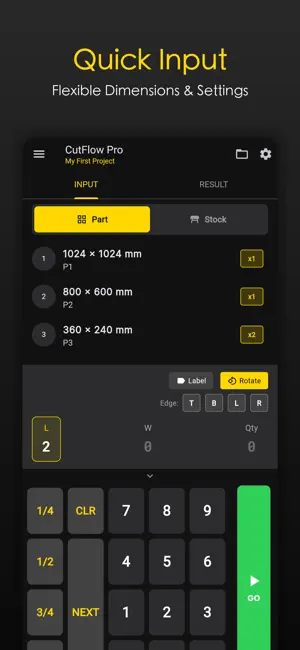
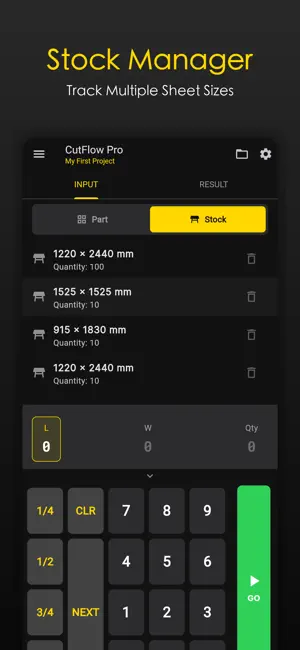
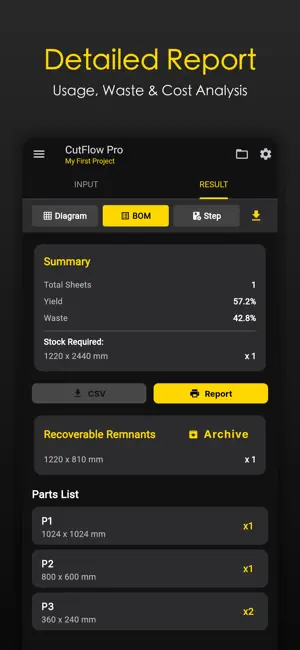
CutFlow Pro is the comprehensive cutting optimization tool designed for carpenters, DIY enthusiasts, and woodworking professionals. Version 1.0.1 brings a powerful new engine and interactive workflows to help you work smarter, not harder. Key Features: **1. Intelligent Optimization Engine** - **Max Yield Strategy**: Advanced nesting algorithms to squeeze the most out of every sheet, saving you money on material. - **Min Cuts Strategy**: Option to prioritize layout simplicity for faster cutting (Guillotine/Shear cuts). - **Custom Constraints**: Configure blade kerf, trim sizes, and cut direction (longitudinal/transverse/mixed) to match your equipment. **2. Interactive Step-by-Step Guide (NEW!)** - Ditch the static diagrams. Follow a guided, interactive workflow for every sheet. - Visual cues for fence settings and cut directions. - Zoomed-in view of every cut operation to ensure zero mistakes. - Visual indicators for edge banding on parts. **3. Stock & Remnant Management (NEW!)** - **Standard Stock Library**: Keep your frequently used sheet sizes ready for quick access. - **Remnant Tracking**: Automatically identify reusable offcuts and save them to your inventory for future projects. Reduce waste and save cost! **4. Project & Data Management** - **Multi-Project Support**: Create, save, and manage multiple projects locally. - **Flexible Units**: Seamlessly switch between Metric (mm, cm, m) and Imperial (Decimal/Fractional) units. - **Grain Direction Control**: Respect material grain by enabling or disabling rotation for specific parts. - **Edge Banding**: Input edge banding requirements (Top/Bottom/Left/Right) for each part. **5. Detailed Project Statistics** - View comprehensive summaries including total sheets required, yield percentage, and waste ratio. - Detailed BOM (Bill of Materials) list with cut status tracking. **6. Offline & Private** - No internet required. All calculations happen locally on your device. - Your project data stays with you. No cloud account needed. Whether you're building custom cabinets, furniture, or handling a large renovation, CutFlow Pro is your digital assistant for efficient material planning. What's New in Version 1.0.2: - **Interactive Step-by-Step Mode**: A game-changer for workshop efficiency. - **Dual Optimization Strategies**: Choose between saving material or saving time. - **Remnant Management System**: Don't throw away money—track and use your offcuts. - **Enhanced UI**: Improved input methods with custom fractional keypad. Support URL: https://cutflow-pro.vercel.app/ Privacy Policy URL: https://cutflow-pro.vercel.app/private/privacy_policy.html Terms Of Service URL: https://app-theta-flame.vercel.app/cutflowPro/private/terms_of_service.html SUBSCRIPTION INFO: CutFlow Pro Premium offers exclusive features to boost your productivity: • Unlimited Projects: Create and save as many projects as you need. • Unlimited Stock Items: Manage unlimited stock sizes and inventory. • Full Access: Unlock complete BOM reports and step-by-step cutting guides. • Advanced Algorithms: Access premium nesting strategies like 'Max Yield' for best material savings. Subscription Terms: • Title: Weekly Subscription • Price: $3.99 / Week • Trial: 3 Days Free Trial • Payment will be charged to your Apple ID account at the confirmation of purchase. • Subscription automatically renews unless it is canceled at least 24 hours before the end of the current period. • Your account will be charged for renewal within 24 hours prior to the end of the current period. • You can manage and cancel your subscriptions by going to your account settings on the App Store after purchase.
What’s new
Version 1.0.3 · Updated April 16, 2026
bug fix
App privacy
The developer, Zhaoqing Hengtuzhiqi Technology Co. , Ltd., reported these privacy practices to Apple.
Data Used to Track You
The following data may be used to track you across apps and websites owned by other companies:
- Identifiers: User ID, Device ID
Data Not Linked to You
The following data, which may be collected but is not linked to your identity, may be used for the following purposes:
- Identifiers: User ID, Device ID
- Diagnostics: Crash Data, Performance Data, Other Diagnostic Data
Used for: App Functionality
Alternatives to CutFlow Pro - Cut Optimizer
Looking for apps like CutFlow Pro - Cut Optimizer? Here are 6 similar apps on the App Store. The highest rated is Cutter optimizer (5.0/5), and all 6 are free to download.
-
 Castoro — Sheet Cutting
-
 CutList: Panel Cutting Planner
1.0
CutList: Panel Cutting Planner
1.0
-
 Cutter optimizer
5.0
Cutter optimizer
5.0
-
 DyCut- Dynamic Cutting Layouts
4.6
DyCut- Dynamic Cutting Layouts
4.6
-
 MaxCut: Plano de Corte
-
 Map Canvas: Draw on Maps
4.5
Map Canvas: Draw on Maps
4.5
| App | Rating | Price | Last updated | Compare |
|---|---|---|---|---|
| CutFlow Pro - Cut Optimizer | 1.0 / 5 (1 rating) | Free | April 16, 2026 | |
| Castoro — Sheet Cutting | – | Free | Sep 24, 2026 | Compare |
| CutList: Panel Cutting Planner | 1.0 / 5 (1) | Free | Aug 5, 2026 | Compare |
| Cutter optimizer | 5.0 / 5 (1) | Free | Jun 10, 2026 | Compare |
| DyCut- Dynamic Cutting Layouts | 4.6 / 5 (103) | Free | Apr 29, 2025 | Compare |
| MaxCut: Plano de Corte | – | Free | Jul 14, 2026 | Compare |
| Map Canvas: Draw on Maps | 4.5 / 5 (102) | Free | Sep 27, 2026 | Compare |