

PDF Scanner OCR: Convert App
samet bilgin Business iPhoneiPadiPod touch
PDF Scanner OCR: Convert App is a free Business app for iPhone and iPad by samet bilgin. Requires iOS 26.0. Updated October 14, 2026.
- Price
- Free
- on the App Store
- Size
- 11 MB
- Age 4+
- Updated
- Oct 14
- 2026 · v1.5.2
Screenshots


About PDF Scanner OCR: Convert App
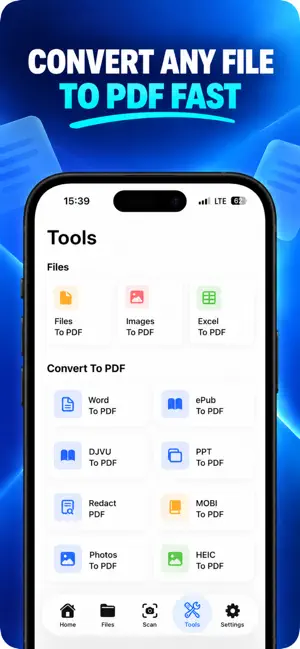
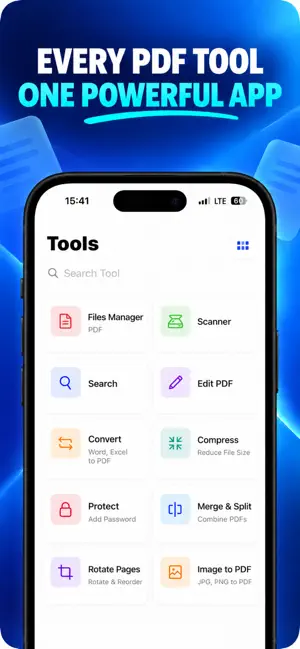
All PDF Tools in One - the most comprehensive PDF solution for iPhone. Scan, edit, convert, and manage every document, file, paper, photo, and ID with a fast, reliable PDF reader, editor, and manager. Built-in OCR, signature tools, and universal convert options cover everything from Word, Excel, and PPT to clean, shareable PDF files. Scan & Capture (cam + photo + paper) - Scan any document, paper, ID, or photo with your cam. - Automatic edge detection, de-skew, and high-quality PDF output. - Batch scan receipts, contracts, and multi-page files in seconds. Powerful PDF Editor (edit + annotate) - Edit PDFs with text, pen, highlight, shapes, and notes. - Redact sensitive info and improve scan quality. - Reorder pages, rotate, merge, split, and clean smudges. Universal Format Converter (convert) - Convert Word, Excel, PPT, ePub, MOBI, DJVU, and photos to PDF. - Convert PDF back to Word, Excel, PPT, and images (JPG, PNG). - Keep layouts intact so your file is ready to send or sign. Advanced OCR (ocr + reader) - Extract text from PDF, paper, or photo to edit, copy, or share. - Make scans searchable and turn printed pages into editable documents. - Works great for receipts, forms, contracts, and IDs. Digital Signature Manager (signature) - Create, save, and reuse multiple signatures. - Sign PDFs quickly and securely - no printer, no hassle. - Great for contracts, approvals, invoices, and legal docs. Smart File Manager (file + manager) - Organize files in one place and mark favorites. - Search across PDF, Word, Excel, PPT, and photo files. - Share or export instantly. Why Choose Us - All-in-one: scan, edit, convert, sign, and manage files in one app. - Privacy-first: documents stay on your device; OCR and edits run locally. - Fast and reliable processing for large documents. Download now and transform your workflow with one powerful, privacy-first PDF reader and file manager. Privacy Policy: https://developing-comet-b87.notion.site/privacy-policy-pdf-scanner-2931f542e1a380eaa045cdb24aa511a2 Terms of Use: https://www.apple.com/legal/internet-services/itunes/dev/stdeula/
What’s new
Version 1.5.2 · Updated October 14, 2026
What's New in 1.5.2 - Fixed dark mode issues in Library, Files, and Scanner screens - Improved text contrast and button visibility - Refined cards, chips, and dialogs for better visual consistency - Performance and stability improvements
App privacy
The developer, samet bilgin, reported these privacy practices to Apple.
Data Not Collected
The developer does not collect any data from this app.
Alternatives to PDF Scanner OCR: Convert App
Looking for apps like PDF Scanner OCR: Convert App? Here are 6 similar apps on the App Store. The highest rated is Tiny Scanner - PDF Scanner App (4.8/5), and all 6 are free to download.
-
 PDF Scanner | File Converter
3.3
-
 Free PDF Scanner App For Doc
4.5
-
 PDF Scanner | Document Scan
4.5
-
 PDF Scanner AI: Scan Documents
4.7
-
 Tiny Scanner - PDF Scanner App
4.8
-
 Scanner App - Scan PDF & Docs
4.6
| App | Rating | Price | Last updated | Compare |
|---|---|---|---|---|
| PDF Scanner OCR: Convert App | – | Free | October 14, 2026 | |
| PDF Scanner | File Converter | 3.3 / 5 (3) | Free | Apr 10, 2026 | Compare |
| Free PDF Scanner App For Doc | 4.5 / 5 (648) | Free | Sep 25, 2026 | Compare |
| PDF Scanner | Document Scan | 4.5 / 5 (1,943) | Free | Oct 30, 2026 | Compare |
| PDF Scanner AI: Scan Documents | 4.7 / 5 (6,615) | Free | Oct 22, 2026 | Compare |
| Tiny Scanner - PDF Scanner App | 4.8 / 5 (183,801) | Free | Sep 13, 2026 | Compare |
| Scanner App - Scan PDF & Docs | 4.6 / 5 (39,729) | Free | Oct 27, 2026 | Compare |